EasyManua.ls Logo

Ssl SX310 - User Manual

Ssl SX310
12 pages
Print Icon
To Next Page IconTo Next Page
Loading...
Question and Answer IconNeed help?

Do you have a question about the Ssl SX310 and is the answer not in the manual?

Summary

How a crossover is used

Installation

Electrical and audio connections

Getting started

Parallel Input System

Selectable crossover slopes

Bass Boost

Phase Shift Selector

Independent Channel Output Level Controls

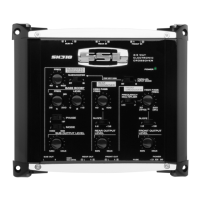
Controls and features

L;R SUB AUDIO INPUTS

Describes the L/R SUB AUDIO INPUTS for the crossover unit.

L;R REAR AUDIO INPUTS

Details the L/R REAR AUDIO INPUTS on the crossover unit.

L;R FRONT AUDIO INPUTS

Explains the L/R FRONT AUDIO INPUTS for the crossover unit.

SUBWOOFER CROSSOVER FREQUENCY CONTROL

Sets the frequency range for the subwoofer outputs.

SUB INPUT SOURCE SELECTOR

Allows selecting the source for the subwoofer channel input.

BASS BOOST FREQUENCY

Sets the center frequency for the Sub channel bass boost.

BASS BOOST CONTROL

Adjusts the bass level up to +12dB for the subwoofer channel.

PHASE SELECTOR

Selects subwoofer output phase for time alignment and imaging.

SUB STEREO;MONO SELECTOR

Chooses between stereo or mono output for the subwoofer channel.

SUBWOOFER OUTPUT LEVEL

Independently adjusts the output gain for the subwoofer channel.

Controls and features, continued

L;R SUB AUDIO OUTPUTS

Details the L/R SUB AUDIO OUTPUTS for the crossover.

REMOTE SUBWOOFER LEVEL CONTROL JACK

Connection point for the remote subwoofer level control.

L;R REAR AUDIO INPUTS

Describes the L/R REAR AUDIO INPUTS on the crossover unit.

L;R FRONT AUDIO INPUTS

Explains the L/R FRONT AUDIO INPUTS for the crossover unit.

FUSE

Specifies the fuse for power protection.

Power Connections

Details the +12V, REMOTE, and GROUND power connections.

PARALLEL INPUT MODE SELECTOR

Selects the input mode for parallel signal routing.

POWER INDICATOR

Indicates the power status of the crossover unit.

HIGH PASS CROSSOVER FREQUENCY MULTIPLIER SWITCH

Adjusts the frequency range for the high pass crossover.

FRONT HIGH PASS CROSSOVER FREQUENCY CONTROL

Sets the crossover frequency for the front high pass.

REAR HIGH PASS CROSSOVER FREQUENCY CONTROL

Sets the crossover frequency for the rear high pass.

SLOPE SELECTORS

Allows choosing the filter slope (6dB or 12dB/octave).

FRONT OUTPUT LEVEL

Adjusts the output gain for the front channel.

REAR OUTPUT LEVEL

Adjusts the output gain for the rear channel.
Audio connections: 2-Channel Stereo System

Audio connections: 4-Channel Stereo Front;Rear System

Audio connections: 6-Channel Stereo Front;Rear;Sub System

Power and Remote Level Control connections

Specifications

Summary

How a crossover is used

Installation

Electrical and audio connections

Getting started

Parallel Input System

Selectable crossover slopes

Bass Boost

Phase Shift Selector

Independent Channel Output Level Controls

Controls and features

L;R SUB AUDIO INPUTS

Describes the L/R SUB AUDIO INPUTS for the crossover unit.

L;R REAR AUDIO INPUTS

Details the L/R REAR AUDIO INPUTS on the crossover unit.

L;R FRONT AUDIO INPUTS

Explains the L/R FRONT AUDIO INPUTS for the crossover unit.

SUBWOOFER CROSSOVER FREQUENCY CONTROL

Sets the frequency range for the subwoofer outputs.

SUB INPUT SOURCE SELECTOR

Allows selecting the source for the subwoofer channel input.

BASS BOOST FREQUENCY

Sets the center frequency for the Sub channel bass boost.

BASS BOOST CONTROL

Adjusts the bass level up to +12dB for the subwoofer channel.

PHASE SELECTOR

Selects subwoofer output phase for time alignment and imaging.

SUB STEREO;MONO SELECTOR

Chooses between stereo or mono output for the subwoofer channel.

SUBWOOFER OUTPUT LEVEL

Independently adjusts the output gain for the subwoofer channel.

Controls and features, continued

L;R SUB AUDIO OUTPUTS

Details the L/R SUB AUDIO OUTPUTS for the crossover.

REMOTE SUBWOOFER LEVEL CONTROL JACK

Connection point for the remote subwoofer level control.

L;R REAR AUDIO INPUTS

Describes the L/R REAR AUDIO INPUTS on the crossover unit.

L;R FRONT AUDIO INPUTS

Explains the L/R FRONT AUDIO INPUTS for the crossover unit.

FUSE

Specifies the fuse for power protection.

Power Connections

Details the +12V, REMOTE, and GROUND power connections.

PARALLEL INPUT MODE SELECTOR

Selects the input mode for parallel signal routing.

POWER INDICATOR

Indicates the power status of the crossover unit.

HIGH PASS CROSSOVER FREQUENCY MULTIPLIER SWITCH

Adjusts the frequency range for the high pass crossover.

FRONT HIGH PASS CROSSOVER FREQUENCY CONTROL

Sets the crossover frequency for the front high pass.

REAR HIGH PASS CROSSOVER FREQUENCY CONTROL

Sets the crossover frequency for the rear high pass.

SLOPE SELECTORS

Allows choosing the filter slope (6dB or 12dB/octave).

FRONT OUTPUT LEVEL

Adjusts the output gain for the front channel.

REAR OUTPUT LEVEL

Adjusts the output gain for the rear channel.

Audio connections: 2-Channel Stereo System

Audio connections: 4-Channel Stereo Front;Rear System

Audio connections: 6-Channel Stereo Front;Rear;Sub System

Power and Remote Level Control connections

Specifications

Ssl SX310 Specifications

General IconGeneral
BrandSsl
ModelSX310
CategoryCrossover
LanguageEnglish

Related product manuals