SSP Professional Lighng
www.sspworld.com
12
the relevant channel LED lights indicating MIDI IN channel is set.
5.2 Setting MIDI OUT
1) Tap the Flash button 2 three times while holding down the Record button, the Segment Display
reads “CHO” indicating MIDI IN channel setup is available.
2) Tap the Flash button numbered from 1-16 to assign MIDI OUT Channel 1-16, the relevant channel
LED lights indicating MIDI OUT channel is set.
5.3 Exit MIDI Setting
Press and hold down the Record button. While holding down the Record button tap the Rec. Exit
button to exit MIDI setting.
5.4 Receiving MIDI File Dump
Tap the Flash button 3 three time while holding down the Record button, the Segment Display reads
“IN” indicating the controller is ready to receive MIDI le dump.
5.5 Sending MIDI File Dump
Tap the Flash button 4 three time while holding down the Record button, the Segment Display reads
“OUT” indicating the controller is ready to send a le.
NOTE:
During le dump, all other operations will not function. Functions will automatically return when the
le dump is completed.
File dump will be interrupted and stop if errors occur or power failure.
5.6 Implementation
1) During receiving and sending MIDI data, all MIDI scenes and channels being run will automatical-
ly paused if there is no response within 10 minutes.
2) During receiving and sending le dump, the controller will automatically search for or send Device
ID of 55h(85), a le named DC2448 with an extension of “BIN(SPACE)”.
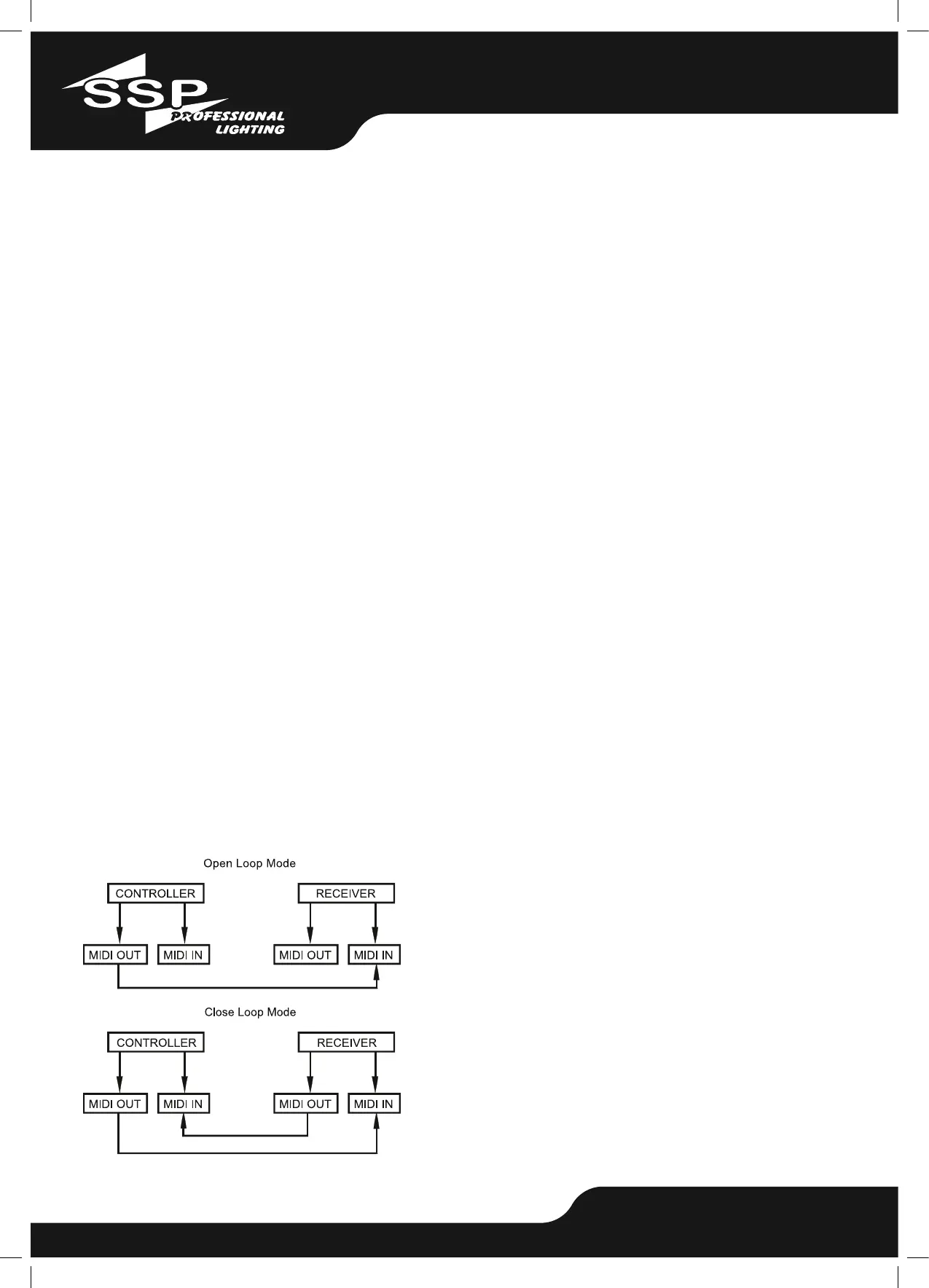
3) File dump allows this controller to send its MIDI data to next unit or other MIDI devices.
4) There are two types of le dump mode described as below:


 To Next Page
 Loading...