EasyManua.ls Logo

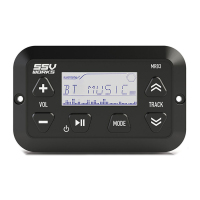
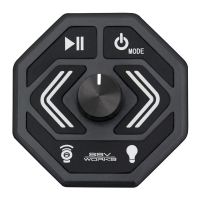
SSV Works MRB3 - Button Locations and Functions; Play;Pause and Power; Volume Control; Mode Selection and Settings

SSV Works MRB3
10 pages
Print Icon
To Next Page IconTo Next Page
To Previous Page IconTo Previous Page
Loading...
BUTTON
LOCATIONS
AND
FUNCTIONS
e
-1----
@
VOL
------~
TRACK
@
9~7
~
~
---1--1---
GENERAL
OPERATIONS
1.
Play/Pause
Power
On/Off
Mute
2.
Volume
Up/Down
3.
Mode
4.
Track
Forward/Back
Station
Forward/Back
Menu
Settings
Up/Down
5.
LCD
Dispiay
Power
On/Off:
Press
II
to
power
on.
Press
and
hold
II
to
power
off.
Volume:
Press
the
VOL(+)
or(·)
button
to
increase
or
decrease
the
volume.
Mute
On/Off:
Press
II
briefly
to
mute
the
sound.
Press.
II
again
to
un-mute
the
sound.
Mode
Sources:
Press
the
MODE
button
to
switch
between
AUX,
FM,
AM,
Bluetooth
(BT
MUSIC).
Mode
Settings
(Bass/Treble/Balance/Fader/EQ/Loudness):
Press
the
MODE
button
for
2
seconds
and
then
press
the
~
button
until
the
function
you
want
is
shown
on
the
display.
Press
VOL(+)(·)
to
change
the
settings
of
the
menu
item
displayed.
Bass
(BAS)jTreble
(TRE):
Press
the
VOL(+)
or(·)
button
to
adjust
Bass
&
Treble.
Balance
(BAL):
Press
VOL(+)
or(·)
to
adjust
balance
(sound
distribution
between
the
right
and
left
speakers).
Fader
(FAD):
Press
VOL(+)
or(·)
to
adjust
sound
distribution
between
the
front
and
rear
speakers.
Equalizer
(EQ):
Press
VOL(+)
or
(·)
to
select
one
of
the
EQ
options:
OFF,
FLAT,
CLASS,
POP,
ROCK,
JAZZ,
METAL.
The
equalizer
will
be
disabled
if
EQ
OFF
is
set.
The
equalizer
setting
is
shown
at
the
bottom
of
the
display.
Loudness
(LOUD):
Press
VOL(+)
or(·)
(LOUD
ON)
or
to
disable
the
function
(LOUD
OFF).
When
the
loudness
function
is
on,
LOUD
is
shown
on
the
right
of
the
display.
Select
USA/Europe
Area
Frequencies
(AREA):
Press
VOL(+) or(-) to
select
Radio
Region
(USA/
Europe
Frequencies).

Related product manuals