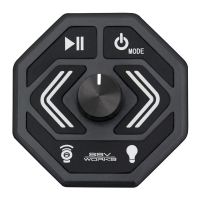
The SSV Works MRB3 Bluetooth Media Controller is a robust audio system designed for off-road vehicles, specifically the Can-Am Ryker. This user guide and installation manual provides comprehensive instructions for both operating the device and integrating it into your vehicle.
Function Description
The MRB3 serves as a central hub for your vehicle's audio, offering a range of functions including radio, auxiliary input, and Bluetooth audio streaming. It is designed to withstand the rigors of off-road environments, providing reliable performance in various conditions. The system integrates a media controller (MRB3 brain) with a speaker kit (RKR-2K) to deliver a complete audio solution.
Usage Features
The MRB3 controller features a user-friendly interface with clearly labeled buttons and an LCD display.
- Power On/Off and Mute: The Play/Pause button (1) serves multiple purposes. A brief press will mute or unmute the sound, while a longer press will power the unit on or off.
- Volume Control: Dedicated VOL(+) and VOL(-) buttons (2) allow for easy adjustment of the audio volume.
- Mode Selection: The MODE button (3) cycles through available audio sources, including AUX, FM radio, AM radio, and Bluetooth (BT MUSIC).
- Track/Station Navigation: The Track Forward/Back buttons (4) are used to skip tracks during Bluetooth playback or navigate radio stations. These buttons also function for menu settings navigation.
- LCD Display: The LCD display (5) provides visual feedback on the current mode, settings, and track information.
General Operations:
- Volume Adjustment: Press VOL(+) to increase volume and VOL(-) to decrease it.
- Mute: Briefly press the Play/Pause button to mute, press again to unmute.
- Source Selection: Press the MODE button to switch between AUX, FM, AM, and Bluetooth.
- Mode Settings: Press and hold the MODE button for 2 seconds, then use the Track Forward/Back buttons to cycle through settings like Bass, Treble, Balance, Fader, Equalizer (EQ), and Loudness. Use VOL(+) or VOL(-) to adjust the selected setting.
- Bass (BAS)/Treble (TRE): Adjust low and high frequencies.
- Balance (BAL): Distribute sound between right and left speakers.
- Fader (FAD): Distribute sound between front and rear speakers.
- Equalizer (EQ): Select from preset EQ options (OFF, FLAT, CLASS, POP, ROCK, JAZZ, METAL). EQ is disabled if set to OFF.
- Loudness (LOUD): Toggle loudness enhancement ON or OFF.
- Radio Region (AREA): Select USA or Europe frequencies for the radio.
Radio Functions:
- Band Selection: Press MODE to switch between FM and AM bands.
- Automatic Station Search: Press the Track Forward or Track Back button to initiate an automatic search for the next available station.
- Manual Station Search: Press and hold the Track Forward or Track Back button until "M - SEEK" appears. Briefly press the same buttons to manually change the frequency. To return to automatic search, press the Track Forward or Track Back button again.
Bluetooth Audio Streaming:
- Pairing:
- Enable Bluetooth on your mobile device.
- The MRB3 will appear as "SSV" in your device's Bluetooth settings. Select it.
- Enter the passkey "0000" if prompted.
- Upon successful pairing, a Bluetooth logo and "CONNECT" "BT MUSIC" will appear on the MRB3's LCD display.
- Playback Control:
- Pause/Resume: Briefly press the Play/Pause button to pause or resume music.
- Skip Track: Use the Track Forward or Track Back buttons to navigate to the previous or next song.
Connecting an External Audio Device (Optional):
- AUX Input: Press MODE until "AUX" is displayed. An optional SSV Works 3PUSB35A accessory (sold separately) provides a 3.5mm AUX-in and USB charging port for external devices.
Maintenance Features
The manual emphasizes that users should not attempt to disassemble or repair the MRB3 themselves. Any such attempts will void the warranty. For technical assistance or repair information, users are instructed to contact SSV Works directly.
Installation Recommendations:
- Battery Disconnection: SSV Works recommends disconnecting the negative battery terminal before starting any installation to prevent electrical issues or damage.
- Professional Assistance: For any issues or repairs, contacting SSV Works for technical assistance is the recommended course of action.
- Enclosures: Limited lifetime warranty against defects in material or workmanship.
- Electronics (MRB3): Limited 1-year warranty against defects in material or workmanship.
- Kicker Speakers: Limited 1-year warranty against defects in material or workmanship.
- Kicker Amplifiers: Limited 2-year warranty against defects in material or workmanship.
- Labor: Labor for replacement of defective components is not covered.
- Voiding Warranty: Changes or modifications to the MRB3 not authorized by SSV Works will void the warranty.
This comprehensive guide ensures that users can effectively operate and maintain their SSV Works MRB3 Bluetooth Media Controller, providing a rich audio experience for their Can-Am Ryker.

 Need help?
 General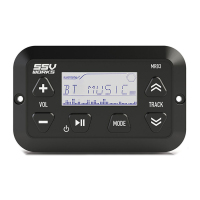

 To Next Page