GETTING STARTED
INSTALLING THE BATTERIES
When you rst receive your case you will need to
open the cover with the key in order to install the
baeries. Baeries are included and are located
inside the case.
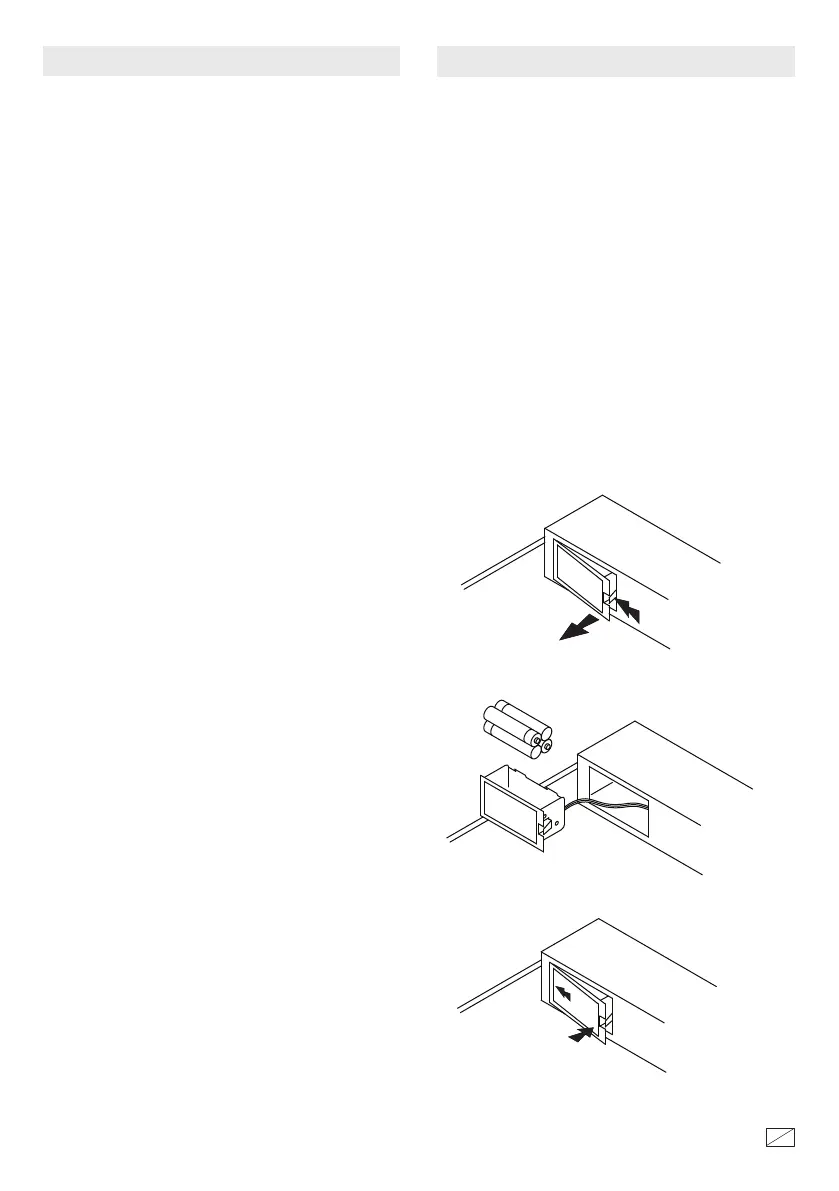
Pull the foam upward and away from the baery
compartment. Remove the baery compartment by
pushing the tab and pulling the compartment out as
shown. Install (4) AAA alkaline baeries as shown.
Reinstall the compartment by hooking the back end
in place and snapping shut. CAUTION: Be careful
not to pinch any wires while reinstalling the baery
compartment.
NOTE: If the baeries are low the combination
buons will ash red when pushed. Replace the 4
AAA baeries with new alkaline baeries as
described below.
NOTE: is key has also been provided if you lose
or forget your security code or the baeries run
low. If you lose your key, you may purchase a
replacement key by referencing the serial number
located on the back of the case. See section
regarding replacement keys for further
information.
To open the case, insert key into lock and turn
counterclockwise until the cover automatically
opens. NOTE: You must turn the key back to the
locked position before you are able to close and
lock the cover.
NOTE: Do not mix old and new baeries. Do not
mix alkaline, standard or rechargeable baeries.
OPEN
CLOSE
40656-1512
2
12


 To Next Page
 Loading...