EasyManua.ls Logo

Stack-On PC-1665 - User Manual

Stack-On PC-1665
12 pages
Print Icon
To Next Page IconTo Next Page
Loading...
Your Electronic Combination:
Serial #:
®
PC-1665
PC-1690
IMPORTANT
NOTE: You can store your Key #, Serial # and
Combination on Stack-On’s SECURE web site –
www.stack-on.com under Customer Service.
Storing your Key # or Combination will provide
instant access to this important information
should you ever lose your keys or your
combination.
Only you will have access to this information.
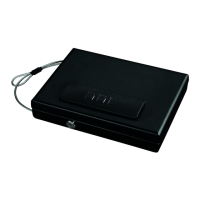
CONTROL FEATURES
1. Key lock
2. Combination buttons
3. Reset button (inside case)
4. Battery Compartment (inside case)
• Record the serial number from the tag
on the front.
• Record your combination number.
• Keep keys and your combination in a
secure place away from children.
• DO NOT STORE KEYS OR YOUR
COMBINATION IN THE CASE.
Instructions
40656-1512
1
12
Question and Answer IconNeed help?

Do you have a question about the Stack-On PC-1665 and is the answer not in the manual?

Summary

Control Features

Key Lock

Describes the function and operation of the key lock mechanism on the safe.

Combination Buttons

Details the electronic combination input buttons located on the safe.

Reset Button

Explains the location and use of the reset button inside the safe.

Battery Compartment

Identifies the location and access to the battery compartment for power.

Getting Started

Opening the Case with Key

Instructions on how to open the safe for the first time using the provided key.

Installing the Batteries

Programming Your Own Electronic Combination

Opening the Safe Using Your Combination

Securing the Case with the Cable

Turning the Keypad Sound Off;On

Key Request

Limited One Year Warranty

Stack-On PC-1665 Specifications

General IconGeneral
BrandStack-On
ModelPC-1665
CategoryIndoor Furnishing
LanguageEnglish