EasyManua.ls Logo

Stalwart XL830L - User Manual

Stalwart XL830L
6 pages
Print Icon
To Next Page IconTo Next Page
Loading...
Digital multi-meter multi-tester
INSTRUCTION MANUAL
Question and Answer IconNeed help?

Do you have a question about the Stalwart XL830L and is the answer not in the manual?

Summary

Safety Information and Symbols

Safety Symbols

Explains safety symbols like dangerous voltage, earth ground, double insulation, and fuse replacement.

Product Description and Specifications

General Description

Overview of the multi-meter's capabilities for measuring various electrical parameters.

Front Panel Description

Details the display, hold button, rotary switch, and input jacks on the meter's front panel.

Specifications Overview

Provides general specifications including accuracy, operating environment, and dimensions.

Detailed Specifications

General Specifications

Key general parameters like maximum voltage, fuse protection, power source, and display type.

DC Voltage Specifications

Details the ranges, resolutions, and accuracy for DC voltage measurements.

DC Current Specifications

Details the ranges, resolutions, and accuracy for DC current measurements.

AC Voltage Specifications

Details the ranges, resolutions, and accuracy for AC voltage measurements.

Diode & Continuity Specifications

Details specifications for diode testing and continuity checks, including overload protection.

Measurement Functions and Instructions

Resistance Measurement

Instructions for measuring resistance, including lead connection and circuit precautions.

Transistor hFE Test

Procedure for testing NPN and PNP transistors using the hFE socket.

Temperature Measurement

Instructions for using a K-type thermocouple for temperature readings.

Advanced Functions and Maintenance

Audible Continuity Test

How to perform an audible continuity test using the meter.

Test Signal Use

Details on using the built-in test signal generator for calibration or testing.

Battery & Fuse Replacement

Guidance on replacing the meter's battery and fuse, including safety warnings.

Overview

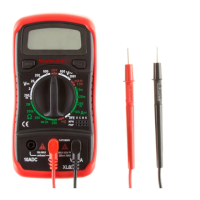
The Stalwart Digital Multi-Meter Multi-Tester (Model XL830L) is a handheld 3 1/2-digit, 7-segment, 15mm high LCD multi-meter designed for a variety of electrical measurements. It is battery-operated and built according to IEC-1010 standards for electronic measuring instruments, falling under overvoltage category CAT II and pollution 2.

Function Description:

This versatile device is capable of measuring:

  • DC and AC Voltage: Allowing users to check both direct and alternating current voltages across various ranges.
  • DC Current: For measuring direct current flow in circuits.
  • Resistance: To determine the electrical resistance of components.
  • Diode Test: To check the functionality and forward voltage drop of diodes.
  • Transistor Test (hFE): For testing the gain (hFE) of NPN and PNP transistors.
  • Continuity Test: An audible test to quickly check for open or closed circuits.
  • Temperature Measurement: When used with a K-type thermoelectric couple, it can display the ambient or object temperature in Celsius.
  • Test Signal Output: Provides a test signal (50Hz or 1000Hz depending on the model) between the V.Ω.mA and COM jacks, useful for various circuit testing applications.

Usage Features:

The multi-meter features a clear LCD display that shows measurement readings, along with symbols for specific functions like "H" for hold and "1" for overrange indication. A "dot" is displayed for negative polarity.

  • Rotary Switch: This central control allows users to select the desired measurement function (DCV, ACV, DCA, Resistance, Diode, hFE, Temperature, Test Signal) and the appropriate range for the measurement. It also serves as the power on/off switch for the device.
  • Hold Button: When pressed, this button freezes the current reading on the LCD display, indicated by an "H" symbol, allowing users to record values even after disconnecting the probes. Pressing it again releases the hold.
  • Input Jacks:
    • "COM" Jack (Black): This is the common or negative input terminal for all measurements.
    • "V.Ω.mA" Jack (Red): This is the positive input terminal for voltage, resistance, and current measurements (except for high current 10A measurements).
    • "10A" Jack (Red): This dedicated jack is used for high current DC measurements up to 10A.
  • Transistor hFE Socket: Located on the front panel, this socket allows for direct insertion of transistor leads (emitter, base, collector) to test their hFE value.
  • Backlight: The display features a backlight for improved visibility in dimly lit environments.
  • Range Selection: For unknown values, users are advised to start with the highest range setting and gradually reduce it for optimal resolution.
  • Safety Precautions:
    • Always disconnect test leads from the circuit before changing functions or ranges.
    • Avoid touching unused terminals when the meter is connected to a circuit.
    • Exercise caution when working with voltages above 60V DC or 30V AC RMS, keeping fingers behind probe barriers.
    • Ensure all capacitors are discharged and power is off before measuring resistance in a circuit.
    • Never perform resistance measurements on live circuits.
    • Do not connect components to the hFE socket when making voltage measurements with test leads.
    • The device is designed for installations up to 600V above earth ground in category II.

Maintenance Features:

The Stalwart multi-meter is designed for user-friendly maintenance, with clear instructions for ensuring its longevity and safe operation.

  • Fuse Replacement: The device is protected by a F200mA/250V (Quick Acting) fuse. If a fuse blows, it should be replaced only with the specified rating to ensure continued protection against fire. To replace the fuse, the two screws on the bottom of the case must be removed.
  • Battery Replacement: A " " symbol appearing on the display indicates that the 9V battery (NEDA 1604 or 6F22 type) needs to be replaced. The battery is accessed by removing the two screws on the bottom of the case. Users are reminded to observe correct battery polarity during replacement.
  • Cleaning: The meter should be cleaned with a damp cloth and mild detergent. Abrasives or solvents should not be used.
  • Back Cover: The meter should never be used unless the back cover is securely in place and fastened completely to prevent electrical shock hazards.
  • Calibration: Accuracy is specified for one year after calibration, under specific temperature and humidity conditions (18 to 28°C, 64°F to 82°F, with relative humidity up to 80%).
  • Storage: The device has a specified storage temperature range of -10°C to 50°C.

The instruction manual, a set of test leads, and a 9-volt battery (6F22 type) are included as accessories with the multi-meter.

Stalwart XL830L Specifications

General IconGeneral
TypeDigital Multimeter
DisplayLCD
Digits3.5
Battery9V
Diode TestYes
Continuity BuzzerYes
Square Wave OutputNo
Capacitance RangeNo
Frequency RangeNo
Temperature RangeNo
Battery Type9V (6F22)
Safety RatingCAT II 600V
DC Voltage Range200mV to 600V
AC Voltage Range200V to 600V
DC Current Range200uA to 10A
Resistance Range200Ω to 2MΩ