10 11
21.10.201921.10.2019
ENEN
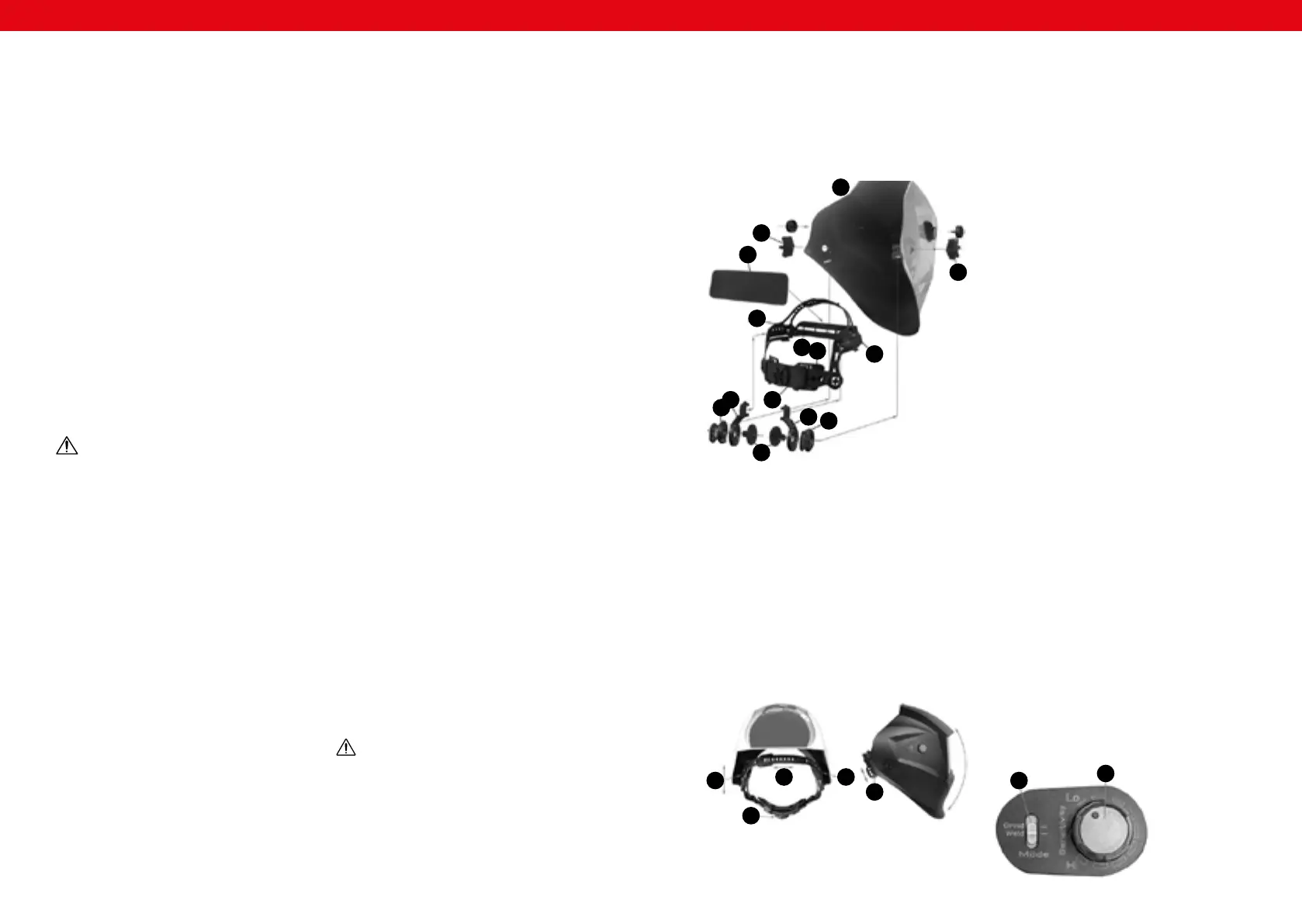
1. welding mask
2. xing nuts
3. sweat protector
4. left band
5. right band
6. front band
7. rear exible band
8. left inclination angle adjustment ring
9. left band fastening
10. band length adjustment
11. right band fastening
12. right inclination angle adjustment ring
13. screws xing the band to the mask
3.2. DEVICE USE
ASEMBLING THE DEVICE
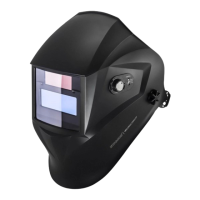
The auto-darkening welding helmets comes ready for use.
The only thing you need to do before welding is to adjust
the position of the headband and to select the correct
shading factor for your work.
It is possible to make the adjustment while wearing
the mask, by changing the circumference as
necessary.
• If the headband is too high or too low, it can be
adjusted as necessary. In order to do so, loosen the
end of the band by removing the clasp from the hole
and loosen both ends to increase the circumference,
or pull them together to decrease the circumference;
next, snap the clasp using the next hole (see setting
“1” in gure 1)
• Should it be necessary to adjust the distance between
the operator’s face and the lter cartridge, pull back
the clamp of holder “2” and set appropriate distance
for both sides of the mask.
• Check if the mask ts while wearing it, by lifting and
lowering the mask several times. If the band moves
when the mask is raised or lowered, it should be
readjusted until the band is settled properly.
• The angle of inclination is adjusted by setting the
latches “4” – unlock the latch by pulling it back
(until the latch leaves the hole), then move it by the
necessary angle and lock the latch. The adjustment is
to be carried out for both sides of the mask.
3.2.2. PARAMETER ADJUSTMENT
A. SELECTION OF SHADING DEGREE
Choose the appropriate degree of light protection,
as required by the welding process. Before adjusting,
refer to table „shading degree table”. Use the knob
located on the mask to select the appropriate light
protection level.
B. DELAY TIME SELECTION
After nishing welding, the colour of the glass will
change automatically from dark to bright, after the
preset delay time, in order to level the afterglow. The
delay time/return time can be set using the „Delay”
switch: „Short” (short delay ~0,3-0,5 s) / „Med.”
(medium delay ~0,4-0,6- s) / „Long” (long delay
~0,6-0,9 s).
C. PHOTOSENSITIVITY SELECTION
Photosensitivity can be set smoothly using the knob,
between level “Hi (high) or “Lo” (low). The „Hi” setting
is standard, intended for everyday use. If the mask
is exposed to excessive light or another welding
machine located nearby, the photosensitivity should
be reduced.
D. “GRIND” OPTION SELECTION
If the switch is set to „GRIND”, protection from light
is disabled. This allows the user to carefully examine
and process the welding place – the mask protects
the head. Before resuming welding, make sure the
light protection functions have been enabled again.
1
2
2
3
4
5
6
7
8
9
10
11
12
13
Fig. 1:
2
1 2
4
3
2.2. PERSONAL SAFETY
a) Do not use the device when tired, ill or under the
inuence of alcohol, narcotics or medication which
can signicantly impair the ability to operate the
device.
b) The device can be handled only by physically t
persons who are capable of handling it, properly
trained, familiar with this manual and trained within
the scope of occupational health and safety.
c) When working with the device, use common sense
and stay alert. Temporary loss of concentration while
using the device may lead to serious injuries.
d) Use personal protective equipment as required
for working with the device, specied in section 1
(Legend). The use of correct and approved personal
protective equipment reduces the risk of injury.
e) Do not overestimate your abilities. When using the
device, keep your balance and remain stable at all
times. This will ensure better control over the device
in unexpected situations.
f) The device is not a toy. Children must be supervised
to ensure that they do not play with the device.
g) Do not touch the device with wet or damp hands.
h) Don‘t immerse the lter in water.
i) Don‘t use any solvents on the lter screen or helmet
components.
2.3. SAFE DEVICE USE
a) When not in use, store in a safe place, away from
children and people not familiar with the device who
have not read the user manual. The device may pose
a hazard in the hands of inexperienced users.
b) Keep the device in perfect technical condition.
Before each use check for general damage and
2.1. SAFETY IN THE WORKPLACE
a) Make sure the workplace is clean and well lit. A messy
or poorly lit workplace may lead to accidents. Try
to think ahead, observe what is going on and use
common sense when working with the device.
b) If there are any doubts as to the correct operation
of the device, contact the manufacturer's support
service.
c) Only the manufacturer's service point may repair the
device. Do not attempt any repairs independently!
d) Children or unauthorised persons are forbidden to
enter a work station. (A distraction may result in loss
of control over the device).
e) Please keep this manual available for future
reference. If this device is passed on to a third party,
the manual must be passed on with it.
f) If this device is used together with another
equipment, the remaining instructions for use shall
also be followed.
g) This auto-darkening welding helmet will not protect
against severe impact hazards, including grinding
discs.
h) This helmet will not protect against explosive devices
or corrosive liquids.
i) Never place this helmet and the auto-darkening lter
on a hot surface.
j) Please pay attention to the manufacturer´s
indications concerning the temperature range to
be respected while using the helmet (see technical
details).
especially check for cracked parts or elements and
for any other conditions which may impact the safe
operation of the device. If damage is discovered,
hand over the device for repair before use.
c) Device repair or maintenance should be carried out
by qualied persons, only using original spare parts.
This will ensure safe use.
d) To ensure the operational integrity of the device, do
not remove factory-tted guards and do not loosen
any screws.
e) Clean the device regularly to prevent stubborn grime
from accumulating.
f) It is forbidden to interfere with the structure of
the device in order to change its parameters or
construction.
g) This auto-darkening welding helmet is not for
laser welding and oxyacetylene welding / cutting
processes.
h) Should this helmet not darken upon striking an
arc, stop welding immediately and contact your
customer service or your dealer.
i) Never open or tamper with the auto-darkening lter.
j) Don‘t make any modications to either the lter or
helmet, unless specied in this manual. Don‘t use
replacement parts any other than those specied
in this manual. Unauthorized modications and
replacement parts will void the warranty and expose
the operator to the risk of personal injury.
k) Protect lter from contact with liquid and dirt.
l) Clean the lter surface regularly; don‘t use strong
cleaning solutions. Always keep the sensors and
solar cells clean using a clean lint-free tissue.
m) Regularly replace the cracked / scratched / pitted
front cover lens.
n) Never try to open the lter cartridge.
o) The materials which may come into contact with
the skin can cause allergic reactions in some
circumstances.
p) Using lters with a too high protection degree (too
dark) may be harmful, as it forces the operator to get
too close to the radiation source and inhale harmful
gases.
q) During work outdoors with strong natural light, it
is possible to use a protective lter with protection
degree higher by one.
r) During operation, other signicant factors may also
occur, yet it is dicult to assess their impact. They
include in particular:
• The operator’s position relative to the ray or
the arc. For instance, depending on whether the
operator leans over the workpiece or stretches
their hands, it may be necessary to change the
lter degree at least by one.
• Local lighting
• Human factor
REMEMBER When using the device, protect
children and other bystanders.
ATTENTION! Despite the safe design of the device
and its protective features, and despite the use of
additional elements protecting the operator, there
is still a slight risk of accident or injury when using
the device. Stay alert and use common sense when
using the device.
3. USE GUIDELINES
Auto-darkening welding helmets are designed to protect
the eyes and face from sparks, spatter and harmful
radiation under normal welding conditions. Auto-
darkening lters automatically change from a light state
to a dark state when an arc is struck, and then return to
the light state when the welding stops. The auto-darkening
welding helmet comes ready for use. The only thing you
need to do before you are welding is to adjust the position
of the headband.
The user is liable for any damage resulting from
unintended use of the device.
3.1. DEVICE DESCRIPTION
3.2.3. SETTING THE SHADING LEVEL/DELAY TIME/
PHOTOSENSITIVITY/”GRIND” OPTION FOR INDIVIDUAL
MODELS OF WELDING MASKS
OPERATOR | SUB ZERO | HERO
2
1
3.2.1. WELDING MASK BAND MOUNTING ADJUSTMENT
• The entire circumference of the band can be
adjusted using the knob at the back of the band (see
setting “3” in gure 1).


 To Next Page
 Loading...