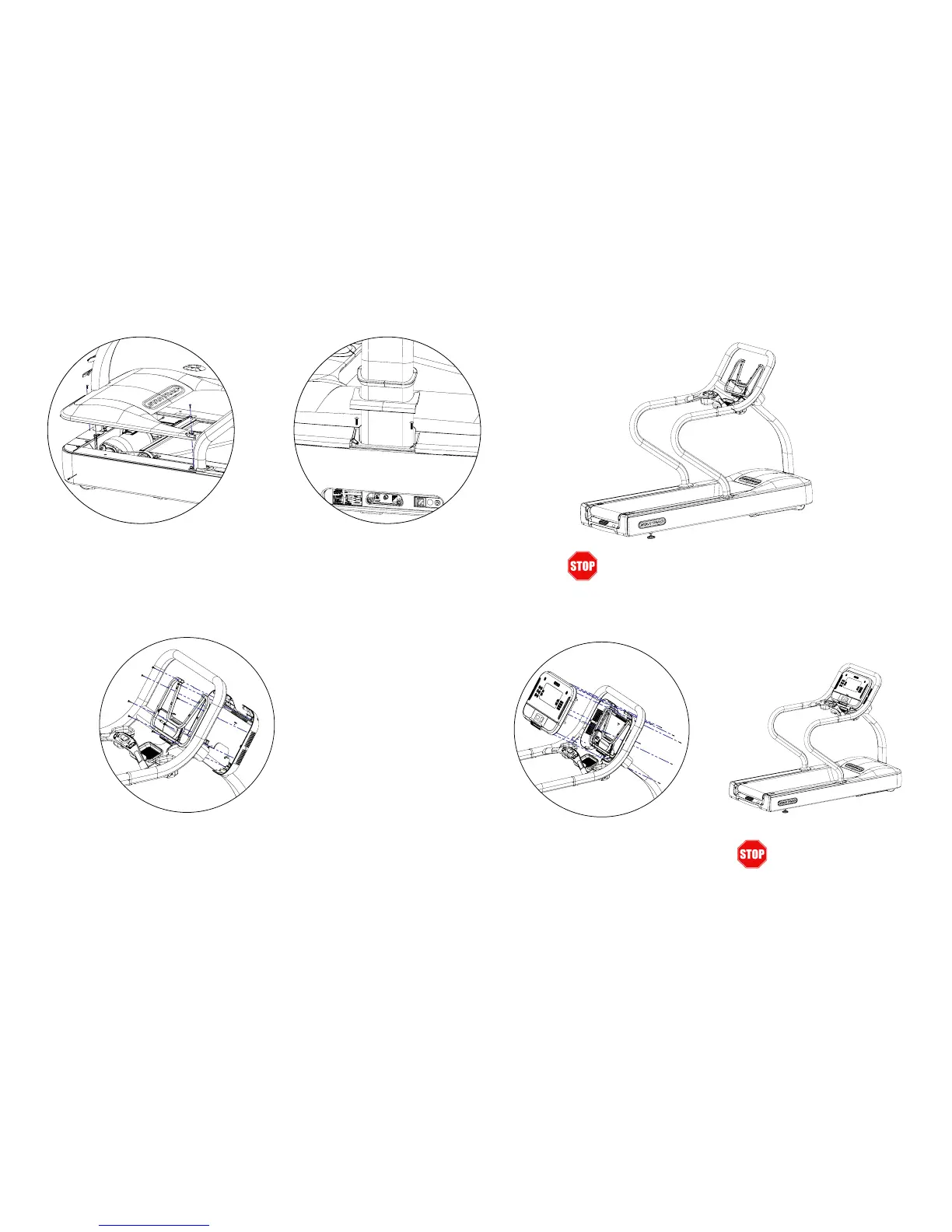
7. Install MotoR shRouD
Reinstall Front Motor Shroud Cap then fasten Mo-
tor Shroud and Side Bed Covers with (6) #10 Truss
Head screws.
8. ReInstall shRouD Cap
Reinstall Motor Shroud Cap and Neck Grommet as
shown
9. valIDate asseMbly
Frame assembly is complete. Prior to mounting con-
sole, verify console rail is secure and all mast screws
are present.
10. Install DIsplay ReaR housIng
Fasten the back half of the console assembly to the
display rail using the screws supplied with the console.
11. ConneCt Cables to Console boaRD
Connect the appropriate wires coming out of the
mast to the correct locations, please reference the
console wiring guide (Doc 620-8387) contained in
the console box.
12. seCuRe DIsplay
Secure the front half of the console assembly to the
back half using the screws supplied with the console
taking care not to pinch any wires and ensuring that
the rubber console grommet has a good seal.
Document #620-8379 - Revision A
13. InstallatIon CoMplete
Perform nal testing:
1. Auto-calibrate the unit
2. Test max elevation
3. Test fans


 To Previous Page