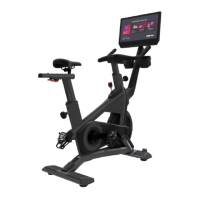
The document is an owner's manual for the Core Health & Fitness Virtual Bike by Star Trac.
Function Description
The Star Trac Virtual Bike is a stationary training equipment designed for commercial gymnasium or health club use. It provides a virtual cycling experience, allowing users to engage in exercise programs. The bike is not equipped with a free-wheel, meaning pedal speed must be reduced in a controlled manner. It features a console that provides various workout options, tracks and saves workout data, and allows for connectivity with devices like Apple Watch or Samsung Galaxy Watch for heart rate monitoring. The bike also supports connection to entertainment systems and screen sharing.
Important Technical Specifications
- SKU: 9-7555-8VB
- Description: Virtual Bike
- Unit Weight: 176 lbs (79.8 kg)
- Width: 20.7 in (53 cm)
- Length: 44.4 in (113 cm)
- Height: 59.7 in (152 cm)
- Max User Weight: 350 lbs (159 kg)
- Pedal Bolt Torque: 37 ft-lb (50 N-m)
- Power Supply: 90-260VAC/12VDC 5A MIN
- Battery: AA SIZE, 1.5V (for certain components, though not explicitly stated for the main unit)
- Clearance: Minimum of 23.6 inches (0.6 meters) on at least one side and either behind or in front of the exercise bicycle. A minimum of 19.7 inches (0.5 meters) between two adjacent units is recommended.
Usage Features
Assembly and Setup:
The manual provides detailed instructions for assembly, including attaching the rear and front stabilizers, and installing the seat post, seat assembly, and pedals. Specific torque values (37 ft-lb or 50 N-m) are provided for securing bolts, emphasizing the use of a torque wrench.
Adjustments:
- Handlebar or Seat Slider: Users can adjust the handlebar and seat slider positions by raising a cam lever, moving the component to the desired position, and then returning the lever to lock it securely.
- Seat Post or Handlebar Post Height: Height adjustments are made using a locking pop-pin. The pin is turned counterclockwise and pulled out, the post is adjusted to the desired height (ensuring it does not exceed the "STOP" mark), and then the pop-pin is released and turned clockwise to lock it securely without wobble.
- Resistance: Resistance is adjusted by turning a handle: clockwise to add resistance and counter-clockwise to reduce it.
Console Operation:
- Activation: The console screen saver can be activated by pedaling or touching the screen.
- Workout Selection: Users can select from various workout options via a graphical interface on the main menu.
- Data Tracking: The console allows users to track and save workout data by pairing an Apple Watch or Samsung Galaxy Watch via an icon on the bottom right corner of the display.
- Connectivity:
- Connecting a Device: Instructions are provided for connecting external devices.
- Connecting to Entertainment: The bike can connect to entertainment systems.
- Screen Sharing: The console supports screen sharing functionality.
- Login Experience: The manual details the login process for users.
- Bluetooth & WiFi: Instructions are included for connecting to Bluetooth and WiFi networks.
- HDMI Connection: There are instructions for testing the HDMI connection.
- Emergency Stop: The bike is equipped with an emergency stop handle; pressing it down will stop the machine.
Safety Guidelines:
- Users must read the entire owner's manual and all installation instructions before use.
- All warnings posted on the machine must be observed.
- The equipment is intended for commercial use in a supervised environment.
- Users should consult a physician before starting any exercise program.
- Proper exercise clothing and athletic shoes should be worn, and loose clothing, long hair, and towels should be kept away from moving parts.
- Care should be taken when mounting or dismounting, ensuring the pedal is in its lowest position and the machine is at a complete stop.
- The top surface of the pedals must be kept clean and dry.
- Adjustment devices (seat, slider, pop-pin) must be fully engaged to prevent injury.
- The maximum user weight limit is 350 lbs (159 kg).
- Heart rate monitoring systems may be inaccurate, and users should stop exercising immediately if they feel faint, dizzy, or experience pain.
- Only Startrac-qualified pedals should be used.
- The generator chain guard should not be opened unless instructed.
Maintenance Features
General Maintenance:
- The safety and integrity of the machine depend on regular examination for damage and wear.
- Worn or damaged parts must be replaced immediately, or the equipment must be removed from service until repaired.
- The owner is solely responsible for ensuring regular maintenance is performed.
Console Maintenance Mode:
The console has a dedicated "Maintenance Mode" which includes features for:
- Console Information & Software Updates: Allows for checking console information and performing software updates.
- General Settings: Access to various general settings.
- Apps: Management of applications on the console.
- Testing: Includes tests for the fan and HDMI connection.
- Calibration:
- Gear Calibration: Instructions for calibrating the bike's gears.
- Powermeter Calibration: Instructions for calibrating the powermeter.
- Error List: Provides a list of errors for troubleshooting.
Replacement Parts:
The manual includes a list of assembly parts with their part numbers and descriptions, facilitating the ordering of replacement parts. A complete list of replacement parts can be found in the online Owner's Manual or through CoreConnect.
Support & Service:
The manual directs users to "SUPPORT & SERVICE" for operational questions or if any components are missing or damaged. A "CONTACT SUPPORT NOW" button is prominently displayed on the cover.

 Need help?
 General


 To Next Page