6
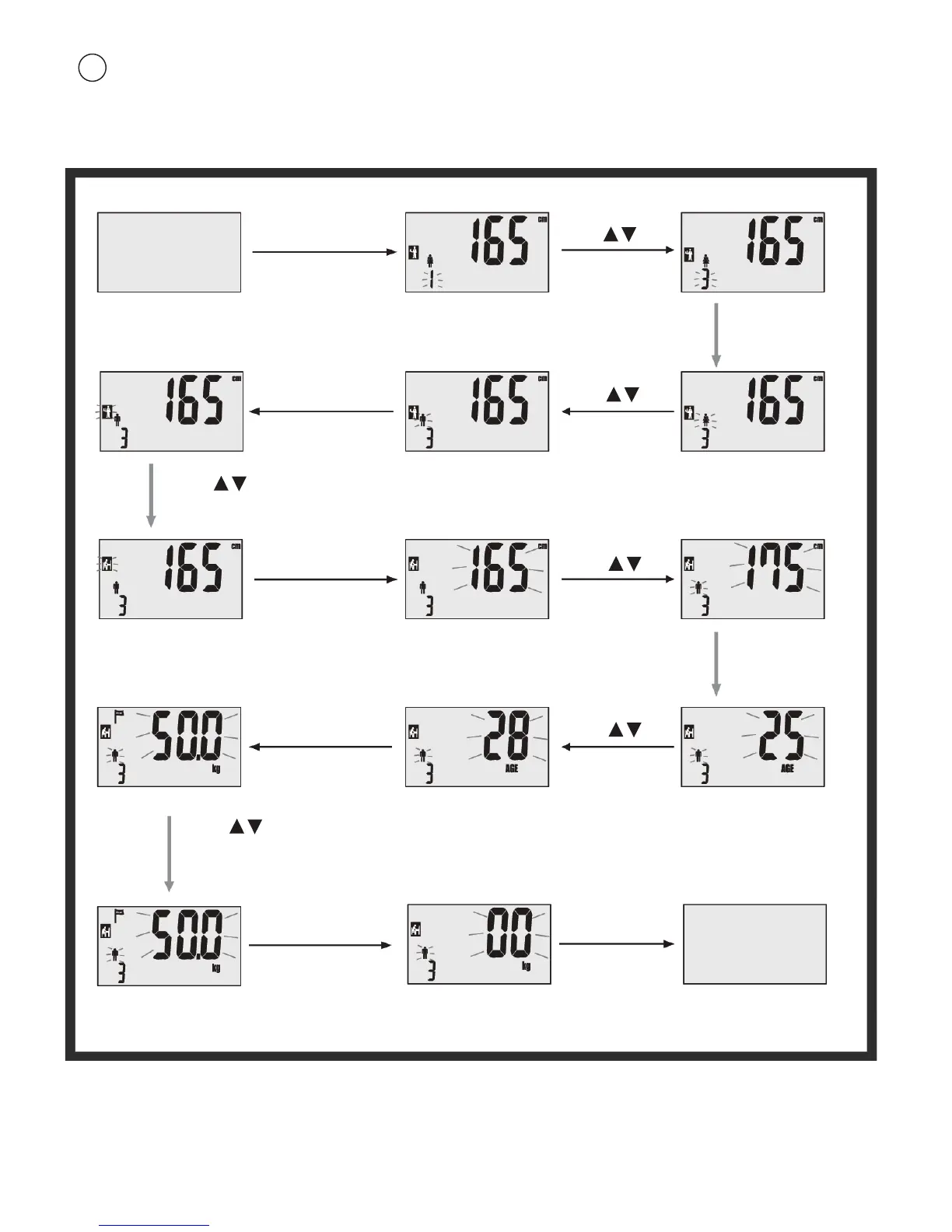
Parameter setting
Example: the 3rd user, male, 175cm, 28 years old, can set
his parameters as follow:
3
Press
to select your target
weight.
Press ON/SET
Default parameters
to turn on.
Power off
Press ON/SET
Press
to select user code.
to confirm and
prompt to next
setting.
Press ON/SET
to confirm and prompt
to next setting.
Press
to select gender.
Press ON/SET
to confirm and prompt
to next setting.
Press
to select height.
Press ON/SET
to confirm and prompt
to next setting.
Press
to select age.
Press
to select activity level.
Press ON/SET
to confirm and
prompt to next
setting.
Power off
Personal parameters
have been saved.
Scale shuts off
automatically after
8 secondes.
LCD screen shows “0.0”
Press ON/SET
Note:
. If while setting the parameters there are no entries for period of 6 seconds, the parameters already set will be
automatically saved and body fat measuring will start.
. If body fat measuring starts before you had time to finish setting your parameters, press SET for 3 seconds to return to
the setting mode. You will then be able to set you user code, gender, activity level, height, age and target weight again.


 To Next Page