4
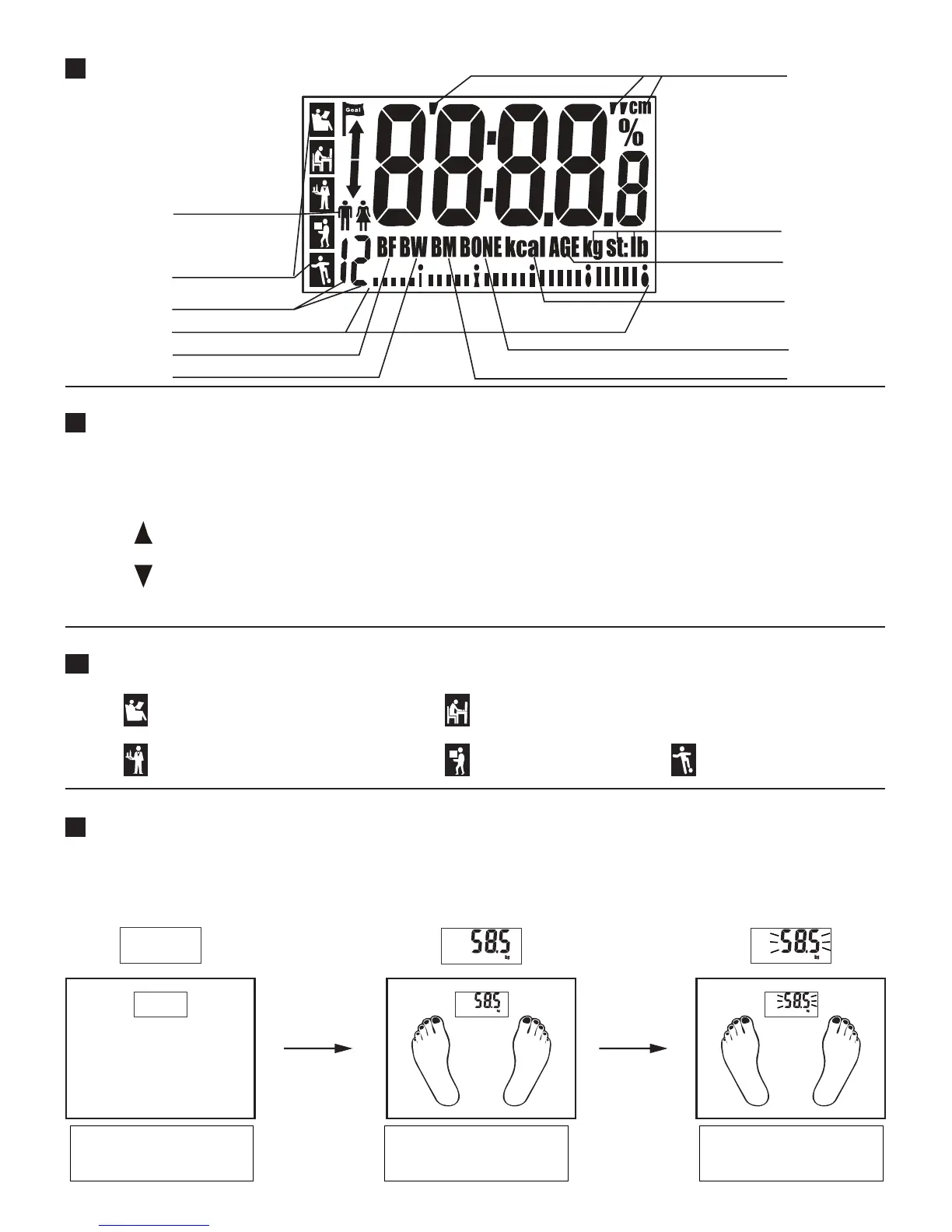
LCD Display
Key Illustration
SET : Turn on the scale / Save parameters / Prompt to next parameter.
(Please refer to the Setting personal parameter section)
: Advance the value by one interval each press. Hold down button to advance more quickly.
: Decrease the value by one interval each press. Hold down button to decrease more quickly.
Regular Weighing Mode
(indicates body weight only)
1. Auto step on weighing
Activity Levels
Sedentary/very inactive:
little or no exercise
Moderate activity:
always standing or walking
Extremely active:
athletes
Install battery (please refer
to Page 3) and place the
scale on flat floor.
Displays your weight. Once weight is stabilized
digits will flash and lock in.
Light activity:
non-physical work
Very active:
manual or physical work
Height Unit
Weight Unit
Age
Calorie Unit
Bone %
Muscle %
Gender
Activity levels
Fat status indication
Fat %
Hydratation %
User memory code


 To Next Page