Zero
g/oz
WT/PDS
CLR/SUPR
MC
kcal
kJ
Prot
Sodium
Salt
Chol
Carb
Glu
Fat
Gras
Fibr
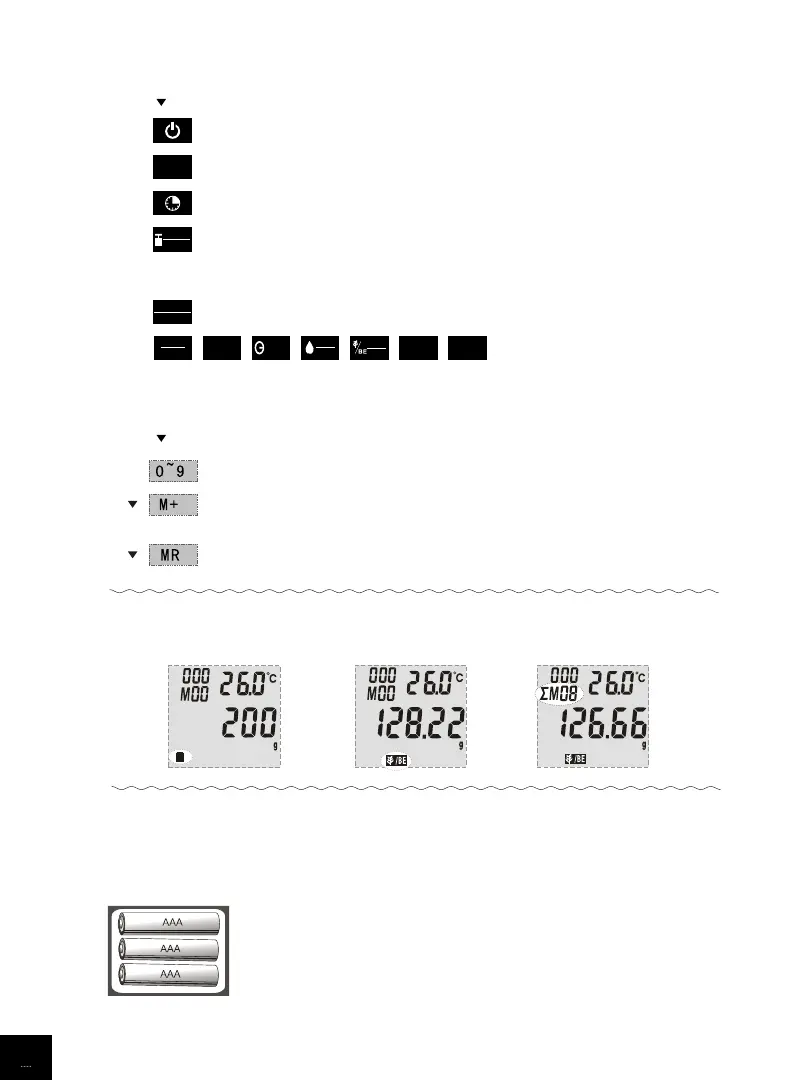
• BUTTONS ILLUSTRATION
• WORKING MODES
• INSTALL / REPLACE BATTERIES
3 alkaline batteries AAA (included). Remove package foil before use.
Function keys
Power switch
Reset to zero during weighing
Set alarm timer span
1. Transfer weight unit under weighing mode
2. Back to show the weight of food under nutrition value mode
3. Check total weight of all food items stored in memory
To clear current LCD value
Nutrition codes
1. Check nutrition value under nutrition value mode
2. Check total nutrition value when recalling historical records
Numeric keypad
Input food code or set alarm timer span
To add the nutrition value of food item being weighed to memory
Max. 99 memory can be added.
Check total nutrition value of the food items stored to memory
Weighing mode
Nutrition value mode
Nutrition value
saving mode
3
A. Take out the used batteries, with the aid of a sharp object if needed.
B. Install new batteries by putting one side of the battery down
first and pressing down the other side. (Please observe the polarity)


 To Next Page