5
6
8
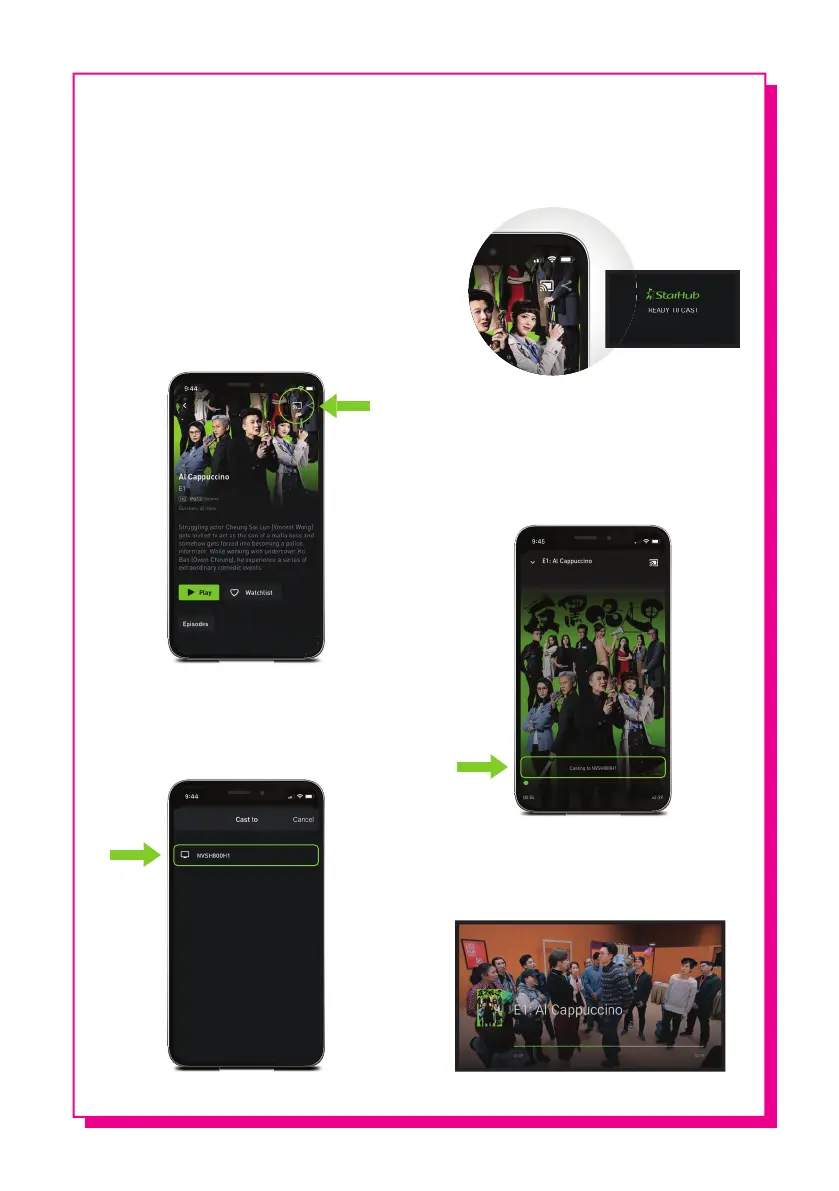
Once your mobile device is
connected, the Chromecast icon will
turn white, and your TV screen will
show READY TO CAST.
9
You will be able to control the
programme cast using your mobile
device. Do check that it shows
Casting to [device name] on your
mobile screen.
10
Enjoy your favourite programmes
on your TV screen!
Log in to your StarHub TV+ app on
your mobile device using your Hub iD
and password.
Ensure that both your StarHub TV+
box and mobile device are connected
to the same WiFi network.
Select the programme you would
like to cast, then click on the
Chromecast icon located at the top
right corner of the screen.
7
Select the device name that
corresponds to your StarHub TV+ box.
Screens are for illustrations only and may differ for Apple and Android devices.


 To Previous Page