6 PROsine 2.5/3.0 Advanced Control System (ACS) Owner’s Manual
2. ACS Panel Operation / Menu Navigation
The top level screen for the ACS panel displays battery voltage and battery
current. This screen should be the usual screen displayed as it provides overall
status of your batteries and informs you of current either being drawn from the
batteries (a “-“ in front of the current reading) or delivered to the batteries (a “+”
in front of the current reading). The “-“ indicates the PROsine Inverter•Charger
is in inverter mode (negative current direction from the battery) while the “+”
indicates charger mode operation (positive current direction to the battery).
2.1. Menu Selection
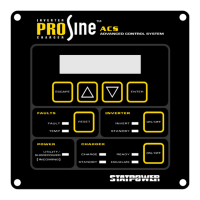
To navigate the menu and select parameters, follow these instructions:
1. Press the ▲ or ▼ buttons to scroll up or down through the menu and values.
2. Press the
ENTER button to select the desired item.
3. If the parameter is “user settable”, you can then press
ENTER, then the ▲ or
▼ button to scroll (up or down) through the available choices. Press
ENTER
again when your choice of the setting is displayed to select it.
4. For “installer settable” parameters, refer to Section 2.3.
5. Press
ESCAPE to move up one level in the menu. Press ENTER to select a
level in the menu and use the ▲ or ▼ buttons to scroll through the options at
that level.


 To Next Page