EasyManua.ls Logo

Status BETWEEN 3ANC - Controlling the Between 3 ANC; Physical Button Controls; Touch Control Functions

Status BETWEEN 3ANC
12 pages
Print Icon
To Next Page IconTo Next Page
To Previous Page IconTo Previous Page
Loading...
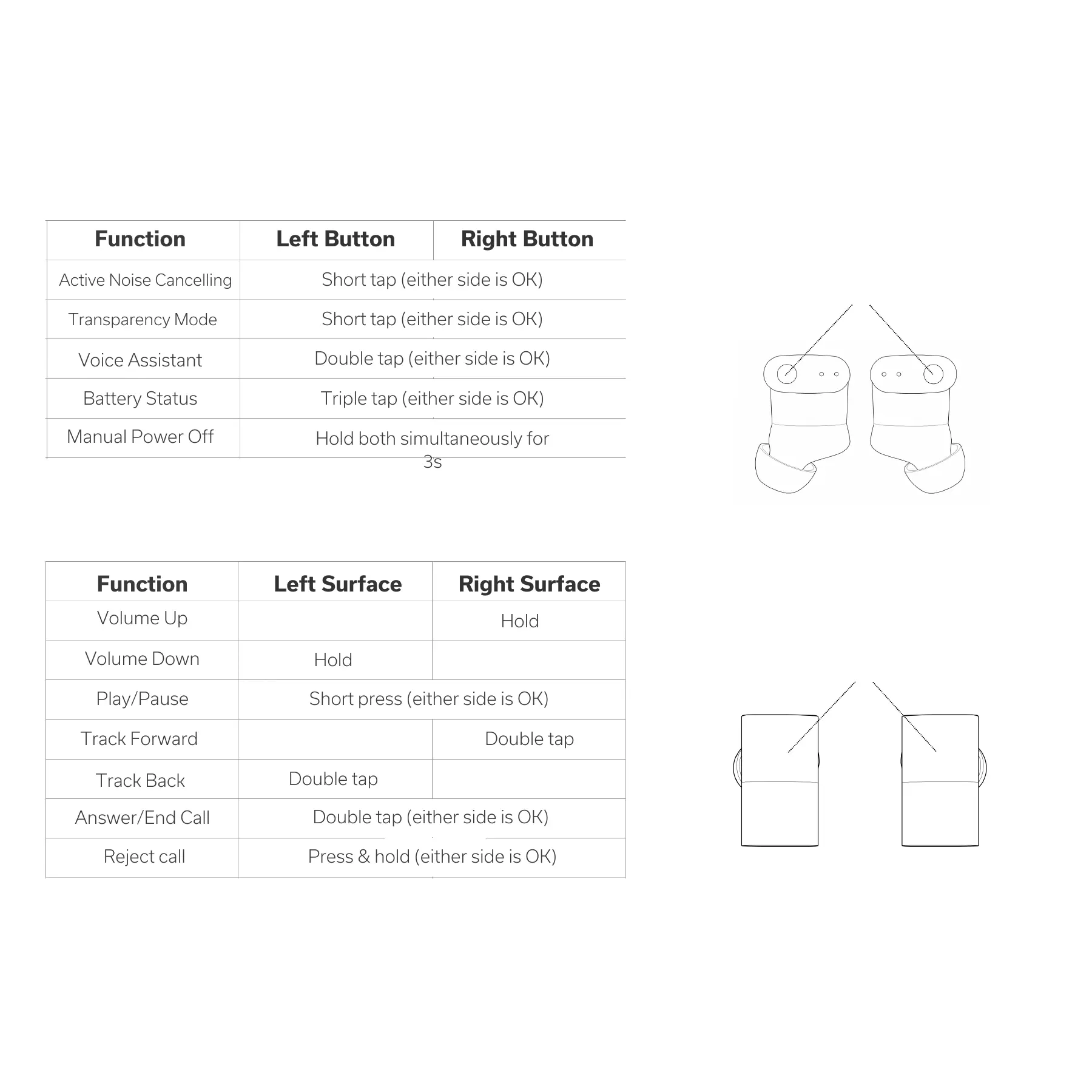
Controlling the Between 3ANC
Physical Buttons:
Function
Left Button
Right Button
Transparency Mode
Short tap (either side is OK)
Function
Left Surface
Right Surface
Volume Up
Volume Down
Play/Pause
Short tap (either side is OK)
Short press (either side is OK)
Double tap (either side is OK)
Voice Assistant
Triple tap (either side is OK)
Battery Status
Manual Power Off
Hold both simultaneously for
3s
Touch Controls
Track Forward
Track Back
Hold
Hold
Double tap
Double tap
Answer/End Call
Reject call
Double tap (either side is OK)
Press & hold (either side is OK)
There's a physical button on
top of each earbud:
And a touch control surface
on each of the earbuds: