LEVEL
5
0
1
3
4
6
7
9
10
2
8
L
R
(INTERNAL)
LEVEL CONTROL
INTERNAL MUTE
EXTERNAL
(BYPASS)
LINE1
LINE2
LINE3
LINE4
SOURCE
POWER EARSPEAKERS
PRO-TYPE ONLY
SRM-T8000 VACUUM TUBE INPUT DRIVER UNIT FOR EARSPEAKERS
①
②
③
④
⑤
⑥
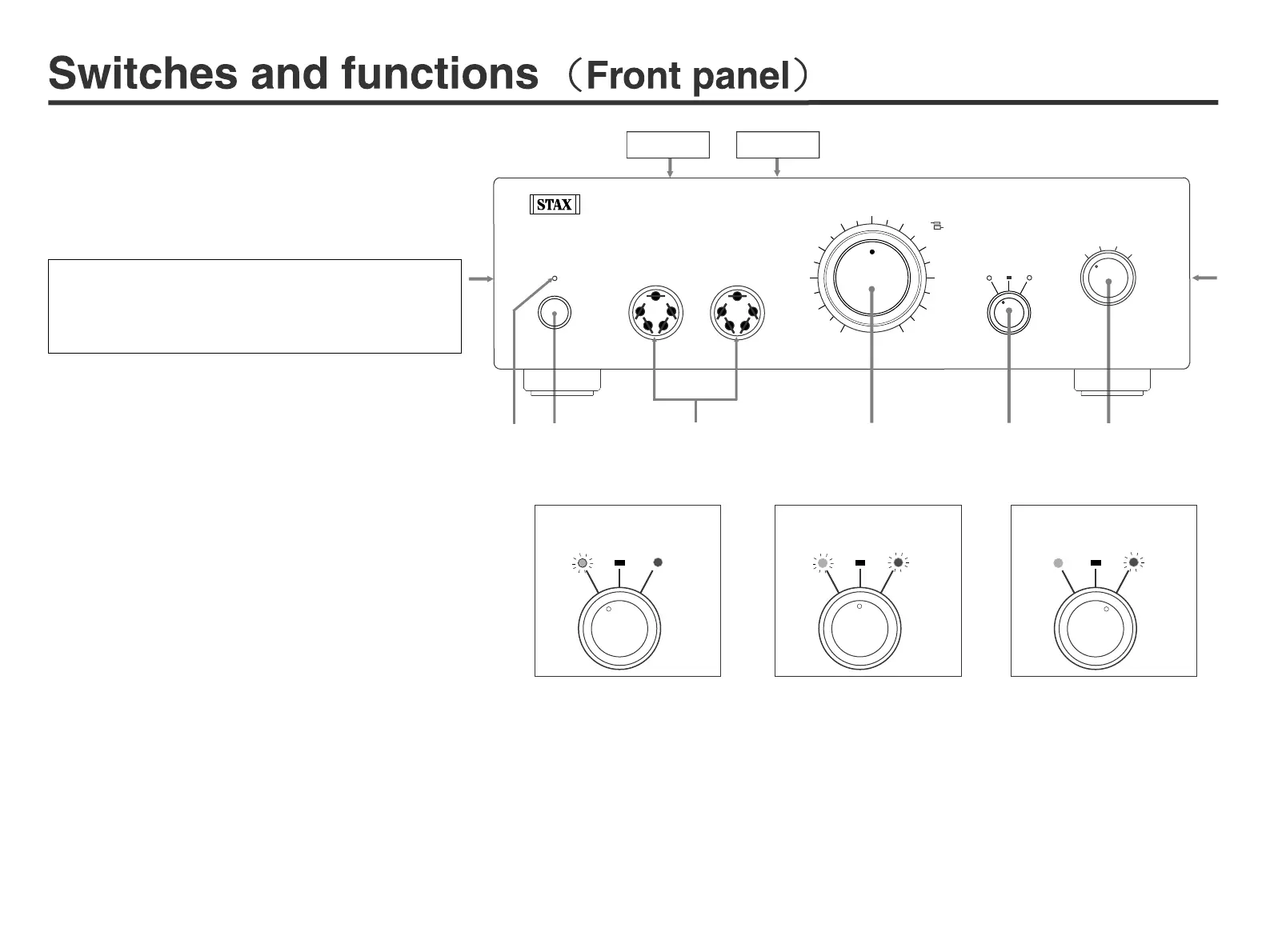
②Power switch: pushing in the switch turns the unit on, and
pushing it out turns the unit off.
③Sockets for PRO Type earspeaker: insert 5-pin type
earspeaker plug.
④Volume knob: double-axis structure enables to turn left
and right channel simultaneously. In case right-and-left
channel volume is unbalanced, adjust the volume by inde-
pendently turning the separate volume knobs. The front
side is L-CH and the back side is R-CH.
※ We recommend to return volume knob to "0 " when you
turn on or off the unit.
INTERNAL MUTE EXTERNAL
(BYPASS)
LEVEL CONTROL
INTERNAL MUTE EXTERNAL
(BYPASS)
LEVEL CONTROL
INTERNAL MUTE EXTERNAL
(BYPASS)
LEVEL CONTROL
⑤LEVEL CONTROL: volume control operation can be switched either to
the internal volume of the unit, or to the external volume using attenuator
or preamplifier.
1. INTERNAL: Green LED lights up and level can be controlled by inter-
nal volume.
2. MUTE: Green/Red LED blinks and mutes sound in order to urge you
to pay attention before using external volume.
3. EXTERNAL: Red LED lights up and level can be controlled by pream-
plifier or external volume.
When power on and off:
It is recommendable to turn down the volume control
knob to “0” or to set the “LEVEL CONTROL” to “MUTE”.
①
Power indicator LED: this blinks for about 1 minute
after powered on and lights up when the tube heater is
warmed up. (Even when the unit is turned on right af-
ter it was turned off, the power indicator blinks again
for about 1 minute.)
Please do not block up the vent of top-cover and both side.
Please do not put a thing on a ventilation hole.
⑥SOURCE: input selector.
1. LINE1/LINE2: selects RCA plug input. Use RCA pin cable provided or
your favorite one.
2. LINE3: selects XLR balance cable input. Polarity is 1-SHIELD 2-HOT 3
-COLD. When connecting equipment with 3-HOT, use polarity
conversion adaptor or conversion cable.
3. LINE4: can be selected only when option card is used.
Factory default
“MUTE” position
Direct input
GREEN
LED
Lights
GREEN
LED
Blinks
RED LED
Blinks
Top cover Air vent
4


 To Next Page
 Loading...