Need help?
Do you have a question about the STAX SRM-252S and is the answer not in the manual?
Product contains high-voltage circuitry. Avoid disassembly or modification.
Lists compatible audio sources like amplifiers, CD players, and portable devices.
Connect audio sources via rear panel input using supplied cables.
Connect the AC adapter to a wall socket and the unit's DC inlet.
Connect ear speaker to the front panel output, then power on and adjust volume.
Direct output for connecting to other driver units or amplifiers.
Avoid distorted sound when connected amp is off; power on or disconnect cable.
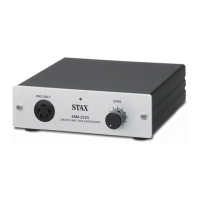
Identifies front panel components: pilot lamp, output terminal, volume knob.
Identifies rear panel components: input/parallel out, DC input terminals.
Diagrams show direct connection to various source devices like DVD, CD, and portable players.
Connect to an amplifier's "REC OUT" or "PRE OUT" terminal.
Adjust portable device volume first, then driver unit volume for optimal listening.
Checks AC adapter, power, input signal, and cable for no sound.
Reduce volume if sound distortion occurs due to excessive levels.
Move away from interference sources or check cable grounding for hum.
Minor channel imbalance during volume adjustment is normal "gang-error".
Covers frequency response, gain, distortion, impedance, input level, output voltage, temp, dimensions, weight, power, and accessories.
Pack unit securely in its original or padded box for shipping.
Use a trackable parcel delivery service for shipping.
Provide the driver unit's "product name" when returning for repair.
Overseas repair/inquiry not accepted; contact local distributor.
 General
| Gain | 60 dB |
|---|---|
| Input Impedance | 50kΩ |
| Inputs | 1 x RCA |
| Power Consumption | 10 W |
| Harmonic Distortion | 0.01% or less (1kHz, 100Vrms output) |
| Outputs | 1 x PRO bias 5-pin |
| Power Supply | AC 100V, 50/60Hz |
| Input Level | 100 mV |

 To Next Page