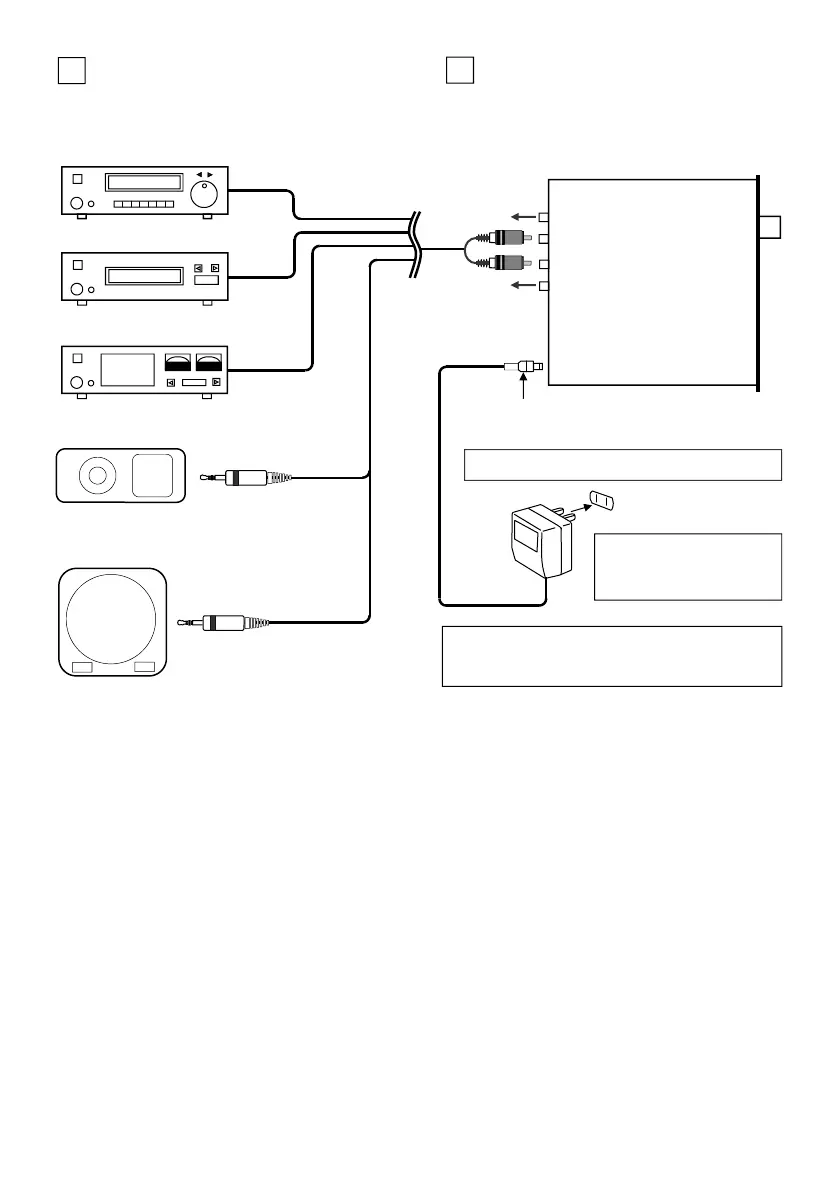
DVD-VIDEO/VIDEO DECK etc.
CD/SACD/DVD-Audio/TUNER
CASSETTE/MD/DAT Deck etc.
SRM-252S
OUT
R-ch
L-ch
OUT
IN
IN
ACアダプターに表示された電
源電圧のコンセントに差し込ん
でお使いください
付属ACアダプター・Supplied AC power adaptor
DCプラグ/DC Plug
Portable-Audio Player / PC-Audio, TV etc.
ステレオミニプラグ
Stereo mini plug
ミニプラグ→ RCAプラグ
ソース機器と直接接続する場合:When connecting directly to source equipment:
現在お使いのシステムに追加する場合:
プリアンプ又はプリメイン・アンプの録音用
出力「REC OUT」端子へ接続してください。
音量は本機のボリュームで調整できます。ま
た、SACD/CDプレーヤー、カセットデッキ、
チューナー、ビデオデッキ、DAT/MDデッキ
等。また、パソコンのオーディオ出力・ポー
タブルオーディオプレーヤー等の音声ライン
出力やヘッドフォン端子にも直接接続できま
す。
ヘッドフォン端子へ接続した際の音量調
整の仕方は?
ヘッドフォン用の端子のみでLINE出力がない
ポータブル・オーディオプレーヤーやTV等の音
量調整は、付属のヘッドフォンを使用する時
の音量のボリューム位置に固定します。次
に、本機のボリュームで最適な音量になるよ
うに調整してください。
Portable-CD Player etc.
接続の例
3
3
Connection examples
The AC power adaptor must be inserted into a wall
(or table) socket of the same mains voltage stated
on the adapter box.
When adding the SRM-252S to the existing
system:
Connect it to the “REC OUT” terminal of a pre-
amplifier or integrated amplifier.
The volume level can be adjusted using the
volume knob on the SRM-252S front panel.
Also SACD/CD player, cassette deck, tuner,
video deck, DAT/MD deck, PC audio output or
headphone jack of a portable audio player can
directly be connected to the SRM-252S driver
unit.
How to adjust the volume level when
connected to a headphone jack?
If a portable audio player or a TV set has only
headphone output with volume control and has
no line output, first adjust and fix the volume
level using its supplied headphone. Next, adjust
the ear speaker volume to an optimal level using
the volume knob of the driver unit.
-4-


 To Next Page