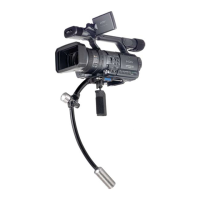
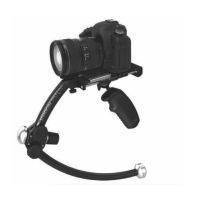
The Steadicam Merlin² is a camera stabilization system designed to provide smooth, professional-looking footage by counteracting unwanted camera movements. It is suitable for both the original Merlin and the Merlin² models, offering a quick start guide to help users set up and operate the device effectively.
Function Description:
The Steadicam Merlin² functions by isolating the camera from the operator's movements, allowing for fluid tracking shots, smooth pans, and stable handheld footage. It achieves this through a system of weights, an adjustable arc, and a gimbal, all working together to maintain the camera's balance and desired drop time. The device is designed to be held with one hand, with the other hand providing light guidance to steer the camera.
Important Technical Specifications and Components:
The Merlin² system comprises several key components:
- Dovetail Camera Mounting Plate: This plate attaches to the bottom of the camera and slides onto the stage of the Merlin². It features a letter 'H' to help align the camera's center of gravity.
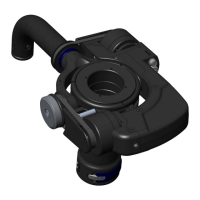
- Stage: The main platform where the camera mounting plate is secured. It includes fore-and-aft and side-to-side trim rollers for fine-tuning camera balance.
- Upper Spar: Connects the stage to the folding caliper hinge.
- Folding Caliper Hinge: A crucial joint that allows the Merlin to fold for storage and adjusts the arc size. It has two locking knobs that must be loosened before adjusting the arc.
- Caliper Adjusting Knob: Used to change the size of the adjustable arc, which directly impacts the drop time.
- Caliper Release Ring (Merlin²) / Caliper Release Lever (Original Merlin): Locks the caliper hinge into place when unfolded.
- Adjustable Arc: The curved section that connects the upper spar to the lower spar, its size determines the drop time.
- Gimbal: The pivot point that allows the camera to remain level regardless of the operator's hand movements.
- Guide Ring: Located above the gimbal, it can be rotated for fine adjustments to the drop time. It has a guide latch button that must be pressed to rotate it.
- Handle: The primary grip for the operator.
- Lower Spar: The bottom section of the rig where the weights are attached.
- Weights: The system includes 9 weights: a starter weight, middle weights, and finish weights. These are crucial for achieving the correct balance and drop time. The number and placement of weights depend on the camera's payload.
- End Weight: The final weight at the bottom of the lower spar.
Usage Features:
The quick start guide emphasizes a step-by-step setup process for optimal performance:
- Camera Preparation: Apply gaffer's tape to the camera bottom to prevent movement on the mounting plate. Unfold the Merlin and lock the caliper release ring/lever. Remove the dovetail camera mounting plate.
- Finding Center of Gravity: Use a round object (like a pen) on a flat surface to find the camera's balance point (front-to-back and side-to-side). Mark this point and align it with the 'H' on the dovetail plate.
- Mounting the Camera: Secure the camera to the dovetail plate using the appropriate screw (typically M, N, or O for HDSLRs), ensuring the flat edge of the plate faces the front of the camera.
- Initial Trim Roller Position: Start with the fore-and-aft and side-to-side trim rollers in the middle of the stage.
- Weight Configuration: Attach weights to the lower spar based on the camera's total payload (camera, lens, and accessories). A general rule of thumb is one middle weight per pound of payload. Specific instructions are provided for finish weight placement based on payload weight.
- Arc Adjustment: For payloads of 2-3 pounds, start with the arc in the middle; for 4-5 pounds, start with the arc fully open. Always loosen the two locking knobs on the folding caliper hinge before turning the caliper adjusting knob to prevent damage.
- Mounting the Plate: Secure the dovetail camera mounting plate to the Merlin's stage, aligning the front of the plate with the middle of the stage (#0 on Merlin, #5 on Merlin²). The camera lens should point towards the front finish weight.
- Initial Leveling: Adjust the plate position (forward/back) and use the trim rollers (fore-and-aft, side-to-side) to make the camera sit relatively level.
- Drop Time Adjustment (KEY STEP): This is critical for proper stabilization.
- Determining Correct Drop Time: Hold the Merlin handle with your right hand and the lower spar straight out sideways with your left hand. Let go and observe how long it takes for the rig to swing from sideways to the bottom. The DVD (Section 7, 4:00 mark) provides a visual reference for the correct drop time (approximately 1 second).
- Adjusting Drop Time:
- Arc Adjustment: To make the drop time faster, make the arc smaller (turn caliper adjusting knob counter-clockwise). To make it slower, make the arc larger (turn caliper adjusting knob clockwise). Remember to loosen the locking knobs first and re-tighten them afterward.
- Weight Adjustment: If the arc adjustment isn't sufficient, add more weight to make the drop time faster, or remove weight to make it slower.
- Guide Ring Adjustment: For fine-tuning, press the guide latch button and rotate the guide ring. Clockwise rotation makes the drop time faster, counter-clockwise makes it slower. This is a subtle adjustment and may require multiple turns.
- Re-trimming: After changing the arc, re-trim the camera to sit level again, as weight distribution changes at an angle.
- Dynamic Balance Check: Verify that the lower spar weights and front finish weight move together smoothly. If the bottom weights move first, the rig is back-heavy (move plate forward). If the front weight moves first, the rig is front-heavy (move plate back). Fine-tune trim adjustments to ensure the rig is level.
- Body Posture: Maintain a still core (imagine a glass of water on your head).
- Walking Technique: Roll your feet from heel to toe. Walk upright and relaxed, avoiding bent knees or walking sideways. Swivel the camera using the guide ring.
- Two-Handed Operation: Use the right hand for the handle and the left hand for light guidance on the guide ring (index finger on front, thumb on back). Emphasize a very, very, very light touch with the left hand; do not steer the rig.
- Relaxation: Avoid rigidity; let the Steadicam be a natural extension of your body.
Adjustments for Changing Conditions:
- Zooming: Re-balance using fore-and-aft trim.
- Changing Lenses: For similar weight lenses, use fore-and-aft trim. For significantly different weight lenses, adjust weights and/or arc, then fine-tune with the guide ring.
Maintenance Features:
The guide implicitly suggests maintenance through proper handling:
- Avoid Forcing/Over-tightening: This prevents damage to components.
- Proper Folding: Ensure the caliper release ring is open before folding to avoid damage.
- Loosen Locking Knobs: Always loosen the two locking knobs at the folding caliper hinge before adjusting the caliper adjusting knob to prevent damage to the hinge joint.
The Steadicam Merlin² is an acquired skill, but with practice, users will achieve significantly better results than handheld footage.

 Need help?
 General

 To Next Page