SYSTEM
SYSTEM
FIRMWARE
SYSTEM
CALIBRATION
SYSTEM
SCREEN BRIGHTNESS
SYSTEM
LED BRIGHTNESS
SYSTEM
SCREEN TIMEOUT
FIRMWARE
NEW FIRMWARE
AVAILABLE
CONNECT TO APP
TO UPDATE
CURRENT VER: 1.0.0
NEW VER: 1.0.7
CALIB. - STICKS
ROTATE
SCREEN BRIGHTNESS
5
LED BRIGHTNESS
5
SCREEN TIMEOUT
2 MINUTES
CHARGE LED
5
SLEEP TIMEOUT
4 MINUTES
SYSTEM
SLEEP TIMEOUT
SYSTEM
POWER MODE
SYSTEM
CHARGING LED
SYSTEM
SOCIAL ALERT COLOR
SYSTEM
RESET TO DEFAULTS
POWER MODE
FULL
SOCIAL ALERT COLOR
1
RESET TO DEFAULTS
RESET TO DEFAULTS?
WARNING: THIS WILL
CLEAR ALL SETTINGS
AND PROFILES
BEGIN
A
COMMAND DISPLAY: MAIN MENU - SYSTEM
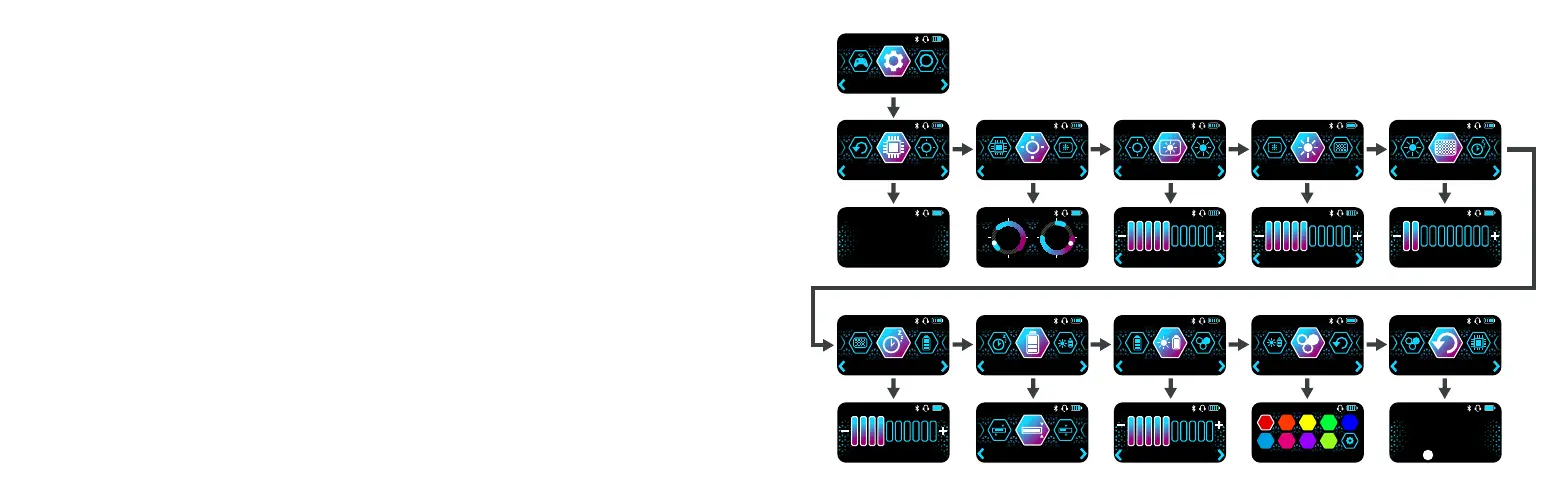
The SYSTEM section allows you to adjust the performance of the global settings options.
All options within the SYSTEM section will be stored in memory but will remain the same
• Firmware:
• Calibration: Enables calibration process to ensure sticks and triggers are operating at peak
performance.
• Screen Brightness: Sets the backlight brightness of the Command Display.
• LED Brightness: Sets the brightness of the RGB LEDs.
• Screen Timeout: Sets the timeout duration to dim the screen when it is not in use. Setting to
0 will keep the screen always on.
• Sleep Timeout: Sets the timeout duration to power the controller down when it is not in use.
Setting to 0 will keep the controller always on.
• Power Mode: Choose between Full, Balanced and Eco to alter the power consumption of the
controller. This feature enforces set values for screen & LED brightness, and screen & sleep
timeout. Setting your own values will result in a custom Power Mode.
• Charging LED: Sets the brightness of the RGB LEDs when controller is charging via the dock.
• Social Alert Colour:
displayed on the Dashboard.
• Reset to Defaults: Be careful! Selecting this option will clear all the on-board memory
settings and revert them to their factory default values.


 To Next Page
 Loading...