Need help?
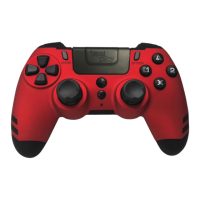
Do you have a question about the steelplay JVAMUL00153 and is the answer not in the manual?
Keep small parts away from children to prevent choking hazards.
Follow general usage rules, avoid repairs, water, and damage.
Install in a dry, dust-free, and temperature-appropriate location.
Avoid electric shock, fire, or damage by following electrical precautions.
Observe safety rules when disposing of electrical and electronic equipment (WEEE).
Arrange cables to prevent tripping and keep them away from children and heat.
Handle batteries carefully to avoid leaks, explosions, and burns.
Be aware of potential discomfort or injury from prolonged controller use.
Connect the controller to a PC via USB and follow pairing instructions.
Plug in the USB adapter and press HOME to pair with your console.
Connect the charging cable to a USB port and the controller.
Learn how to program the M1-M4 paddles for custom button functions.
Details on battery type and power requirements.
Contact information for assistance and troubleshooting.
Information on the warranty period and coverage limitations.
Guidelines for disposing of electrical and electronic equipment.
Meaning of the WEEE symbol for proper electronic waste disposal.
Compliance with EU directives for WEEE and hazardous substances.
FCC rules compliance for digital devices and potential interference.
Details on the wireless frequency band and maximum output power.
 General
| Device type | Gamepad |
|---|---|
| Analog thumbsticks | Yes |
| Gaming control technology | Analogue / Digital |
| Gaming platforms supported | PC, PlayStation 4, Playstation 3 |
| Gaming control function buttons | D-pad, Directional buttons, Menu button, Options button, Turbo button |
| Frequency range | 2.4 GHz |
| Device interface | RF |
| Connectivity technology | Wireless |
| Cable length | 1 m |
| Product color | Blue |
| Power source | Battery |
 Weight and Dimensions
| Weight | 375 g |
|---|


 To Next Page