Low Voltage Thermostat Installation continued…
Page 4 of 4 Document #1206108 Rev 7
03/19/2024
ACCESSING LOCATION VALUES
NOTE: During the first few minutes of operation, access to location
values 1 (L001) - 99 (L099) is allowed. If the timer expires, access
to the locations can be gained by powering the system off and
back on.
To edit or view location settings:
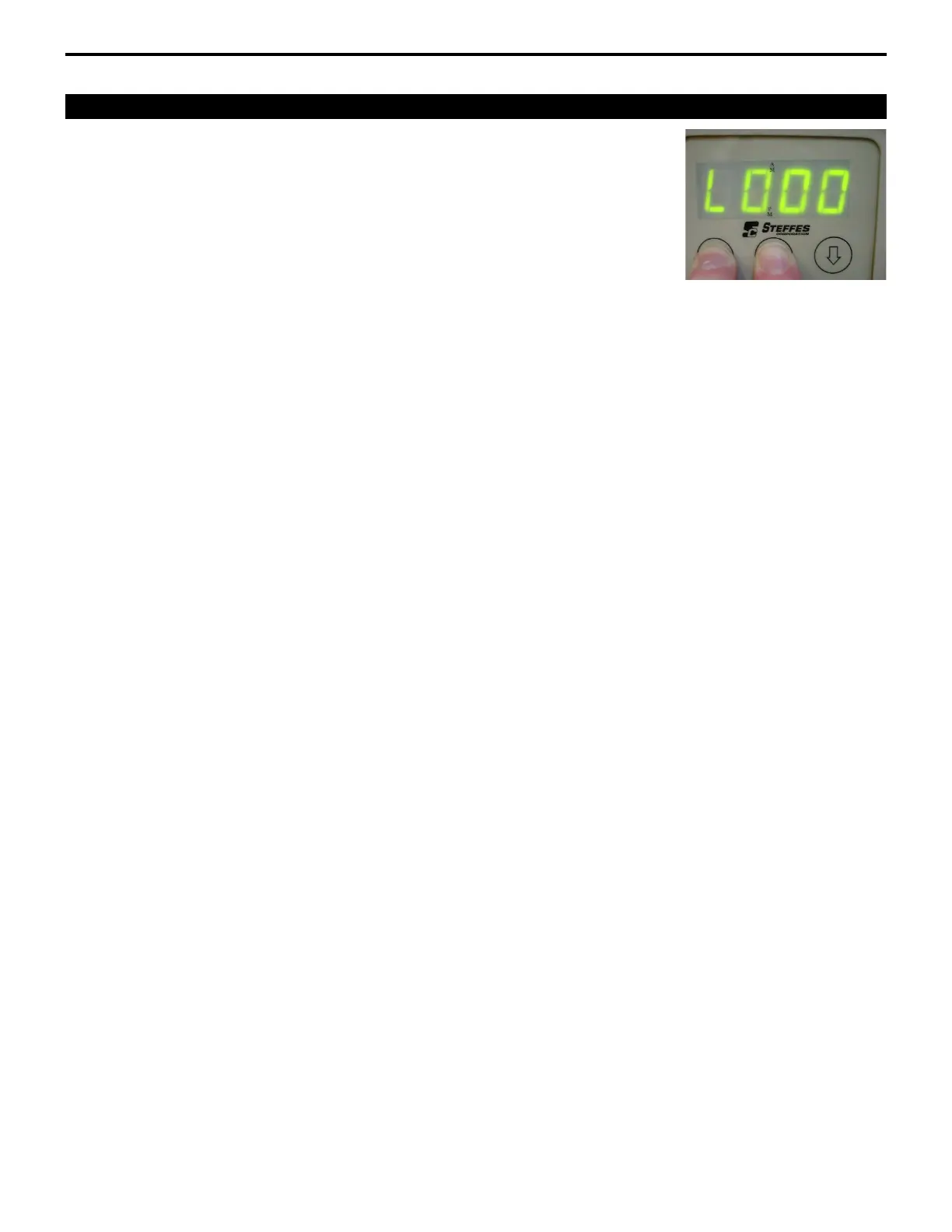
Step 1 Press and hold the M button until the display shows EdIt.
Step 2 While holding the M button, press and hold the up-arrow button.
Continue to hold both buttons simultaneously until L000 is displayed.
NOTE: If the M button is released before the L000 is displayed, start over from Step 1.
Step 3 Release the buttons. The faceplate will flash between L000 and the value in this location. The
L indicates location, and the last three numbers indicate the specific location number. (For
example: Location 91 reads L091) Press the up arrow until the location to be edited is reached.
Step 4 To edit the location value, press and hold the M button, then use the up or down arrow buttons
to change the value in the location.
Step 5 To exit locations, press only the down arrow button until L000 is displayed. Press the down
arrow button one more time. The normal display mode will be shown, and changes made will
be saved.
NOTE: If no buttons are pressed for a brief amount of time, the faceplate automatically
returns to its normal operating mode. Any changes made to the location
settings are saved.



 To Previous Page