1. Battery Charge Indicator - Displays the current battery charge level.
2. Overload warning
3. Headphone socket - If you want to disconnect the internal speaker,
push a 3.5mm headphone plug into the socket.
4. LIGHT- Pressing the button will turn on the backlight. If you want to
turn off the backlight, press the button again.
5. DISC - Metal object discrimination / elimination button.
6. POWER - This button is used to turn the device on or off. Press the
button if you want to turn the device on; after pressing the button
again, the device will turn off.
7. Sensitivity / Depth Indicator. The indicator displays the sensitivity of
the device as well as the probable depth of the target.
8. Detection categories
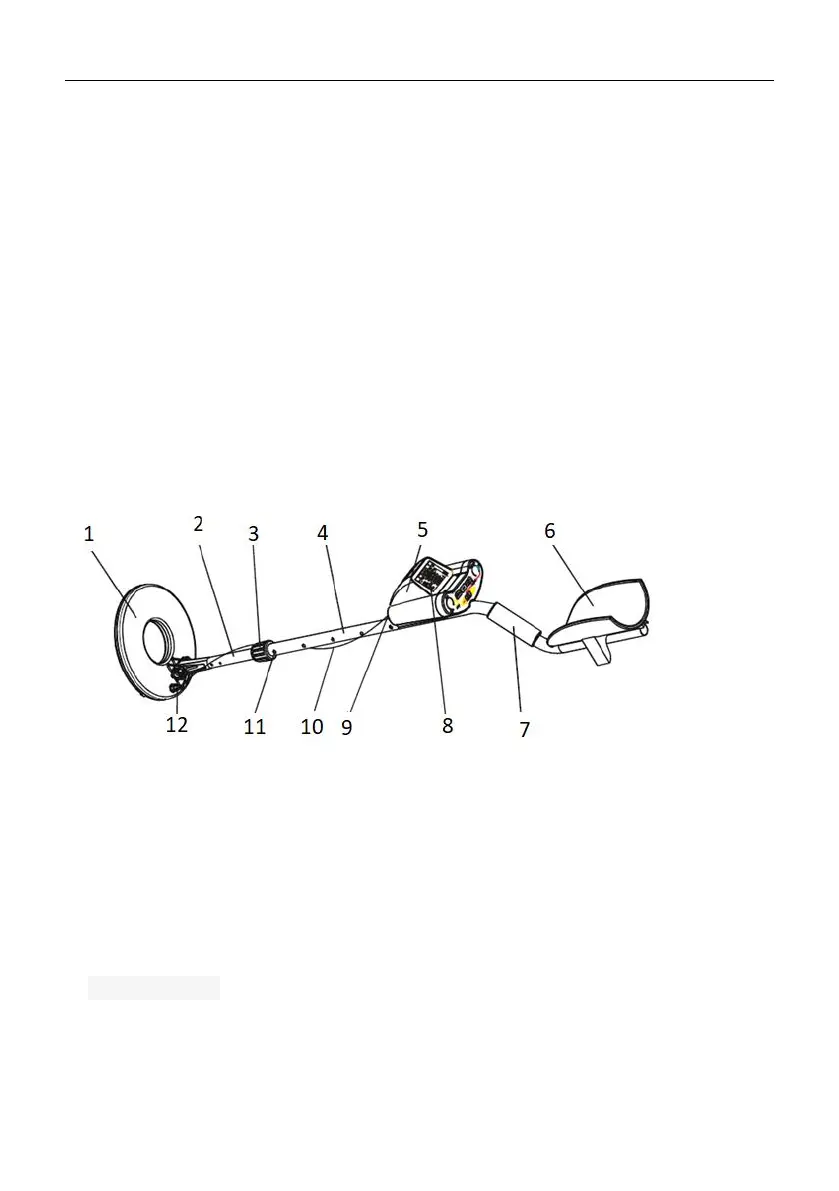
3.1.6. SBS-MD-17
1. Probe
2. Lower pipe
3. Clamping nut
4. Upper pipe
5. Control panel
6. Elbow-rest
7. Handle
8. Display
9. Cable connector
10. Cable connecting the probe with the control panel
11. Spring clip
12. Screw mounting



 To Next Page