The Controls and Connectors
18 Operation Manual
1 VALUE knob/button
Rotating this knob adjusts the volume level of the
assigned function, while pressing the knob turns the
assigned function on or off.
2 FUNCTION [1] - [4] buttons
Selects the parameter operated by the VALUE knob.
The pressed button lights, allowing you to confirm
which button is selected.
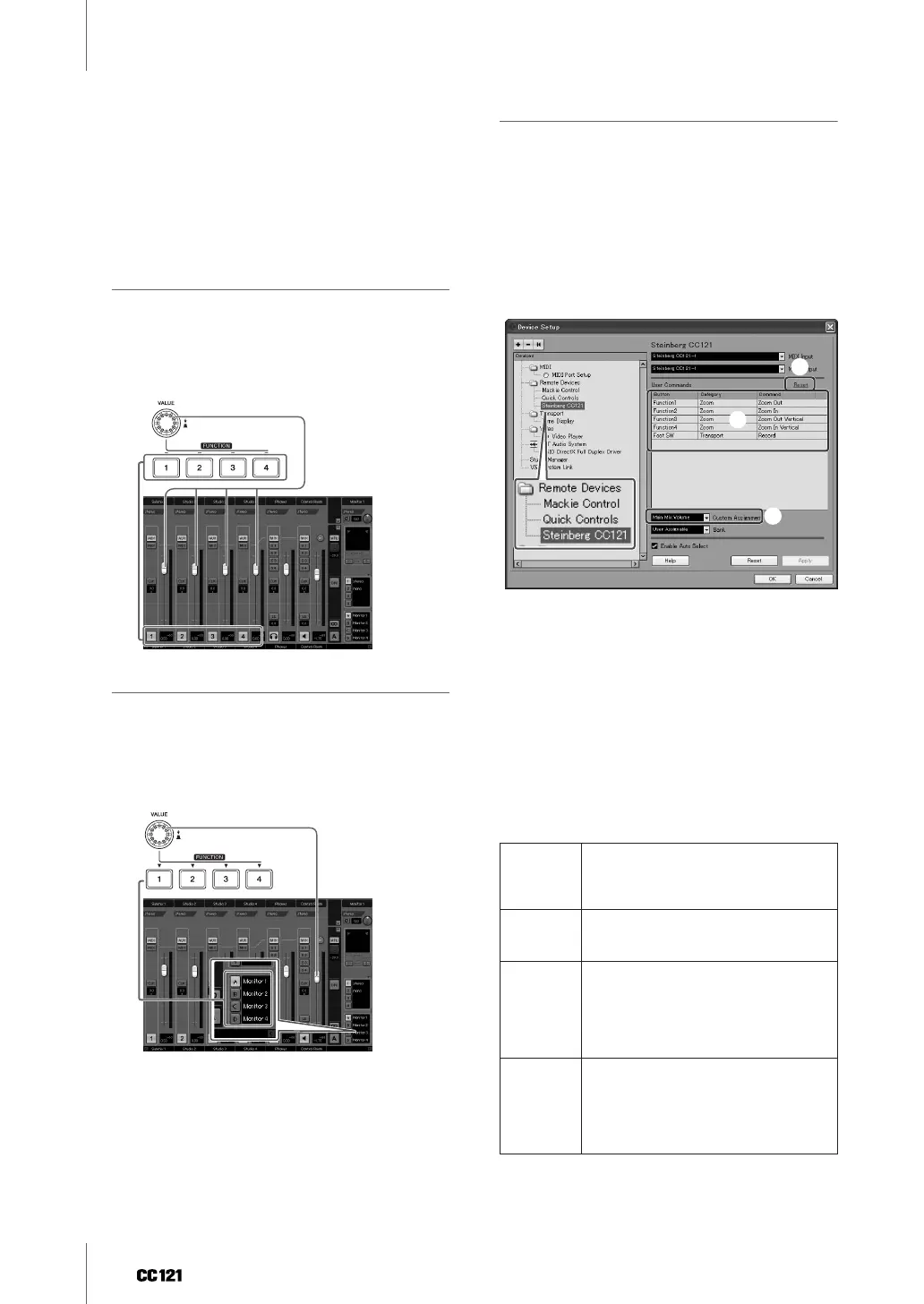
When “Studio Control” is selected:
You can select the desired studio (created on the VST
Connections window) of the Control Room by press-
ing one of the FUNCTION [1] - [4] buttons then adjust
the output level by rotating the VALUE knob. Pressing
the VALUE knob will turn the Studio on or off.
When “Monitor Control” is selected:
You can select the desired Monitor (created on the
VST Connections window) by pressing one of the
FUNCTION [1] - [4] buttons then adjust the monitor
output level by rotating the VALUE knob. Pressing
the VALUE knob will turn the Control Room’s output
on or off.
When “User Assignable” is selected:
You can freely assign desired parameters to the
VALUE knob, FUNCTION [1] - [4] buttons and foot
switch connected to the FOOT SW jack (page 20).
The parameter assignment can be performed in the
Device Setup window (called up via [Device
Setup...] under the [Devices] menu). After selecting
“Steinberg CC121” under “Remote Devices” in the
Devices box then selecting “User Assignable,” set
the following parameters.
1 User Commands
Select the desired function for the FUNCTION [1] -
[4] buttons (“Fnuction1” - “Function4”) and foot
switch connected to the FOOT SW jack by clicking
the “Category” column and “Command” column.
2 Reset
Resets all settings of “User Commands” (1) to
default setting.
3 Custom Assignment
Set the desired function to the VALUE knob. The fol-
lowing four values can be set.
Metronome
Level:
Rotating the VALUE knob adjusts the
output level of metronome sound.
Pressing the VALUE knob switches the
metronome sound on/off.
Main Mix
Volume:
Rotating the VALUE knob adjusts the
output level of main output. Pressing the
VALUE knob switches the mute on/off.
CR
Volume:
Rotating the VALUE knob adjusts the
Monitor output level of the Control Room
Mixer. Pressing the VALUE knob
alternately enables/disables the Monitor
output. This value is available only for
owners of Cubase 4.5 or later.
CR
Phones:
Rotating the VALUE knob adjusts the
Phones output level of the Control Room
Mixer. Pressing the VALUE knob
alternately enables/disables the Phones
output. This value is available only for
owners of Cubase 4.5 or later.
3
1
2


 To Next Page