Panel Controls for the Software Programs
UR824 Operation Manual 12
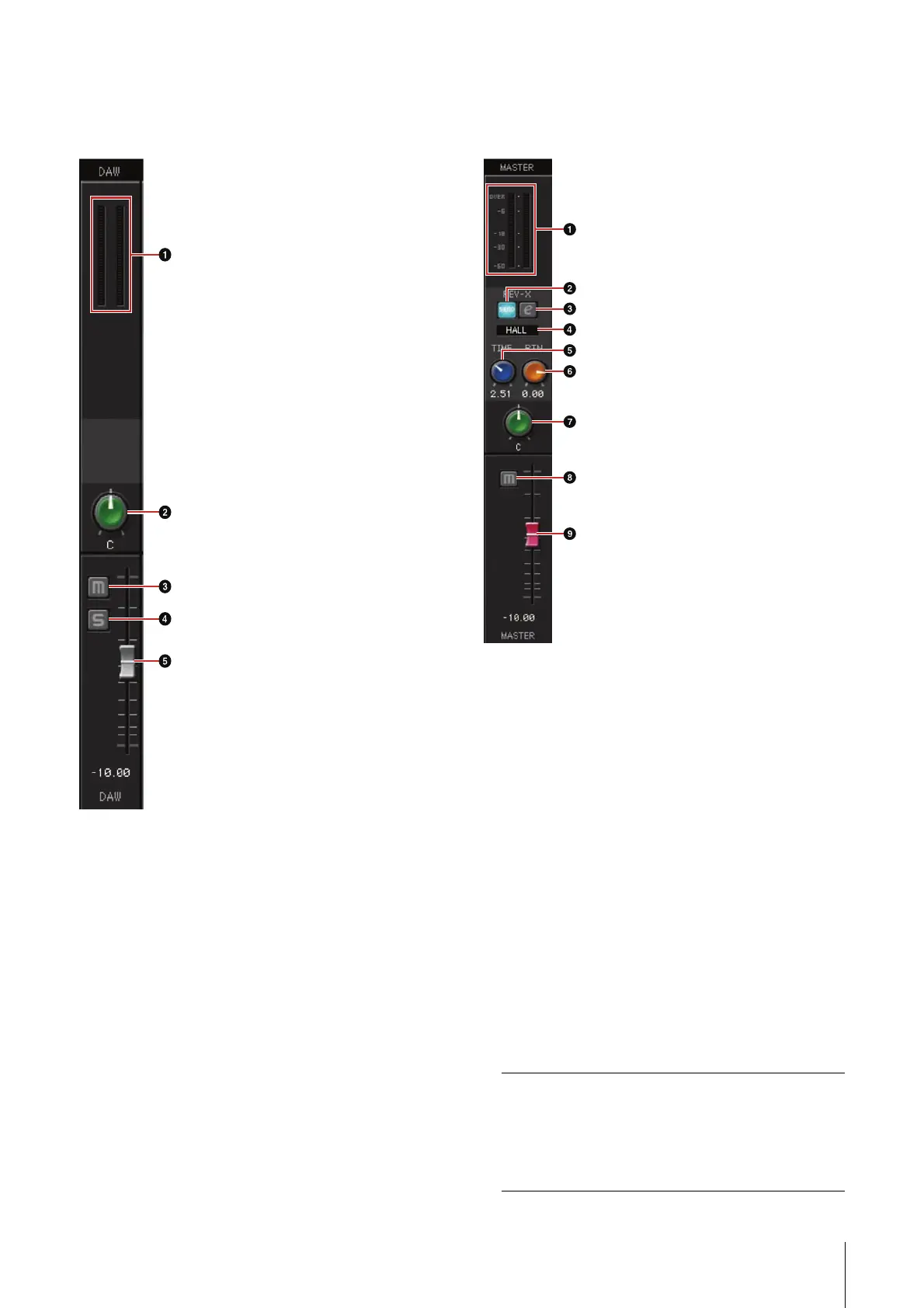
DAW Area
This is the area for configuring the DAW channel
settings.
1 Level Meter
Indicates the signal level.
2 Pan
Adjusts the pan.
Range: L16 – C – R16
3 Mute
Turns the mute on (lit) and off (dark).
4 Solo
Turns the solo on (lit) and off (dark).
5 Fader
Adjusts the signal level.
Range: -∞ dB – +6.00 dB
Master Area
This is the area for configuring the master channel
settings.
1 Level Meter
Indicates the signal level.
2 REV-X Send On/Off
Turns the REV-X on (lit) and off (dark).
You can turn this on for one of MIX 1–4.
3 REV-X Edit
Opens (lit) and closes (dark) the “REV-X” (page
22) setup window.
4 REV-X Type
Selects the REV-X type.
Option: Hall, Room, Plate
5 REV-X Time
Adjusts the reverb time of the REV-X. This
parameter links to Room Size. The adjustable
range varies depending on the REV-X type.
REV-X type Range
Hall 0.103 sec – 31.0 sec
Room 0.152 sec – 45.3 sec
Plate 0.176 sec – 52.0 sec





 To Next Page