Steljes Audio . MS2 User Guide 7
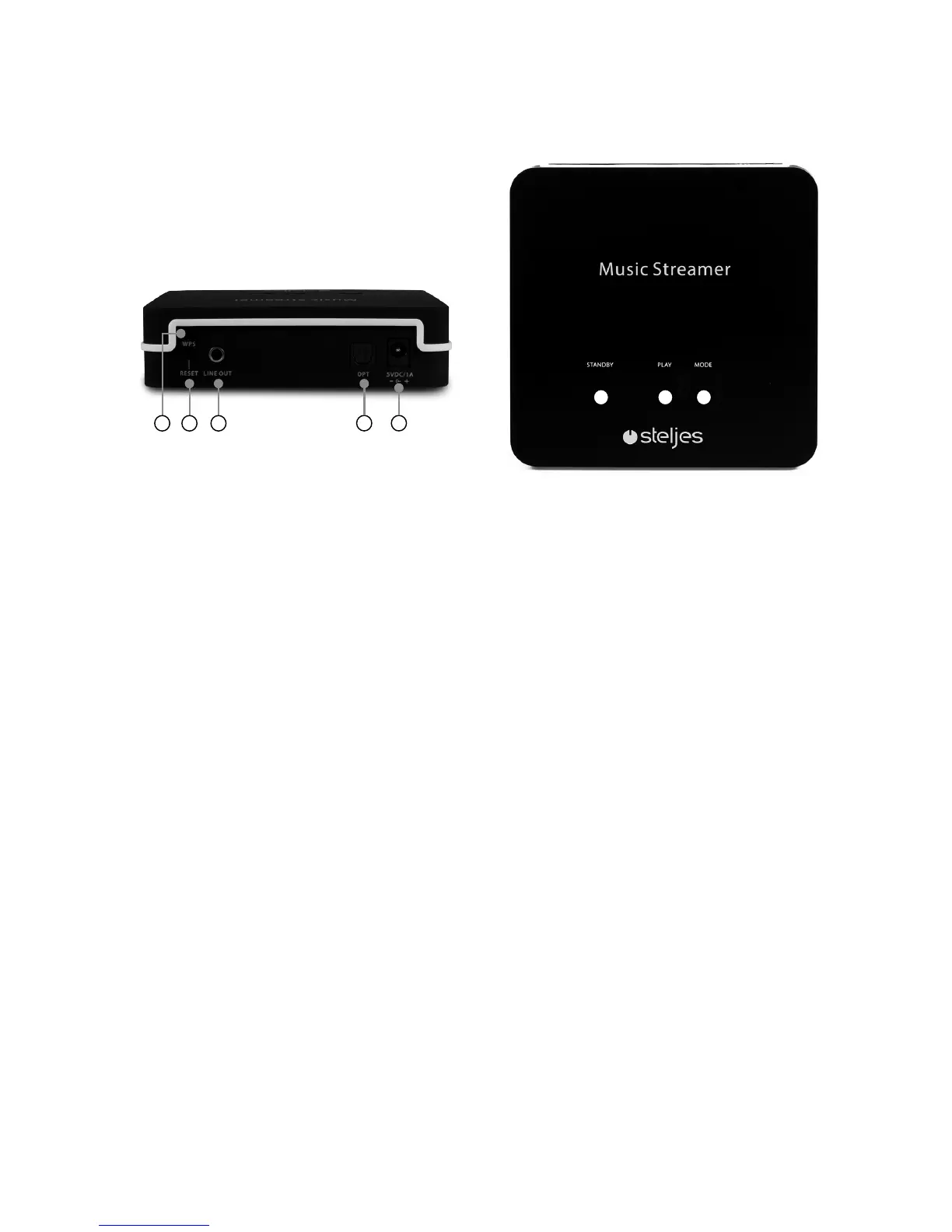
1 2 3
6 7
549
1. STANDBY
Press to power on and once again to
return to standby.
2. PLAY/PAUSE
When playing , briefly press to initiate
playback. Press during playback to
Pause playback and press again to
resume playback.
3. MODE
Press to select Internet radio, Spotify
connect, Music player, Bluetooth modes
playback.
4. RESET
Press the ”RESET” button for 5 seconds
to factory reset the MS2.
5. LINE OUT for Stereo
3.5mm stereo output to be connected
to your existing amplifier or powered
speakers which have a 3.5mm stereo
input.
6. SPDIF OPTICAL Output
Connect to your speaker or amplifier
or other audio equipment which has an
OPTICAL input
7. DC Power input
Connect to the supplied 5V DC 1A
power adaptor.
8. LED
There are various LED states, outlined
below:
• Solid Green – Spotify/ DMR/
Bluetooth playback mode
• Solid White – Music player Playback
Mode
• Solid Blue – Internet radio playback
mode.
• Fast Flashing Green - Error, please
wait or reset the MS2
9. WPS
Press to pair to the network.
CONTROL



 To Next Page