2
UNPACKINGANDINITIALSETUP
RemoveIZONVIEWfromthebox.Keeporiginalpackaging
forthewarrantyperiodandthenproperlydispose.(Please
recycle).
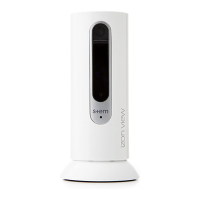
AttachIZONVIEWtothemagneticbaseandplaceona
levelsurface,andpivotthecameratothepreferred
viewingposition.Besuretoread,review,andfollowthe
precautionslistedintheenclosedStemwarrantyand
productsafetyinformation.
RemoveUSBcableandpoweradapterfromthe
packaging.Connectthemini-USBendoftheincluded
cabletotheportontherearofIZONVIEWlabeled
“POWER”.Connectthefull-sizeUSBendofthecabletothe
USBportonthepoweradapter.
Important:
Whensettingupmultiplecamerasatonce,
donotplug-inthesecondcamerauntilsetupiscomplete
forthefirstcamera.
Plugthepoweradapterintoawalloutlet.ThesmallLED
displayonthefrontofIZONVIEWshouldglowanamber
colortoindicatethatitispowered.
UsingacompatibleiPhone,iPad,oriPodtouch,download
thefreeIZONAppfromtheAppStore.Onceyour
downloadiscomplete,opentheIZONAppandfollowthe
simpleinstructionstocompletesetupandbeginusing
yournewIZONVIEWapp-controlledcamera.
1.
2.
3.
4.
5.
Warning:CamerasshouldonlybeconnectedtoaWi-Fi
networkconfiguredwithfirewallprotectionand
wirelesssecurityenabled.


 To Next Page