AV HEADPHONE
The AV Headphone profi le enables users to use a Bluetooth
enabled headphone to listen high-quality stereo music played in
a computer.
TRANSFERING AUDIO FILES, PICTURES AND /
OR VIDEOS FROM A MOBILE (V3) TO COMPUTER
AND VICE-VERSA
If you want to send or receive pictures, sounds and/or videos
from your mobile to the computer or vice-versa, follow these
steps:
1.- Choose the device that you want to use.
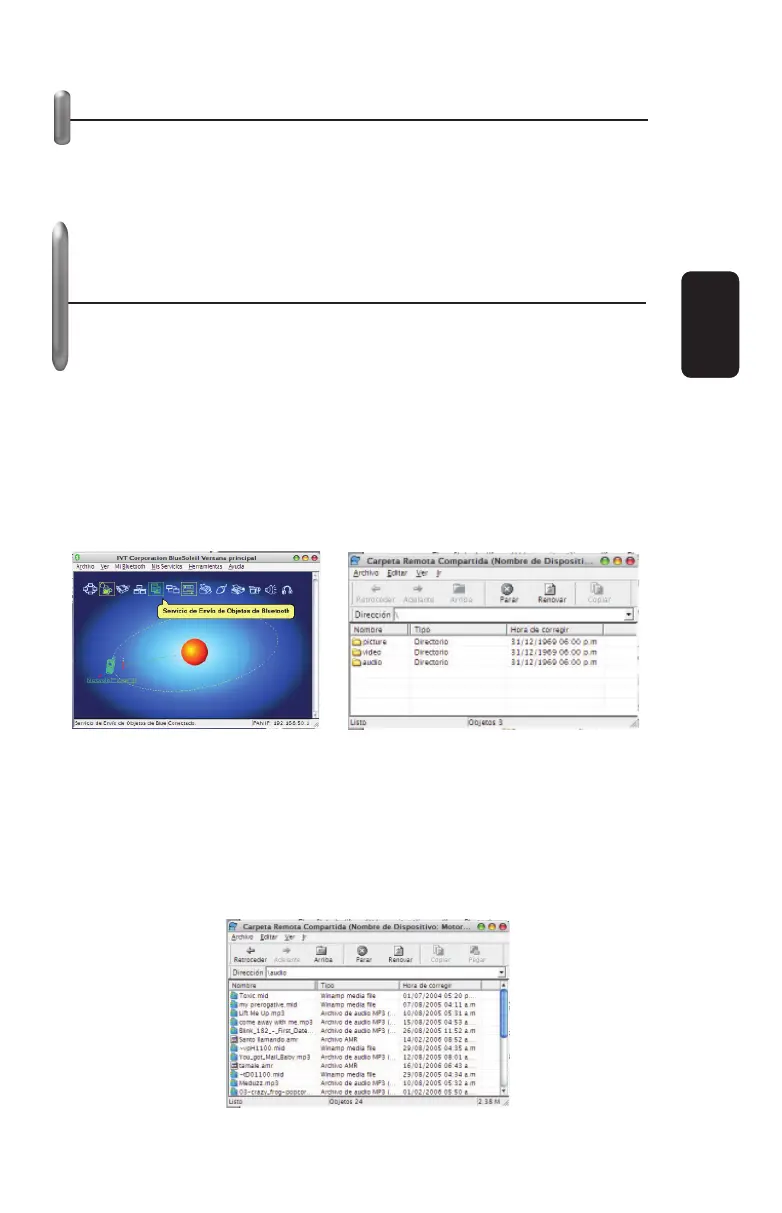
2.- On Main BlueSolail window, choose Bluetooth File Transfer
Service.
3.- Then, the window Remote Shared Folder displays. You can
see some folders in it: Picture, Video and Audio and they
contained fi les from your mobile.
4.- Open the folder where you want to transfer the fi les.
5.- To begin the transfer, choose the desired fi le, drag and drop
to the end destiny (Windows Desktop or a specifi c folder).
6.- To transfer a fi le from the computer to the mobile, follow the
same procedure: choose the desired fi le, drag and drop to the
corresponding folder on the mobile.
ENGLISH
ENGLISH-6


 To Next Page