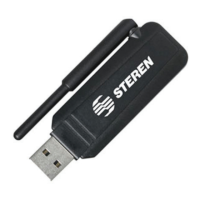
Before using your new Bluetooth Adaptor, please read this
instruction manual to prevent any damage. Put it away in a safe
place for future references.
PRODUCT CHARACTERISTICS
Power is supplied by the USB port
Available for Windows 98 SE, Me, 2000 and XP
20 meters range of functionality
Point to multipoint connections
Compatible with Desktop PCs and Laptops
SYSTEM REQUIREMENTS
CPU with 200 MHz or higher
Internal Memory: 64 Mb or higher, 128 Mb recommended
1 available USB port (standard 1.1)
Operating System: Windows 98 SE, Me, 2000 or XP
Your Bluetooth adaptor allows you to do the next actions:
File transfer
Accessing to Dial-Up nets
Interchange PIM data
Send or receive Business Cards
Synchronize mobile phone data (GSM)
Connect to Bluetooth printers
Some of the features are not available for all the equipments
with Bluetooth technology, please refers to the device user’s
manual to know what type of features are available.
DRIVER INSTALLATION
Attention:
Install the drivers before to plug the Bluetooth Adaptor into
the computer.
1.- Place the CD installation into the CD-ROM drive.
2.- Search Setup.exe fi le and run it.
3.- Choose the desired language on the next window and press
OK to continue.
4.- A Welcome message displays on the screen, press Next to
continue.
•
•
•
•
•
•
•
•
•
•
•
ENGLISH
ENGLISH-2
Before usin
our new Bluetooth Adaptor, please read this
instruction manual to prevent an
dama
e. Put it awa
in a sa
e
place for future references.
ome of the features are not available for all the e
ui
ments
ith Bluetooth technolo
, please refers to the device user’
anual to know what t
pe of features are available
ttention
nstall the drivers before to plu
the Bluetooth Adaptor into
e com
uter


 To Next Page