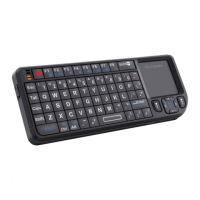
Before using your new USB Numeric Keyboard, please read this
instruction manual to prevent any damage. Put it away in a safe
place for future references.
IMPORTANT
Do not expose to extreme temperatures.
Clean only with a soft, dry cloth.
Do not place heavy objects on the keyboard.
CHARACTERISTICS
Plug & Play
Ultra slim and light design, great for the trips
Compatible with USB 1.1 or higher
Compatible with laptops and desktop computers
High quality membrane key switch, 18 keys keypad
USB hub (2 additional ports)
To start to use your new USB numeric keypad, follow these
steps:
1.- Locates an available USB port on the computer.
2.- Plug the USB cable from the keypad to the computer. The
system will detect the new hardware, after few seconds, the
device will be ready to use it.
3.- If you want to use the numeric keys, press Num Lock button.
When this function is enabled, the indicator LED is on.
4.- If you want to use the shift arrows, press Num Lock. The LED
turns off.
5.- The keypad includes a button ( ) to delete the previous
character, every time it is pressed.
6.- At the same time, you can connect other USB devices
through the keypad, just plug them into the USB connectors.
7.- To stop to use the keypad, unplug the USB cable from the
computer.
SPECIFICATIONS
Input: 5 V 250mA
Dimensions: 85 x 125 x 10 mm
Weight: 130 g
Product design and specifi cations are subject to change,
without notice.
•
•
•
•
•
•
ENGLISH
ENGLISH-2
Before usin
our new USB Numeric Ke
board, please read this
instruction manual to prevent an
dama
e. Put it awa
in a sa
e
place for future references.
←
roduct desi
n and specifi cations are sub
ect to chan
e,
ithout notice


 To Next Page
 Loading...