EasyManua.ls Logo

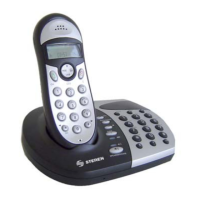
Steren TEL-2480 - User Manual

Steren TEL-2480
17 pages
Print Icon
To Next Page IconTo Next Page
Loading...
Product / Producto: 2,4GHZ
CORDLESS PHONE SYSTEM WITH
ANSWERING MACHINE / TELÉFONO
INALÁMBRICO DE 2,4GHZ CON
CONTESTADORA
Model / Modelo: TEL-2480
Brand / Marca: Steren
CONDICIONES
1. Para hacer efectiva esta garantía se requiere: La presentación de esta póliza y del producto, en el lugar en donde fue adquirido o en ELECTRONICA STEREN S.A. DE C.V.
2. ELECTRONICA STEREN S.A. DE C.V. se compromete a reparar el producto en caso de estar defectuoso sin ningún cargo al consumidor.
3. El tiempo de reparación en ningún caso será mayor a 30 días contados a partir de la recepción del producto en cualquiera de los sitios en donde pueda hacerse efectiva la
garantía.
4. El lugar donde puede adquirir partes, componentes, consumibles y accesorios, así como hacer válida esta garantía es: En cualquiera de las direcciones arriba mencionadas.
ESTA GARANTIA NO ES VALIDA EN LOS SIGUIENTES CASOS:
1. Cuando el producto ha sido utilizado en condiciones distintas a las normales.
2. Cuando el producto no ha sido operado de acuerdo con el instructivo de uso.
3. Cuando el producto ha sido alterado o reparado por personas no autorizadas por ELECTRONICA STEREN S.A. DE C.V.
Nota: El consumidor podrá solicitar que se haga efectiva la garantía ante la propia casa comercial, donde adquirió el producto. Si la presente garantía se extraviara, el
consumidor puede recurrir a su proovedor para que le expida otra póliza de garantía, previa presentación de la nota de compra o factura respectiva.
DATOS DEL DISTRIBUIDOR
DISTRIBUTION / NOMBRE / DISTRIBUIDOR:
ADDRESS / DOMICILIO:
PRODUCT / PRODUCTO: BRAND / MARCA:
MODEL / MODELO: SERIAL NUMBER / No. DE SERIE:
DATE OF DELIVERY / FECHA DE ENTREGA:
Call Center / Centro de Atención a Clientes
del Interior 01 800 500 9000
Mexico City / Cd. de México: 53 54 22 90
Warranty
CONDITIONS:
1. This warranty card with all the required information, the invoice or purchase ticket, the packing or package, must be presented with the product when warranty
service is required.
2. If product hasn’t exceed warranty period, the company will repair it free of charge including transportation charges.
3. The repairing time will not exceed 30 natural days, from the day the claim was received.
4. Steren sells parts, components, consumables and accessories to customer, as well as warranty service, at any of the following addresses:
THIS WARRANTY IS VOID ON THE NEXT CASES:
If the product has been damage by an accident, acts of God, mishandling, leaky batteries, failure to follow enclosed instructions, improper repair by unauthorized
personnel, improper safe keeping.
Notes:
a) The customer can also claim the warranty service on the purchase establishment.
b) If you lose the warranty card, we can reissue it just showing the invoice or purchase ticket.
Póliza de Garantía
This Steren product is guaranteed under
normal usage against defects in
workmanship and materials to the original
purchaser for one year from the date of
purchase.
Garantiza este producto por el término de
un año en todas sus partes y mano de obra
contra cualquier defecto de fabricación y
funcionamiento, a partir de la fecha de
entrega.
V1206

Other manuals for Steren TEL-2480

Questions and Answers

  • M
    Melissa JohnsonAug 20, 2025
    How to fix Steren TEL-2480 Cordless Telephone when no calls are made?
    • P
      patrickperryAug 20, 2025
      To resolve issues with making or receiving calls on your Steren Cordless Telephone, verify that the power adapter is properly connected. Also, ensure the handset batteries have sufficient charge by placing it on the base for recharging if needed. If the issue persists, disconnect the power adapter from the outlet, wait a few seconds, and then reconnect it.
  • C
    carsonmichaelAug 22, 2025
    Why do the batteries of my Steren TEL-2480 last only one or two hours?
    • C
      cabrerakyleAug 22, 2025
      If your Steren Cordless Telephone batteries are only lasting an hour or two, it could be due to several reasons. When charging the phone for the first time, allow it to charge for 15 hours to maximize battery performance. If you didn't do this initially, it could reduce the battery's charge capacity. Other possible solutions include replacing the batteries, cleaning the battery charging contacts with a dry cloth, and checking the connections between the base and the power outlet.
  • E
    Edward MillerAug 25, 2025
    What to do if Steren Cordless Telephone ringer doesn't work?
    • L
      Lorraine YangAug 25, 2025
      If you cannot hear the ringer on your Steren Cordless Telephone, ensure that the power adapter is correctly connected. Also, check that the volume level is not set to 0.
  • G
    Gabrielle NicholsAug 26, 2025
    How to eliminate noise during calls on Steren Cordless Telephone?
    • D
      dnormanAug 26, 2025
      To reduce noise or interference during calls on your Steren Cordless Telephone, try repositioning the handset. Also, make sure that the base unit is not located near other electronic devices.
  • M
    Maureen PerezAug 28, 2025
    Why is my Steren TEL-2480 Cordless Telephone answering machine not recording messages?
    • C
      Casey FischerAug 28, 2025
      If your answering machine is not recording messages, check the base display for the word 'Fu,' which indicates that you need to delete some messages to free up space. Also, make sure the answering machine is turned on and that message 1 (OGM1) is selected; message recording is disabled when message 2 (OGM2) is selected.
  • B
    Bobby FlynnAug 30, 2025
    Why does my Steren Cordless Telephone have a busy tone when trying to make a call?
    • D
      Dennis RodriguezAug 30, 2025
      If you hear a busy tone when attempting to make a call on your Steren Cordless Telephone, and you have multiple handsets, verify that another handset is not already in use for a call.
  • W
    William BarnesAug 31, 2025
    Why Steren TEL-2480 cannot make phone calls?
    • D
      Daniel ChambersSep 1, 2025
      If your Steren Cordless Telephone cannot make phone calls, check that the Key Block function and the Phone Call Restriction are not activated.
  • K
    Kathryn TaylorSep 2, 2025
    Why is caller ID not working on my Steren TEL-2480?
    • D
      Danielle SingletonSep 2, 2025
      If the caller ID is not functioning on your Steren Cordless Telephone, ensure that you are subscribed to the Caller ID service. Also, the incoming number might be private or international.
  • S
    spencerpatriciaSep 4, 2025
    What to do if my Steren Cordless Telephone says to move the handset closer to the base?
    • J
      jeffrey34Sep 4, 2025
      If your Steren Cordless Telephone displays a message to move the handset closer to the base, even if the digits are visible on the screen, try placing the handset nearer to the base. Also, ensure that the base is not positioned near any electrical devices and that the Phone Call Restriction is not activated.
  • K
    Kevin FrostSep 6, 2025
    How to fix Steren TEL-2480 Cordless Telephone when call transfer doesn't work?
    • T
      Tara RodriguezSep 6, 2025
      If you are unable to transfer a call on your Steren Cordless Telephone, make sure that the handset you are trying to transfer the call to is within the base's coverage range. Also, verify that you are dialing the correct handset number.

Steren TEL-2480 Specifications

General IconGeneral
BrandSteren
ModelTEL-2480
CategoryCordless Telephone
LanguageEnglish

Related product manuals