
 Need help?
Do you have a question about the Sterling HARMONY H224 and is the answer not in the manual?
Details combination connectors for XLR/TRS microphone and line level inputs.
Explains 48V phantom power activation and usage warnings.
Explains the USB Type-C port for computer connectivity using USB 2.0.
Six-segment LED meters for monitoring input and output signal levels.
Controls for Gain, PAD, High-Pass Filter, and Master Volume/Mute.
Two 1/4" unbalanced instrument inputs optimized for guitars and basses.
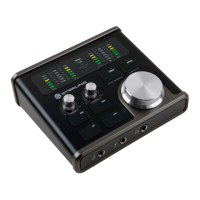
The Sterling Harmony H224 is a professional USB audio interface designed for studio-quality recording, offering a compact and portable solution for routing high-quality audio to and from a computer. It features Class-A discrete microphone preamplifiers, similar to those found in professional recording consoles, ensuring premium amplification with very low distortion, low self-noise, and clarity.
The Harmony H224 serves as a central hub for audio input and output in a recording setup. It connects to a computer via a USB Type-C port, utilizing a USB 2.0 protocol, and is compatible with both macOS and Microsoft Windows operating systems. The device is equipped with two combination input connectors on the back panel, allowing for both XLR and ¼” TRS cables. These inputs are designed to accommodate dynamic, condenser, and ribbon microphones, as well as line-level sources. Each input channel has a dedicated MIC/LINE input switch to control the expected signal type for the preamplifier.
For phantom power, the H224 provides 48V for microphone inputs, activated by a dedicated button. An LED on the display lens illuminates when phantom power is active. The interface also includes two dedicated instrument-level inputs on the front panel with ¼” female unbalanced connectors, optimized for guitars, basses, and other unbalanced instrument sources like synthesizers and drum machines. These front-panel inputs override the rear MIC/LINE inputs, offering a plug-and-play experience.
The H224 features four balanced line-level analog output connectors, all using ¼” TRS output connectors, capable of feeding studio monitors, headphone amplifiers, and outboard processing equipment. A single headphone output connector is located on the front panel for monitoring audio.
MIDI I/O connections are also provided, with a single 5-pin DIN style MIDI Input and MIDI Output port, allowing the H224 to act as a MIDI interface for connecting digital music instruments, controllers, and peripherals. A MIDI LED on the display lens indicates when MIDI data is being received or transmitted.
The top panel of the Harmony H224 provides intuitive controls and visual feedback for monitoring and adjusting audio. Each input channel has six-segment LED meters to monitor input signals before they are transmitted to recording software. A red ‘0dB’ or ‘Clipping’ LED indicates when the input signal reaches 0d BFS, signaling potential overload and distortion. Input gain controls offer 60dB of variable gain for microphones (0db to +60dB) and line-level sources (-25db to +35dB).
PAD switches are available for each input channel, providing -10dB attenuation of the incoming audio signal before it reaches the Analog-to-Digital converter (ADC). These are useful for very loud sound sources to prevent clipping and distortion, and are engineered to maintain a good signal-to-noise ratio. High-Pass Filter switches allow for low-frequency reduction, cutting signals by -12dB per octave starting at 100Hz and below.
Output meters, also six-segment LED meters, monitor playback/output signals from the computer or digital audio workstation (DAW), displaying signal levels reproduced from software applications.
A large Master Control Knob serves as the primary control for Volume and Mute. This encoder can be turned continuously in either direction and features a 'Push' function to mute or unmute an output path. Only one output path (Outputs 1+2, Headphone Output, or Outputs 3+4) can be actively controlled by the Master Knob at a given time.
The DIRECT switch enables direct monitoring of input signals with playback streams from the computer and DAW, eliminating latency. This button can also be configured to output Mono or Stereo panning for direct monitoring by pressing and holding it for two seconds.
The OUTPUT switch allows users to cycle through and select which output path (Outputs 1+2, Headphone Output, or Outputs 3+4) is controlled by the Master Knob for volume and mute adjustments. The selected output path is indicated by illumination of the OUTPUT switch and corresponding indicators on the display lens. The Headphone output can also be switched to monitor Outputs 3+4 by pressing and holding the OUTPUT switch for two seconds.
The H224 requires software downloads for full functionality, including drivers and a control panel application. For macOS, the H224 is a class-compliant Core Audio device, requiring no driver installation, but a GUI Control Panel is available for hardware control and sample rate settings. For Windows OS, a driver and control panel installation is necessary, which includes WDM and ASIO drivers. The control panel application allows users to store hardware settings, including PAD, High-Pass Filter, Direct Monitor, Output Path, Volume, and Mute settings, and offers options for "Always On Top," "Run On System Startup," "Restore Defaults," and "Sample Rate" selection.
The H224 is designed for robust performance in recording environments. While specific maintenance features are not detailed, the software control panel offers "Restore Defaults" functionality, which erases memory functions and restarts the control panel in its factory default configuration. This can be useful for troubleshooting or resetting settings. Regular software updates are recommended, with links provided in the control panel's "About" section, to ensure optimal performance and compatibility. The device's robust construction and Class-A discrete circuitry contribute to its longevity and consistent audio quality.
 General
| Type | Condenser |
|---|---|
| Polar Pattern | Cardioid |
| Frequency Response | 20Hz-20kHz |
| Power Requirements | 48V Phantom Power |
| Weight | 300g |
| Self Noise | 16dB A-weighted |
| S/N Ratio | 78dB |
| Connector | XLR |

 To Next Page