EasyManua.ls Logo

STERNO HOME GL40736 - User Manual

STERNO HOME GL40736
2 pages
Print Icon
To Next Page IconTo Next Page
Loading...
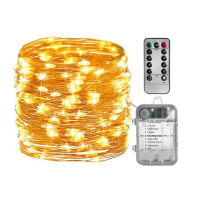
Indoor - Outdoor Stringlight
5021-GL40736-EN_120618
CUSTOMER SERVICE
1-888-867-6095 • customerservice@sternohome.com • www.sternohome.com
Ill. 1
READ, FOLLOW AND SAVE THESE INSTRUCTIONS
MODEL #GL40736
BATTERY INSTALLATION (ill. 1)
Your stringlight requires three (3) AA alkaline 1.5V batteries (not included) to achieve
maximum battery life.
Clean the battery contacts and also those of the device prior to battery installation.
1. To open battery compartment, push clip up.
2. Insert three (3) AA alkaline batteries into the compartment in the proper polarity as shown.
3. Close the battery compartment.
HOW TO OPERATE THE STRINGLIGHT USING BATTERY BOX (ill. 2)
Press the button on the battery box to select from 8 pre-programmed sequences.
HOW TO OPERATE THE STRINGLIGHT AND TIMER USING
REMOTE CONTROL (ill. 3)
“TIMER” MODE”
Push “TIMER” button to activate the timer. The stringlight will automatically turn off after
6 hours.
If the ON or OFF button is pressed, the timer function will be reset and the lights will
not turn on at the desired time. To re-start the timer function, press the timer button at the
desired time to re-initiate this setting.
Note: If the “ON” or “OFF” button on either remote or battery box is pressed, the timer
function will be reset and the lights will not turn on at the desired time.
“ON/OFF” MODE
1. Push the “ON” button to turn stringlight on.
2. Choose a sequence mode by pressing button 1 to 8.
3. Push the “+” or “–” button to adjust the light intensity
4. Push the “OFF” button to turn stringlight off.
FIND A LOCATION FOR THE BATTERY BOX (ill. 4)
Note: Do not place the controller directly on the ground as water could penetrate if it is
soaking in water.
1. The controller is designed for outdoor use and is weather resistant.
2. Make sure that the controller can be installed in a location that will allow a direct
line of sight with the remote to operate properly.
3. Any objects between the front of the control box and the remote control will
reduce the range.
4. Mount the controller in the best location and do not place it close to the electrical outlet.
Button
Ill. 3
Ill. 4
Ill. 2
a
Battery box
8 METRES/26 FEET
MAXIMUM
4 MÈTRES
MAXIMUM
4 METROS
MÁXIMO
Bushes
r
Battery box

Question and Answer IconNeed help?

Do you have a question about the STERNO HOME GL40736 and is the answer not in the manual?

Summary

Battery Installation

Stringlight Operation

Timer Mode

Activates a 6-hour automatic shut-off timer for the stringlight.

On;Off Mode

Controls turning the stringlight on/off, selecting modes, and adjusting brightness.

Operation via Battery Box

Location and Placement

Remote Control Battery Replacement

Troubleshooting

Maintenance and Care

Cautions and Compliance

Overview

This document describes the Sterno Home Model #GL40736 Indoor - Outdoor Stringlight, a battery-operated string light system with remote control functionality.

Function Description:

The Sterno Home GL40736 is a decorative string light designed for both indoor and outdoor use. It provides various lighting modes and intensity adjustments, controlled either directly from a battery box or via a remote control. The system includes a timer function for automatic operation.

Important Technical Specifications:

  • Power Source (Stringlight): Requires three (3) AA alkaline 1.5V batteries (not included).
  • Power Source (Remote Control): Operates with one coin cell battery CR2025 (included) or CR2032.
  • Stringlight Length: 8 meters / 26 feet maximum.
  • Controller: Designed for outdoor use and is weather resistant.
  • Battery Type Compatibility: Do not mix Alkaline, Standard (Carbon-Zinc), or Rechargeable (Nickel Cadmium or Nickel Metal Hydride) batteries.
  • FCC/ICES Compliance: This device complies with Part 15 of the FCC rules and Canadian ICES-005, indicating it meets standards for digital devices and is subject to conditions regarding harmful interference.

Usage Features:

Battery Installation (Stringlight - Ill. 1):

  1. Push the clip up to open the battery compartment.
  2. Insert three (3) AA alkaline batteries, ensuring correct polarity.
  3. Close the battery compartment.
  • Note: Clean battery contacts on both the stringlight and batteries prior to installation for maximum battery life.

Operating with Battery Box (Ill. 2):

  • Press the button on the battery box to cycle through 8 pre-programmed lighting sequences.

Operating with Remote Control (Ill. 3):

  • "TIMER" MODE:
    • Press the "TIMER" button to activate the timer. The stringlight will automatically turn off after 6 hours.
    • If the ON or OFF button is pressed, the timer function will be reset. To re-initiate, press the "TIMER" button at the desired time.
    • Note: Pressing ON or OFF on either the remote or battery box will reset the timer function.
  • "ON/OFF" MODE:
    • Press the "ON" button to turn the stringlight on.
    • Select a sequence mode (1 to 8) by pressing the corresponding number button on the remote.
        1. Combination
        1. In wave
        1. Sequential
        1. Slo glo
        1. Chasing/Flash
        1. Slow fade
        1. Twinkle/Flash
        1. Steady on
        1. Off
    • Adjust light intensity using the "+" or "-" buttons.
    • Press the "OFF" button to turn the stringlight off.

Remote Control Battery Replacement (Ill. 5):

  1. Push the tab while pulling out the battery compartment.
  2. Remove the used CR2025 or CR2032 3V Lithium coin cell battery.
  3. Clean battery contacts and insert a new battery, ensuring correct polarity.
  4. Close the battery door.
  • Note: If the remote range is reduced, replacing the battery should improve it.

Placement of Battery Box (Ill. 4):

  • Outdoor Use: The controller is weather resistant.
  • Avoid Ground Placement: Do not place the controller directly on the ground as water could penetrate it if soaking in water.
  • Remote Line of Sight: Install the controller in a location that allows a direct line of sight with the remote for proper operation. Objects between the control box and remote will reduce the range.
  • Electrical Outlets: Do not place the controller close to electrical outlets.
  • Installation: Mount the controller in the best location.

Important Battery Information:

  • Batteries should be recycled according to local guidelines.
  • Do not dispose of batteries in municipal waste or fire.
  • Recycling helps preserve the environment.
  • This product contains a button battery; if swallowed, seek immediate medical attention as it can cause severe injury or death within 2 hours.
  • Remove batteries from equipment not in use for extended periods.
  • Failure to insert batteries with correct polarity may shorten battery life or cause leaks.
  • Always replace the entire set of batteries at once; do not mix old and new, or different types.
  • Always purchase the correct size and grade of battery.
  • Clean battery contacts prior to installation.
  • Ensure correct polarity (+ and -).
  • Remove used batteries promptly.
  • This product is for decorative use only, not a toy.

Maintenance Features:

Cleaning:

  • To clean, use a damp soft cloth.

Troubleshooting (All lights fail to work):

  • Check that the power is on.
  • Change the remote battery.
  • Clean the front of the controller.

General Care:

  • Avoid contact with standing water and protect from extreme weather.
  • Store indoors when not in use to increase lifespan.
  • Replacement parts can be ordered using the fixture model number and part's name.

FCC/ICES Compliance Notes:

  • This device may not cause harmful interference and must accept any interference received, including undesired operation.
  • Changes or modifications not expressly approved by the party responsible for compliance could void the user's authority to operate the equipment.
  • If interference occurs, try reorienting the receiving antenna, increasing separation between equipment and receiver, connecting equipment to a different circuit, or consulting a dealer/radio/TV technician.

STERNO HOME GL40736 Specifications

General IconGeneral
BrandSTERNO HOME
ModelGL40736
CategoryLighting Equipment
LanguageEnglish

Related product manuals