EasyManua.ls Logo

StGuchi SGDL TG10 - User Manual

StGuchi SGDL TG10
2 pages
Print Icon
To Next Page IconTo Next Page
Loading...
Note
Caution
Caution
Caution
Caution
Caution
Read through this manual before use.
Read the manual and then operate all functions. For a right after-sales service, prepare a
product certificate and keep it.
Do not disassemble the machine at random. It may result in failure.
When you disassemble it at your disposal, it may not work normally. If necessary, contact the
customer center.
Don not give the machine any impact or perform remodeling in any case.
Otherwise, it may result in failure and malfunction.
Do use the machine at a place where there is no water or moisture.
It has no waterproof and dustproof function. So, any failure may be caused by short circuit, etc.
Close all holes in the door after installation.
Otherwise, outsiders may enter without permission through a slot for milk throwing or questions.
Keep the machine away from strong inflammable materials like a gas lighter.
Otherwise, it may result in failure and malfunction.
Do not use the machine at any place where there is strong direct sunlight or high
temperature.
Otherwise, it may result in failure and malfunction.
Do not install the machine at any place where it may contact directly with rain or
snow.
Otherwise, it may result in failure and malfunction.
Do not give direct watering to the machine when cleaning.
Otherwise, it may result in failure and malfunction.
When exchanging batteries, replace all of them by new spares.
If new batteries are used together with used ones, their life cannot be guaranteed and the
machine may not work normally.
Use genuine alkaline batteries only.
If rechargeable batteries are used, the machine may not work normally.
1
Safety Notes
* After registration of the password, necessarily open the door and check that
it is normally registered.
1. Open the battery cover in the indoor body, and press Input button one time.
("Beep" sound will occur.)
2. Input the new password. (Up to 3 to 19 digits can be registered.)
3. Press “
” button to complete the registration.
(“ding-dong-dang" sound will occur to inform you of successful input.)
1. Open the battery cover in the indoor body, and press Input button one time.
("Beep" sound will occur.)
2. Two times press “0” button on the digit board in the outdoor body.
3. Press “
” button to complete the deletion.
1. Open the battery cover in the indoor body, and press Input button one time.
("Beep" sound will occur.)
2. Contact each Card/Tag to be registered to the external input part to the
machine. Up to 50 keys can be registered.
3. Press “” button to complete the registration. “Ding-dong-dang” for success.
("Beep" sound for failure.)
3
Name of the parts
4
Password Registering
7
Card/Tag Deleting
(Card/Tag Applied Model)
6
Card/Tag Registering
(Card/Tag Applied Model)
5
Password Changing
- 9V emergency power terminal : In case of battery discharge, you can open the door using a 9V battery.
- Reset function : By pressing reset button through a hole with sharp pin, temporary program error can be solved.
(Pin code dose not change with this action)
- Card/Tag Input part : Contact the Card to the machine to open the door.
- Open/Close button : One-touch button used to open or close the door indoors.
- Manual operating device : Used to open the door manually (available for a fire or other emergences)
- Fire detection sensor : A fire detection sensor to open the door automatically in case of a fire is built in. (60
±5
)
- Dead bolt(keeper) : Indoor fastener of door lock
- Auto lock internal sensor : When auto lock is set, the magnetic sensor to close the door lock automatically is built in.
- Input button : Used to input the password, register and delete the Card.
Outer Body
Indoor Body
- To go to the next stage, perform it before the lamp turns off (within 15 seconds).
- Never fail to register and change the password with the door opened.
- The password is set to “1234” at the factory.
- After installation, necessarily change it before use.
- Register the card/Tag only provided from the manufacturer.
- Rregistering and using Transportation card or Credit card can cause security problem,
you may not receive A/S or compensation for any damages in case of that.
* Register the password with the same method as specified above.
* When the new password is registered, the existing password is automatically deleted.
Thank you for purchasing our product. You must be aware of this manual before use.
- This manual includes the product certificate. It must include the name of installation agent, its contact point,
and the date of installation. Otherwise you cannot receive a right after-sales service.
- The performance and design of this product may be changed for the improvement of quality.
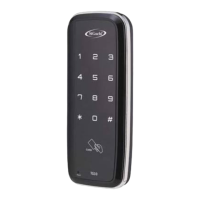
SGDL TG10
• Set and change the password up to 3 to 19 digits • Register Card/Tag up to 50ea
• Fire detection sensor • Auto locking function
• 9V emergency power is supplied. • Alarm sound when forced to open in an abnormal manner
• Burglar and malicious action alarm function
Note for product images used in this manual are for illustrative purposes, and the shape and color of products may vary depending on the model.
Prohibit
Prohibit
Prohibit
Prohibit
Prohibit
When the Card/Tag is deleted, existing registered Card/Tag are completely deleted.
Then, newly register Card/Tag to be used.
DIGITAL DOOR LOCK
2
Components
(Check that the purchased products include components as follows.)
Supplementary Components
(Card/Tag Applied Model)
Seperately purchased components
(Remote control Applied Model)
Card/Tag
Remote control : 1ea
- Register the card/Tag only provided from the manufacturer
- Rregistering and using Transportation card or Credit card can cause security problem,
you may not receive A/S or compensation for any damages in case of that.
Caution
Rubber Magnet
(For single door)
Stopper
(Stopper for door holding)
AA Battery : 4ea
(Alkaline)
Installation DrawingUser Manual Warning Sticker
Outer Body
: 1ea
Indoor Body
: 1ea
Holder Clip Holder
(seperately purchase)
Card/Tag may be changeable in shape & color
Supplementary Components, quantities may vary according
to its access type.
The shape of Remote control may change.
Reset button
9V Emergency
Power Terminal
Password button
Start/Ending button
Card/Tag input part
(Card/Tag Applied Model)
Battery cover
Input Button
Manual Operating
Device
Open/Close button
Dead Bolt (Keeper)
Auto lock internal
sensor
Installation (Glass door lock without fixing plate)
How to change left-side door or right-side door.
1.Open battery cover.
2.Insert screwdriver through a hole.
3.Unscrew the fixed one.
4.Push aside to the direction of .
5.Pull the outer body to the direction of .
6. Turn it 180˚ and fix it again.
Installation Tips!
1. Sprinkling a little water over Glass door help you install easier.
2. According to door condition, Silicone coating around door lock prevent from slipping off.
Push direction.
Question and Answer IconNeed help?

Do you have a question about the StGuchi SGDL TG10 and is the answer not in the manual?

Summary

Safety Notes

General Safety Precautions

Avoid disassembly, impact, moisture, flammable materials, extreme temperatures, and direct water contact.

Battery and Maintenance

Use genuine alkaline batteries, replace all at once, and handle cleaning carefully.

Name of the Parts

Outer Body Components

Identifies key external parts including password button, card/tag input, reset button, and auto lock sensor.

Indoor Body Components

Details internal parts like battery cover, input button, card/tag input, and open/close button.

Password Registering

Step-by-Step Password Setup

Guides on registering a new password, including inputting and confirming with specific sounds.

Password Changing

Updating Existing Password

Instructions for changing the password using the same method as registration.

Card;Tag Registration and Deletion

Registering Card;Tag Keys

Process for registering up to 50 keys by contacting them to the input part.

Deleting Card;Tag Keys

Procedure to delete registered keys, which removes all previously registered keys.

Door Operation

Opening the Door

Methods for opening the door using password or card/tag from outside, and from inside.

Closing the Door

Details on automatic and manual locking procedures for closing the door from inside and outside.

Lock Functions and Settings

Dual Lock Function

Enables an external dual lock feature for enhanced security, preventing indoor opening.

Auto;Manual Lock Setting

Configuration for automatic or manual door locking after closing, with adjustable time.

Alarm and Safety Features

Burglar and Malicious Action Alarm

Triggers an alarm sound if the door is forced open from the outside.

Fire Sensing Function

Automatic door unlocking triggered by a thermal detection sensor at 60°C ±10°C.

Troubleshooting and Maintenance

Trouble Diagnosis

Common issues like password errors, registration failures, and non-locking doors.

Battery Exchange Method

Guidance on replacing batteries, including using spare batteries for emergency power.

Overview

The SG-DL TG10 is a digital door lock designed for enhanced security and convenient access. It integrates various authentication methods, including fingerprint, password, and RFID card, making it suitable for a range of residential and commercial applications.

Function Description

The primary function of the SG-DL TG10 is to provide secure access control to a door. It replaces traditional mechanical locks with electronic authentication methods, offering multiple ways to unlock the door:

  • Fingerprint Recognition: Users can register their fingerprints for quick and secure access. The device features a semiconductor fingerprint sensor for accurate and rapid identification.
  • Password Authentication: A numerical keypad allows users to enter a pre-set password. The lock supports "dummy numbers" to enhance security by confusing onlookers about the actual password.
  • RFID Card/Tag Access: The lock is compatible with RFID cards or tags (e.g., Mifare S50/S70) for contactless entry. Users can register multiple cards or tags.
  • Mechanical Key Override: In case of electronic failure or battery depletion, a traditional mechanical key can be used to unlock the door, serving as an emergency backup.

Beyond basic access, the lock includes several advanced security and convenience features:

  • Automatic/Manual Lock Setting: The lock can be configured to automatically lock after a set period (typically 5 seconds) or to require manual locking.
  • Burglar and Malicious Action Alarm Function: An integrated alarm system triggers if the door is forced open, if an incorrect password/fingerprint/card is entered multiple times consecutively (typically 5 times), or if the lock is tampered with.
  • Fire Sensing Function: A built-in temperature sensor detects abnormally high temperatures (e.g., 60°C ± 5°C) and automatically unlocks the door to facilitate escape in case of fire. It also triggers an alarm.
  • Sound Control Function: Users can adjust the volume of the lock's operational sounds (e.g., keypad tones, voice prompts) or mute them entirely.
  • Low Battery Warning: The lock provides an audible and visual warning when the batteries are running low, prompting users to replace them.
  • External Power Supply: In case of complete battery depletion, an external 9V battery can be temporarily connected to power the lock for emergency access.
  • Passage Mode: This mode allows the door to remain unlocked for continuous access, suitable for periods when frequent entry and exit are required.
  • Double Lock Function (Privacy Mode): An internal button or switch can be activated to prevent external access, effectively locking the door from the inside and disabling all external authentication methods except the mechanical key.

Important Technical Specifications

  • Category: Digital Door Lock
  • Access Mode: Fingerprint, Password, RFID Card, Mechanical Key
  • Material: Zinc Alloy
  • Mortise Type: Mortise B (standard)
  • Operating Temperature: -20°C to 55°C
  • Operating Humidity: 0% to 95% (non-condensing)
  • Outdoor Unit Size (W x H x D): 68 x 310 x 28.5 mm
  • Indoor Unit Size (W x H x D): 68 x 310 x 28.5 mm
  • Power Supply: DC 6V (4 x AA Alkaline Batteries)
  • Emergency Power: DC 9V (External Battery)
  • Static Current: < 50 uA
  • Dynamic Current: < 300 mA
  • Card Frequency: 13.56MHz (Mifare S50/S70)
  • Fingerprint Capacity: Up to 100 fingerprints
  • Password Capacity: 1 password (6-12 digits)
  • Card Capacity: Up to 100 cards
  • Door Thickness: 35-50 mm (standard), with optional accessories for thicker doors (up to 90 mm)
  • Door Gap: 3-10 mm
  • Backset: 60 mm or 70 mm (adjustable)

Usage Features

  • User-Friendly Interface: The lock features a clear numerical keypad and an intuitive display for easy operation and programming. Voice prompts guide users through various settings and actions.
  • Registration of Users:
    • Fingerprint: Up to 100 fingerprints can be registered. The first three registered fingerprints are designated as administrator fingerprints, which have elevated privileges for managing other users and settings.
    • Password: A single 6-12 digit password can be set. It is recommended to use "dummy numbers" when entering the password to prevent others from guessing it.
    • RFID Card/Tag: Up to 100 RFID cards/tags can be registered. Similar to fingerprints, the first three registered cards are administrators.
  • Deleting Users: Individual fingerprints, passwords, or cards can be deleted. There is also an option to delete all registered users simultaneously.
  • Volume Control: The sound volume can be adjusted or muted, which is useful for quiet environments or to avoid disturbing others.
  • Passage Mode Activation: This mode can be activated or deactivated via the internal unit, allowing the door to remain unlocked for extended periods.
  • Double Lock Activation: The double lock feature is engaged from the inside, providing an additional layer of privacy and security by preventing external access.
  • Emergency Power Supply: If the batteries are completely drained, a 9V battery can be connected to the external emergency power terminals to temporarily power the lock and allow entry.
  • Installation Flexibility: The lock is designed for easy installation on standard doors, with adjustable backset and support for various door thicknesses. It is suitable for both left-handed and right-handed doors.

Maintenance Features

  • Battery Replacement: The lock uses 4 AA alkaline batteries. When the low battery warning is triggered (audible and visual), users should replace the batteries promptly. It's recommended to use high-quality alkaline batteries for optimal performance and longevity.
  • Cleaning: The device should be cleaned regularly with a soft, dry cloth. Avoid using abrasive cleaners, solvents, or harsh chemicals that could damage the surface or electronic components.
  • Troubleshooting: The manual provides a comprehensive troubleshooting guide for common issues such as "door not opening," "fingerprint not recognized," "password not working," "card not recognized," "alarm sounds," and "low battery." This guide helps users diagnose and resolve minor problems independently.
  • Warranty and Support: The product comes with a warranty, and users are advised to contact the dealer or manufacturer for professional assistance if issues cannot be resolved through troubleshooting. Regular maintenance and adherence to usage guidelines are crucial for ensuring the device's long-term reliability and performance.
  • Firmware Updates: While not explicitly detailed in the provided manual, modern digital locks often support firmware updates to improve functionality, fix bugs, or enhance security. Users should check with the manufacturer for information on available updates.

StGuchi SGDL TG10 Specifications

General IconGeneral
BrandStGuchi
ModelSGDL TG10
CategoryDoor locks
LanguageEnglish

Related product manuals