12 - English
1
2
3
4
ON
DIP
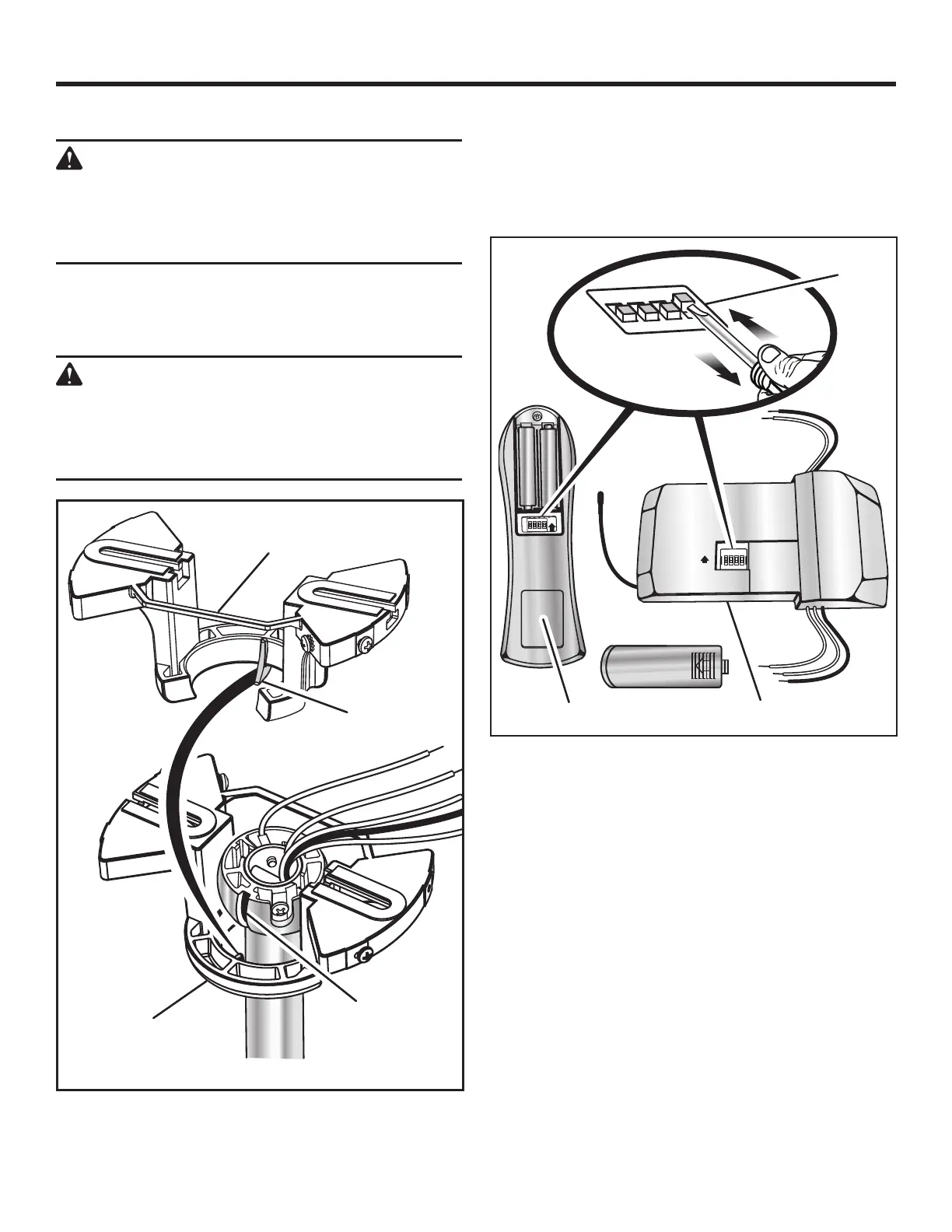
Verify the DIP switches on the receiver and the remote
control are both in the same configuration.
NOTE: The switches can be adjusted as needed to avoid
possible interference with other remote units in your
home, but always make sure that the same configuration
is set on both the remote and the receiver.
HANGING THE CEILING FAN
WARNING:
Once you begin the process of hanging the ceil-
ing fan, do not leave the fan unattended until the
installation process is complete. A falling fan
could cause serious personal injury or death.
Carefully lift the assembled fan up to the mounting bracket
assembly and seat the pivot ball in the mounting bracket
socket. Rotate the fan as needed so the tab on the mount-
ing bracket socket seats in the groove in the pivot ball.
WARNING:
Failure to engage the fan’s tab into the groove
on the mounting bracket could allow the fan
to wobble and/or fall. A falling fan could cause
serious personal injury or death.
INSTALLATION
BACK SIDE OF
MOUNTING BRACKET
FRONT SIDE OF
MOUNTING BRACKET
PIVOT BALL
GROOVE
MOUNTING
BRACKET TAB
DIP SWITCH
ON
ON
DIP
1 2
3
4
ON
ON
E
1 2
3
4
C
E
REMOTE CONTROL
RECEIVER


 To Next Page