EasyManua.ls Logo

Stinger HEIGH10 STH10CIV - User Manual

Stinger HEIGH10 STH10CIV
24 pages
Print Icon
To Next Page IconTo Next Page
Loading...
2006-2011 Honda Civic
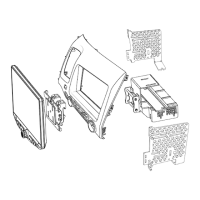
10” Multimedia Infotainment System
Installation Guide
A video installation guide is available at:
https://stingerelectronics.com/installvideos
NOTE! Read this installation guide thoroughly before disassembling
the vehicle or making wire connections. Installation of this product
requires technical skill, experience, and specialized tools.
If you feel uncomfortable performing the steps outlined in this
manual, please have this product professionally installed by an
authorized Stinger or Phoenix Gold Dealer.
STH10CIV
Question and Answer IconNeed help?

Do you have a question about the Stinger HEIGH10 STH10CIV and is the answer not in the manual?

Summary

Kit Components Overview

Kit Components Overview

Lists the parts included in the HEIGH10 installation kit for the Honda Civic.

Tools Required for Installation

Tools Required for Installation

Lists the necessary tools for performing the vehicle installation and component setup.

Vehicle Disassembly Procedure

Transferring Factory Panel Components

Instructions for removing and transferring factory climate control and vent components to the new dash panel.

HEIGH10 Wiring Diagram and Connections

HEIGH10 Wiring Diagram

Visual guide detailing the connections between the HEIGH10, vehicle harness, and adapters.

Honda Civic Vehicle Wire Connections

Connecting Parking Brake and Camera Reverse Wires

Details on connecting the parking brake wire (pink) and optional camera reverse wire (green/white).

Connecting Speed Sense Wire

Procedure for connecting the optional speed sense wire (blue) for navigation and cameras.

GPS Antenna and USB Port Installation

GPS Antenna Installation

Guidance on positioning and securing the GPS antenna for optimal performance.

Dual USB Extension Installation

Instructions for installing the SSUSB2 Dual USB Extension to provide accessible USB ports.

HEIGH10 Radio and Display Assembly

Radio Module and Bracket Assembly

Steps for assembling the radio module with the metal and plastic mounting brackets.

Attaching Display Mounting Clamp

Procedure for attaching the display mounting clamp to the HEIGH10 display unit.

HEIGH10 Radio;Panel Assembly

Main Panel and Side Bracket Assembly

Instructions for preparing the main panel and attaching side brackets.

Installing HEIGH10 Assembly into Dash Kit

Steps for inserting the assembled HEIGH10 unit into the dash kit and securing it.

HEIGH10 Vehicle Installation

Connecting HEIGH10 Module Cables

Connecting display, power, and antenna cables to the HEIGH10 module.

Securing Radio and Climate Control Panel

Guide to sliding the assembled panel into place and securing it with clips.

Mounting the Display Unit

Instructions for attaching the display unit to the bracket and securing it.

HEIGH10 Function Test

Pre-Reassembly Function Checks

Steps to verify all functions and features of the HEIGH10 unit before final reassembly.

HEIGH10 Vehicle Reassembly

Reinstalling Interior Panels

Step-by-step guide for reassembling the vehicle's interior panels after installation.

Summary

Kit Components Overview

Kit Components Overview

Lists the parts included in the HEIGH10 installation kit for the Honda Civic.

Tools Required for Installation

Tools Required for Installation

Lists the necessary tools for performing the vehicle installation and component setup.

Vehicle Disassembly Procedure

Transferring Factory Panel Components

Instructions for removing and transferring factory climate control and vent components to the new dash panel.

HEIGH10 Wiring Diagram and Connections

HEIGH10 Wiring Diagram

Visual guide detailing the connections between the HEIGH10, vehicle harness, and adapters.

Honda Civic Vehicle Wire Connections

Connecting Parking Brake and Camera Reverse Wires

Details on connecting the parking brake wire (pink) and optional camera reverse wire (green/white).

Connecting Speed Sense Wire

Procedure for connecting the optional speed sense wire (blue) for navigation and cameras.

GPS Antenna and USB Port Installation

GPS Antenna Installation

Guidance on positioning and securing the GPS antenna for optimal performance.

Dual USB Extension Installation

Instructions for installing the SSUSB2 Dual USB Extension to provide accessible USB ports.

HEIGH10 Radio and Display Assembly

Radio Module and Bracket Assembly

Steps for assembling the radio module with the metal and plastic mounting brackets.

Attaching Display Mounting Clamp

Procedure for attaching the display mounting clamp to the HEIGH10 display unit.

HEIGH10 Radio;Panel Assembly

Main Panel and Side Bracket Assembly

Instructions for preparing the main panel and attaching side brackets.

Installing HEIGH10 Assembly into Dash Kit

Steps for inserting the assembled HEIGH10 unit into the dash kit and securing it.

HEIGH10 Vehicle Installation

Connecting HEIGH10 Module Cables

Connecting display, power, and antenna cables to the HEIGH10 module.

Securing Radio and Climate Control Panel

Guide to sliding the assembled panel into place and securing it with clips.

Mounting the Display Unit

Instructions for attaching the display unit to the bracket and securing it.

HEIGH10 Function Test

Pre-Reassembly Function Checks

Steps to verify all functions and features of the HEIGH10 unit before final reassembly.

HEIGH10 Vehicle Reassembly

Reinstalling Interior Panels

Step-by-step guide for reassembling the vehicle's interior panels after installation.

Overview

The Stinger HEIGH10 STH10CIV is a 10-inch multimedia infotainment system designed for 2006-2011 Honda Civic vehicles. This installation guide provides comprehensive instructions for integrating the system into the vehicle, covering everything from initial disassembly to final function testing and reassembly. The system aims to upgrade the vehicle's existing radio and climate control assembly with a modern, large-screen infotainment unit, enhancing the in-car experience with advanced multimedia and connectivity features.

Function Description

The HEIGH10 STH10CIV system serves as a central hub for in-vehicle entertainment, navigation, and connectivity. Its primary function is to replace the factory radio/climate control assembly with a 10-inch multimedia display and radio module. Key functionalities include:

  • Multimedia Playback: The system supports audio and video playback from various sources, including USB drives, Bluetooth-paired devices, and potentially other auxiliary inputs (depending on additional harnesses).
  • Radio Reception: It provides AM/FM radio reception, allowing users to tune into their favorite stations.
  • Smartphone Integration: A significant feature is its compatibility with Apple CarPlay and Android Auto, enabling seamless integration of smartphone functionalities like navigation, messaging, and music streaming directly onto the HEIGH10 display.
  • Connectivity: The system includes USB ports for connecting external devices and a GPS antenna for navigation services.
  • Vehicle Integration: It is designed to integrate with the vehicle's existing controls, such as steering wheel controls, and incorporates factory components like air vents, passenger airbag light, hazard switch, and climate control knobs/buttons into the new dash panel.
  • Camera Support: The system supports optional rear and front cameras, enhancing safety and convenience during parking and maneuvering.
  • Speed Sense Integration: For advanced features like Stinger Navigation or front camera functionality, a speed sense wire connection is provided.

Usage Features

The HEIGH10 STH10CIV is designed for intuitive user interaction, offering a blend of touchscreen control and integration with existing vehicle controls.

  • Large Touchscreen Display: The 10-inch display provides a clear and expansive interface for accessing all system functions, making navigation through menus and media playback straightforward.
  • Physical Controls: While primarily touchscreen-driven, the system retains the vehicle's factory climate control knobs and buttons, ensuring familiar and easy access to essential climate functions. The volume and power knob are also integrated for quick adjustments.
  • Steering Wheel Control Compatibility: For vehicles equipped with steering wheel controls, the system is designed to respond to these buttons, allowing for safe and convenient operation of audio and other functions without taking hands off the wheel.
  • USB Connectivity: Dual USB extension ports are provided, allowing users to connect multiple USB devices for media playback, smartphone charging, or firmware updates. The installation guide details how to replace the original 12-volt power outlet with these dual USB ports for a clean, integrated look.
  • GPS Antenna: The dedicated GPS antenna ensures accurate location tracking for navigation applications, crucial for optimal performance of Apple CarPlay and Android Auto.
  • Expandability: The system is designed with expandability in mind, supporting additional harnesses for components like amplifiers, SiriusXM tuners, and auxiliary inputs, allowing users to customize their audio experience further.
  • User Guide Access: A comprehensive HEIGH10 User Guide is available online, providing detailed instructions for operating all features and troubleshooting common issues.

Maintenance Features

Maintenance for the HEIGH10 STH10CIV primarily revolves around proper installation, software updates, and general care to ensure longevity and optimal performance.

  • Professional Installation Recommended: The installation guide strongly recommends professional installation by an authorized Stinger or Phoenix Gold Dealer due to the technical skill, experience, and specialized tools required. This helps prevent damage to the vehicle or the product and ensures correct wiring and functionality.
  • Pre-Installation Precautions: The manual emphasizes critical precautions such as disconnecting the vehicle's negative battery cable before any wire connections, protecting vehicle surfaces, and ensuring components do not hinder vehicle operation. These steps are vital for safe installation and to prevent electrical shorts or damage.
  • Wire Management: Instructions for bundling cables and harnesses with electrical tape or wire ties are provided to prevent interference with moving parts and ensure a neat, secure installation. Insulating exposed wires is also highlighted to prevent short circuits, fire, or electric shock.
  • Fuse Replacement: In case of a fuse replacement, the guide stresses the importance of using a fuse of the correct rating (amperes) to prevent fire hazards.
  • Firmware Updates: The USB ports are essential for firmware updates, which are crucial for maintaining compatibility with evolving smartphone operating systems (Apple CarPlay, Android Auto) and for accessing new features or bug fixes. Users are advised to refer to the HEIGH10 Installation Guide for more information on USB ports and updates.
  • Troubleshooting Guide: The HEIGH10 User Guide includes a dedicated troubleshooting section to help users diagnose and resolve common issues, reducing the need for professional service for minor problems.
  • Technical Support: Stinger provides robust technical support via phone, email, and chat, offering assistance during business hours for any installation or operational queries. This ensures users have access to expert help when needed.
  • Component Transfer: The installation process involves transferring several factory components (air vent, passenger airbag light, hazard switch, climate control knobs/buttons) to the new dash panel. This design choice ensures that essential factory controls remain functional and integrated, simplifying maintenance of these specific parts.
  • Secure Fastening: The guide provides detailed instructions for securing all components with appropriate screws and clips, ensuring the infotainment system is firmly mounted and resistant to vibrations or movement during vehicle operation. This contributes to the system's long-term reliability.

Stinger HEIGH10 STH10CIV Specifications

General IconGeneral
Display Size10.1 inches
TouchscreenYes
BluetoothYes
GPS NavigationYes
Apple CarPlayYes
Android AutoYes
SiriusXM ReadyYes
Backup Camera InputYes
ProcessorQuad-core
RAM2 GB
Internal Storage32 GB
Expandable StorageYes, up to 128 GB
Wi-FiYes
Front CameraNo
Power Supply12V DC
Resolution1280 x 720
Operating SystemAndroid
USB Ports2
Rear CameraSupports Rear Camera Input

Related product manuals