- 17 -
Introduction
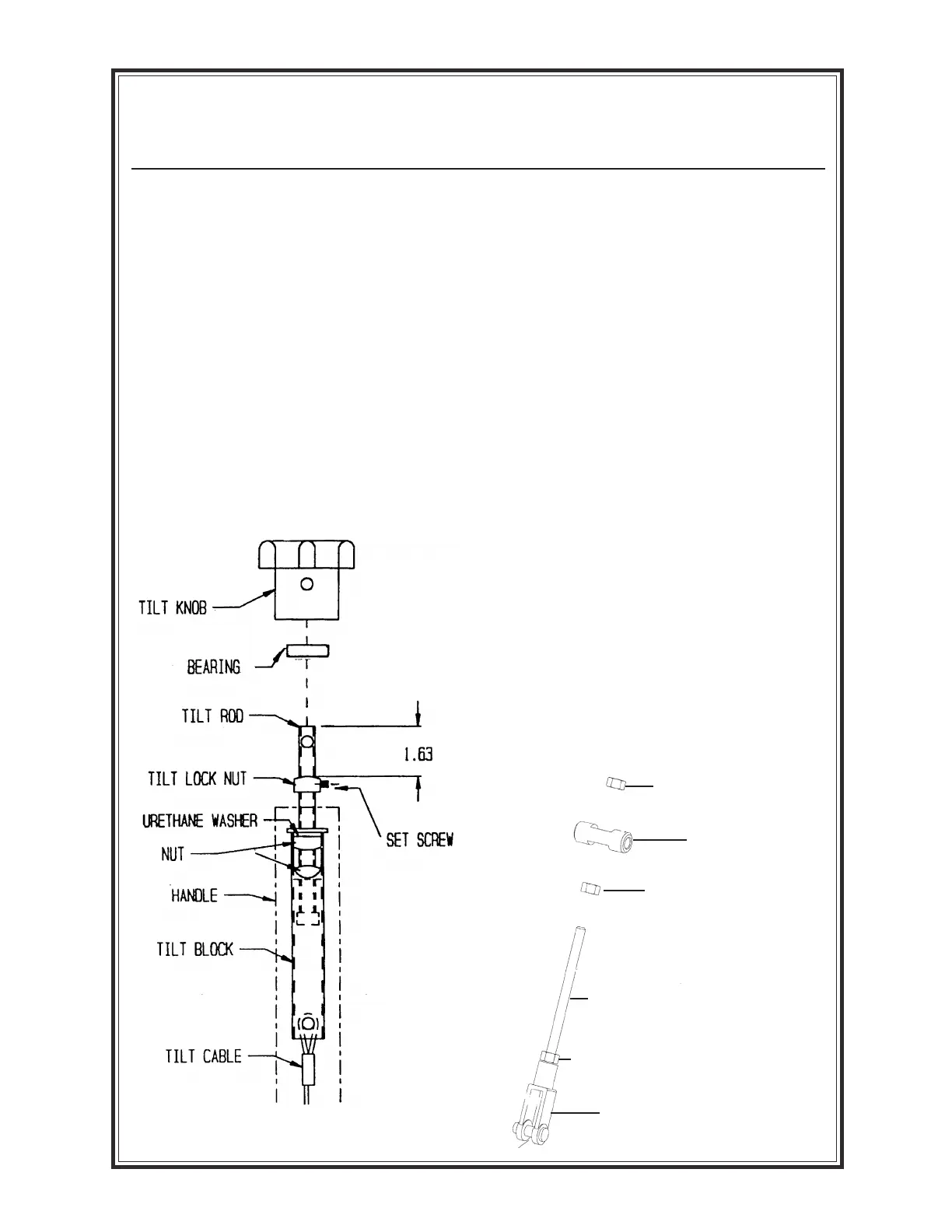
TO ADJUST TILT LOCK NUT--The tilt
lock nut is located on the tilt rod assembly.
Using the lifteye, raise the trowel with an
overhead crane. Back off tilt knob until there is
enough cable slack to access the tilt lock nut.
For more tilt, loosen lock nut set screw and turn
lock nut towards tilt knob, 1 turn, and lock set
screw. Crank knob to full tilt position and
check clearance between the tilt lever and
gearcase for 1/64" (paper thickness). Repeat
adjustment if required.
NOTE: Cables may stretch over time and
may need to be replaced if full tilt is no
longer obtainable.
SWIVEL
LINKAGE ROD
NUT
YOKE END
Adjust Tilt Knob Lock
Nut/Linkage Rod
TO ADJUST ProPitch LINKAGE
Rod
--The linkage rod is fastened to a yoke end
and a swivel by two nuts. To adjust follow the
steps listed below.
1. Using the lifteye, raise the trowel using an overhead
crane.
2. The lower end of the linkage rod is connected to a
yoke and held in place with two (2) nuts. Loosen the
nut on the upper end of the linkage rod to allow
slack in the tilt cable when the ProPitch handle is in
full tilt position.
4. With handle in full tilt position, adjust the nut on the
backside of swivel at the upper end of linkage rod
until the proper gap is achieved between the tilt
lever and the gearcase--approximately 1/64 inch.
5. Tighten nut on the outside of swivel to lock linkage
rod into position.
6. Repeat adjustment if required.
NOTE: Cables may stretch over time and
may need to be replaced if full tilt is no
longer obtainable. Refer to Service and Parts
Manual for full diagram and parts break-
down.
NUT
NUT


 To Next Page