Introduction 5
DS100 (U320) User's Guide - Rev. A02 StorCase Technology, Inc.
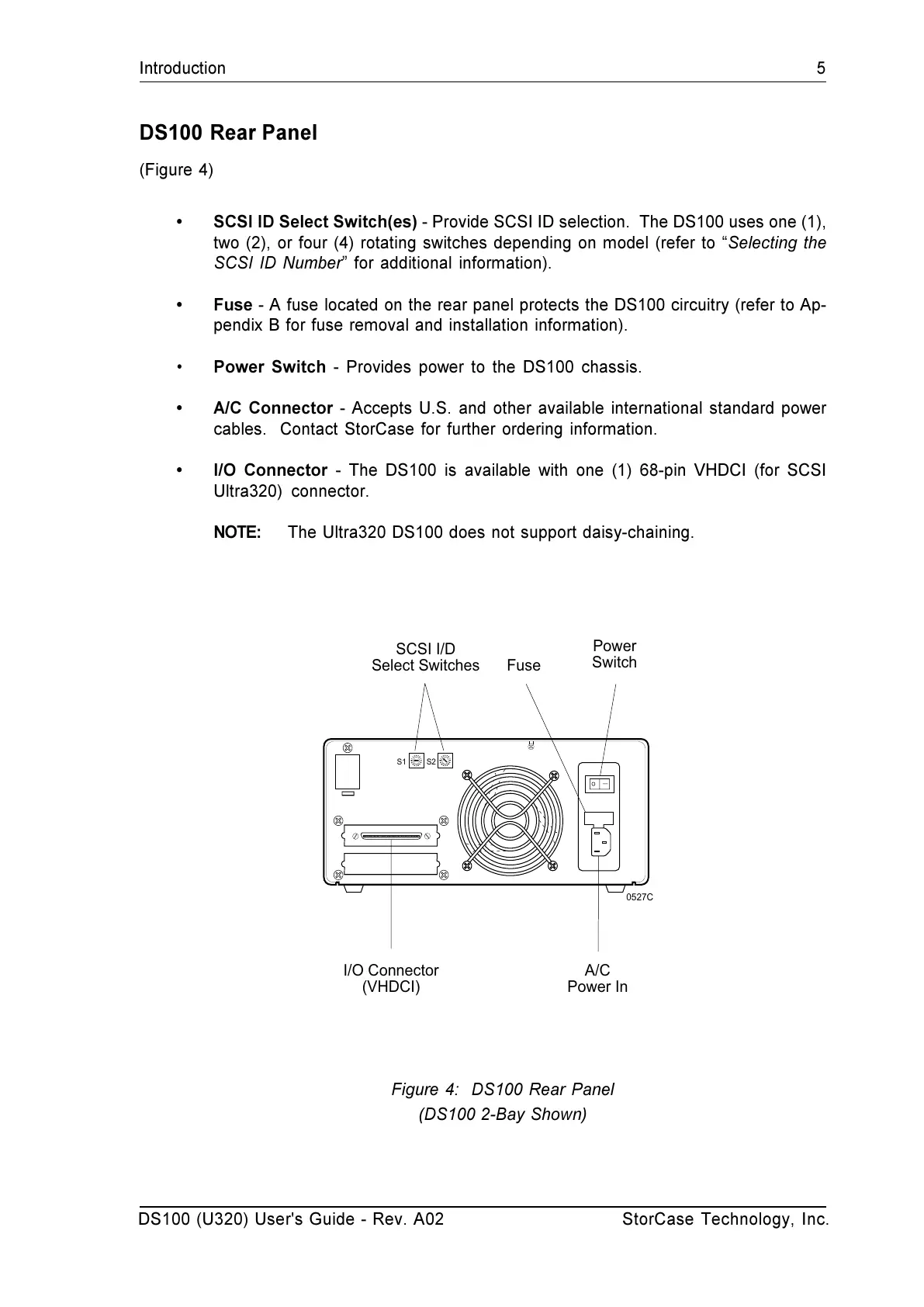
DS100 RearPanel
(Figure 4)
SCSI ID Select Switch(es) - Provide SCSI ID selection. The DS100 uses one (1),
two (2), or four (4) rotating switches depending on model (refer to Selecting the
SCSI ID Number for additional information).
Fuse - A fuse located on the rear panel protects the DS100 circuitry (refer to Ap-
pendix B for fuse removal and installation information).
Power Switch - Provides power to the DS100 chassis.
A/C Connector - Accepts U.S. and other available international standard power
cables. Contact StorCase for further ordering information.
I/O Connector - The DS100 is available with one (1) 68-pin VHDCI (for SCSI
Ultra320) connector.
NOTE: The Ultra320 DS100 does not support daisy-chaining.
Figure 4: DS100 Rear Panel
(DS100 2-Bay Shown)
S1
S2
SCSI I/D
Select Switches
Power
Switch
A/C
Power In
I/O Connector
(VHDCI)
Fuse
0527C


 To Next Page