DS100 (U320) User's Guide - Rev. A02 StorCase Technology, Inc.
Installation 11
SCSI ID
FACTORY
NEW
W
A
R
N
I
N
G
RIGHT SIDE
LEFT SIDE
3.5 Drive
(Not Included)
Adapter Bracket
(1 Pair per Drive Bay)
#6-32 Phillips
Pan Hd. Screw
(4 Plcs per Drive)
0543
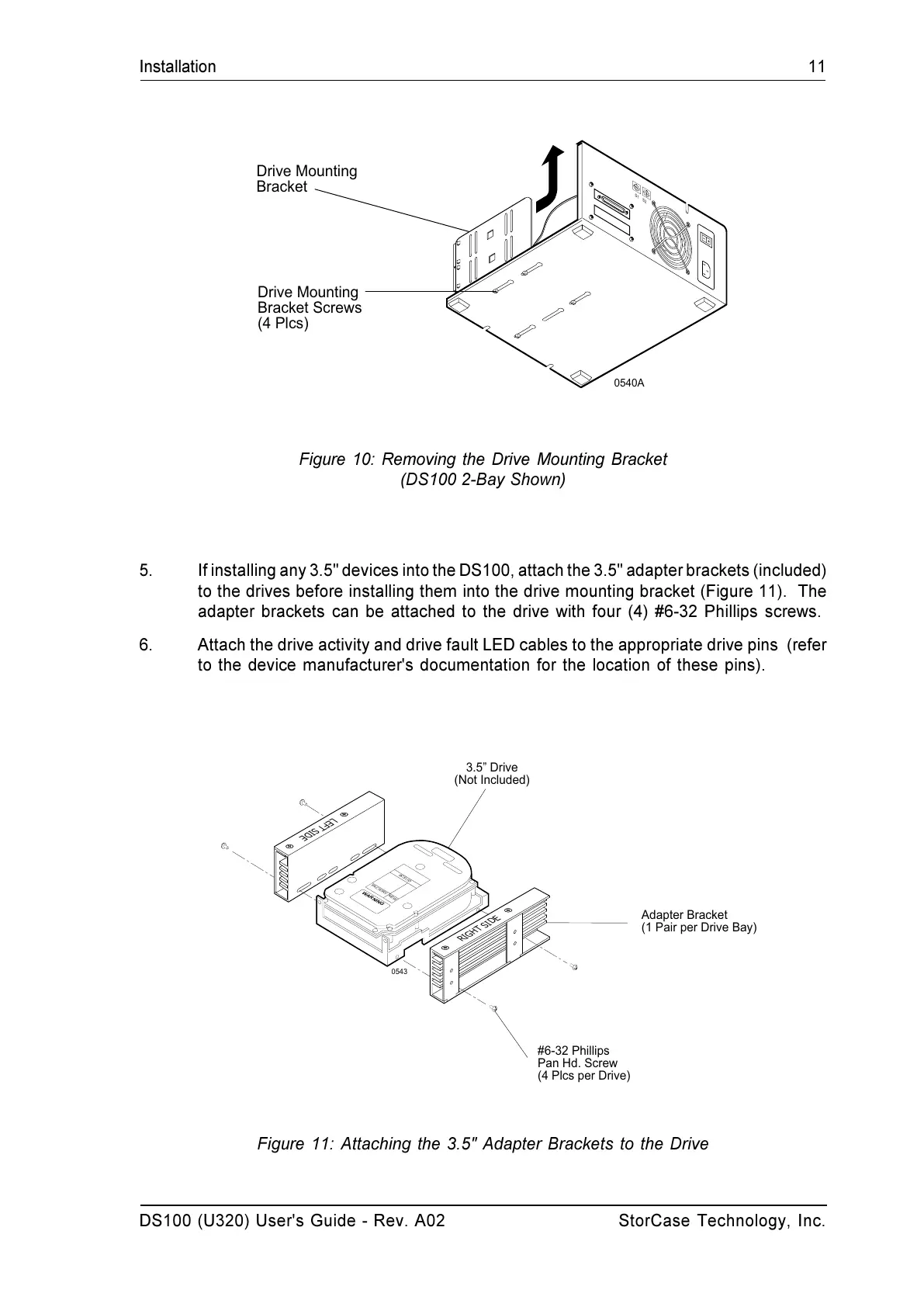
Figure 11: Attaching the 3.5" Adapter Brackets to the Drive
5. If installing any 3.5" devices into the DS100, attach the 3.5" adapter brackets (included)
to the drives before installing them into the drive mounting bracket (Figure 11). The
adapter brackets can be attached to the drive with four (4) #6-32 Phillips screws.
6. Attach the drive activity and drive fault LED cables to the appropriate drive pins (refer
to the device manufacturer's documentation for the location of these pins).
Figure 10: Removing the Drive Mounting Bracket
(DS100 2-Bay Shown)
0540A
S
1
S
2
Drive Mounting
Bracket Screws
(4 Plcs)
Drive Mounting
Bracket


 To Next Page