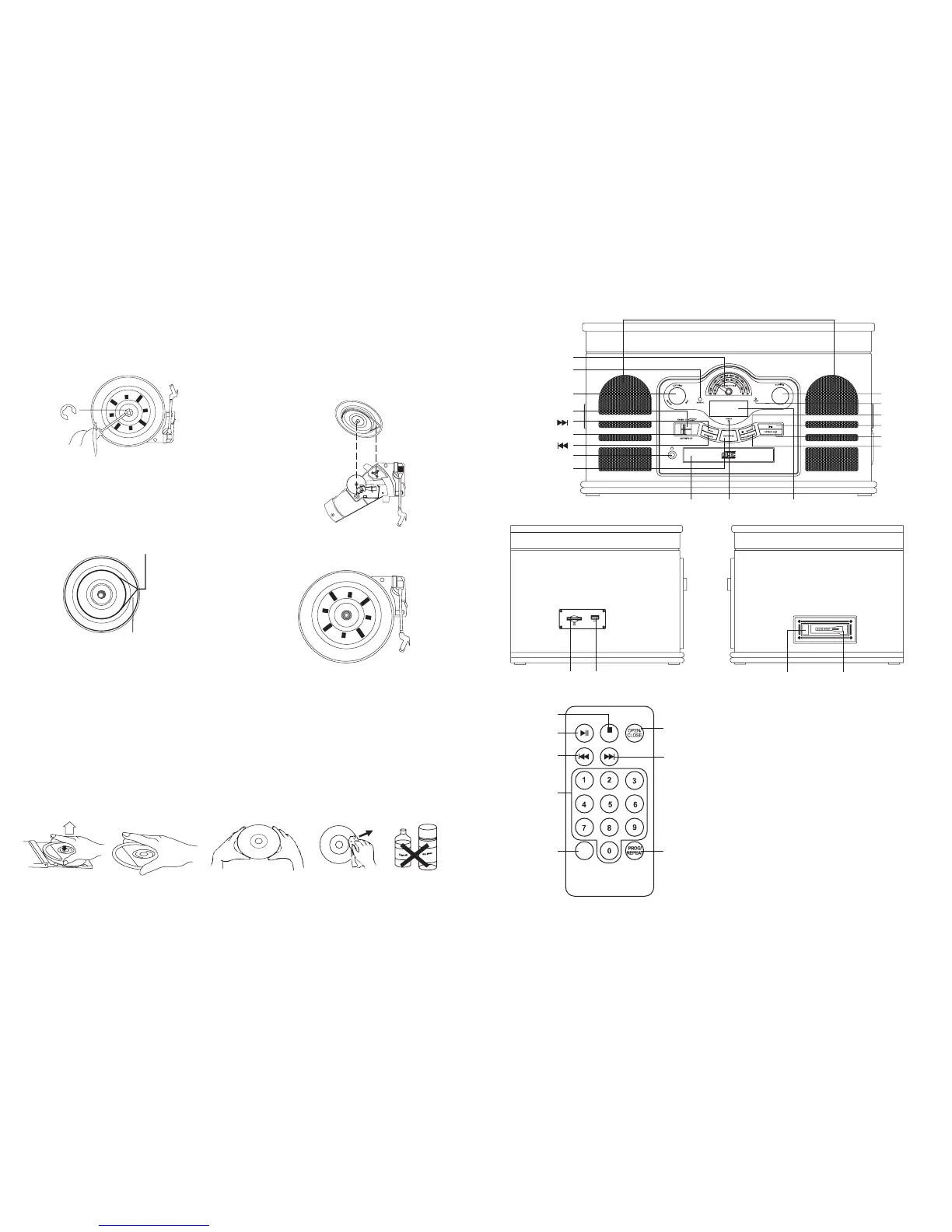
CONTROL LOCATORS
REC/
ERASE
SD/USB
STOP/SD/USB
PLAY/PAUSE
BACKWARD SKIP
0-9
REC/ERASE
PROG/REPEAT
FORWARD SKIP
OPEN/CLOSE
29
COMPACT DISC CARE
To remove a disc from its storage case, press down on the centre of the case and lift the disc out, holding it carefully by
the edges. Fingerprints and dust should be carefully wiped off the disc’s recorded surface with a soft cloth. Unlike conventional
vinyl or Shellac records, compact discs have no grooves to collect dust and microscopic debris, so a gentle wipe with a
soft clean cloth should remove most particles. Wipe in a straight line from the inside to the outside of the disc. Small dust
particles and light stains will have absolutely no effect on sound reproduction quality. Clean the disc periodically with a
soft, lint-free, dry cloth. Never use detergents or abrasive cleaners to clean the disc. If necessary, use a CD cleaning kit.
Never affix labels to the surface of compact discs or write on them, except very gently with specialist CD-R Pens.
lron binder
RE-ATTACHING THE TURNTABLE DRIVE-BELT
The turntable drive belt is factory fitted - use these instructions only if the turntable fails to revolve.
STEP 1
Use a screwdriver to remove the black iron
C-clipand lift the turntable off the
phonograph mechanism.
STEP 2
Retrieve the dropped black rubberband and
replace it around the column on the bottom
of the turntable, then pull it out gently without
overstretching and hook the band around the
small column point at the edge of the turntable,
as shown in the diagram.
STEP 4
Gently turn the turntable until a ‘plop’-sound is heard,
which indicates the repositioning of the rubber band.
Replace the C-clip to secure the turntable.
STEP 3
To fix the turntable back onto the phonograph mechanism,
make sure the column point is positioned over the correct
place on the phonograph mechanism, while placing the
axis of the turntable in the hole on the phonograph
mechanism, as shown in the diagram.
Small column point
Rubber band
SD CARD USB PORT
NOTE - FORWARD SKIP / or BACKWARD SKIP / buttons on the remote control look like this (|<< and >>|) and on the music
centre look like this (UP/FF, DOWN/FB). Throughout these instructions we will show the symbol as per the remote control.
CASSETTE DOORCASSETTE EJECT/
FAST FORWARD
DIAL SCALE PLATE
FORWARD SKIP
BACKWARD SKIP
STOP/SD/USB
TUNING KNOB
REC/ERASE
PLAY/PAUSE
OPEN/CLOSE
ON-OFF SWITCH /
VOLUME CONTROL
LCD DISPLAY
RADIO\CD\
PHONO SWITCH
AM\FM\FM.ST SWITCH
CD DRAWER
POWER INDICATOR
EARPHONE JACK
SENSOR
Speakers
FM.ST LED
PROG/REPEAT


 To Next Page
 Loading...