Please confirm the photocells are well connection and programmed. Please check if the door will be
automatically reversed when encountering an obstacle during door closing.
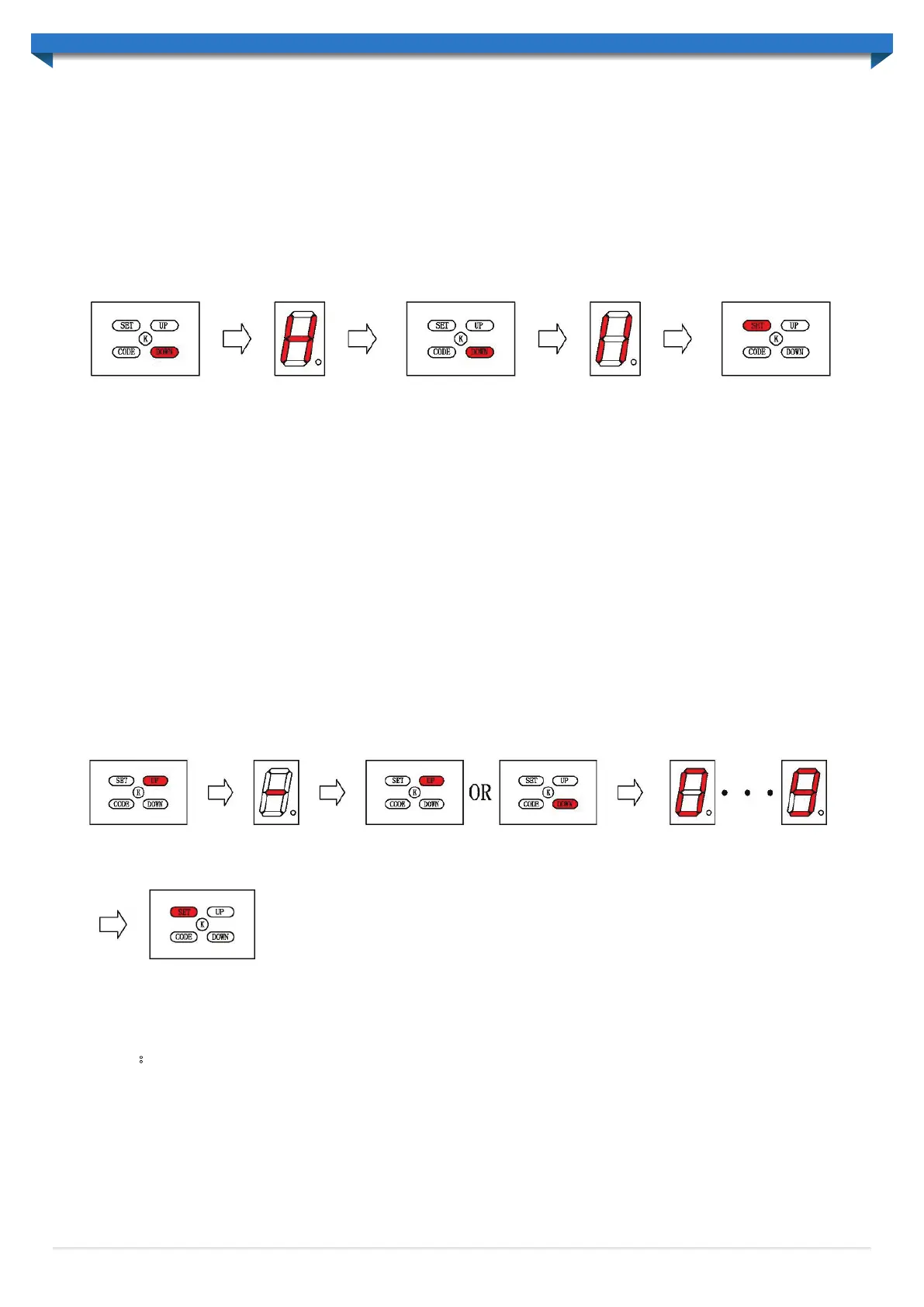
4.5.3 Canceling the photocell function:
Press ‘DOWN’ button and hold on until the LED displays ‘H’ , press ‘DOWN’ button the LED displays 11’ , to
cancel this function, press ‘SET’ to confirm. The default is close for this function.
to cancel this function. When setting is finished,
WARNING: Close the photo beam function when not utilizing photo beam sensor.
4.6 Auto close setting:
Press ‘UP’ button and hold on until the LED displays ‘-’. Press ‘up’ button once, the auto-close time will
increase by 1 minute, the maximum time is 9 minutes. Press ‘down’ button the auto-close time decrease by 1
minute. The auto-close function will be turned off when LED displays 0. Press ‘SET’ button to confirm.
The default setting for this function is 0 (off).
NOTE:The auto close is only available when door is at its full open position.
When using auto close mode, a photo electric beam must be fitted correctly
and tested for operation at regular intervals.
Press ‘UP’ or ‘DOWN’ button to choose the close time
14


 To Next Page