CHARGING
Fully charge battery packs before use. The battery packs may be stored in the charger continuously, as
there is no danger of overcharge.
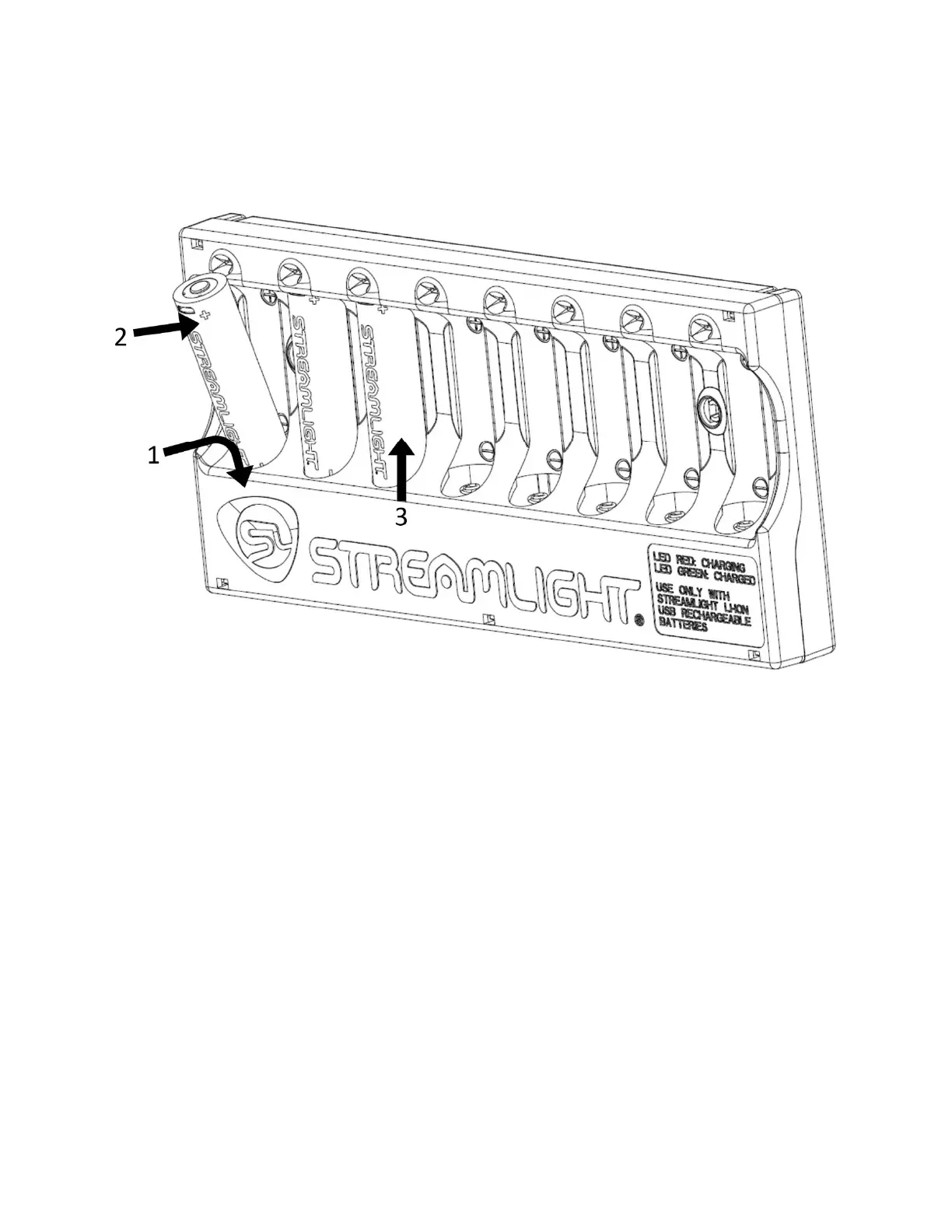
To charge a SL-B26™ protected Li-Ion USB rechargeable battery pack:
1. Insert the negative end of the battery pack into the spring end of the charger cavity (polarity is marked
in each battery cavity).
2. Guide the positive end of the battery pack into the charge cavity until fully seated against charger
housing.
3. Release the battery pack and the spring will push the battery pack against the positive charge contact.
The LED above the positive end of the battery pack should light to indicate charging has begun.
LED CHARGE INDICATORS
The red LED above the inserted battery pack must light to ensure the battery is being charged.
Charging…LED is steady red.
Charged…LED is steady green.
Error…all LED indicators will be off. This may be caused by out of range temperature or
overcharge. Once temperature returns to normal operating range, LEDs will indicate normally.
Charge time is approximately 5.25 hours for one to eight battery packs.
IMPORTANT: Maximum charging temperature range is 20°F to 115°F with optimal temperature range
between 50°F and 86°F. A safety circuit prevents charging outside the maximum range, and the LEDs will
not illuminate while in this condition. When temperature is within an acceptable range, charging will
resume.


 To Next Page