2
FOLLOW THESE STEPS IN SEQUENCE TO ASSURE PROPER SET-UP AND ADJUSTMENT.
STEP 1: OPENING THE ERGO-PRO
TM
.
Photo 5
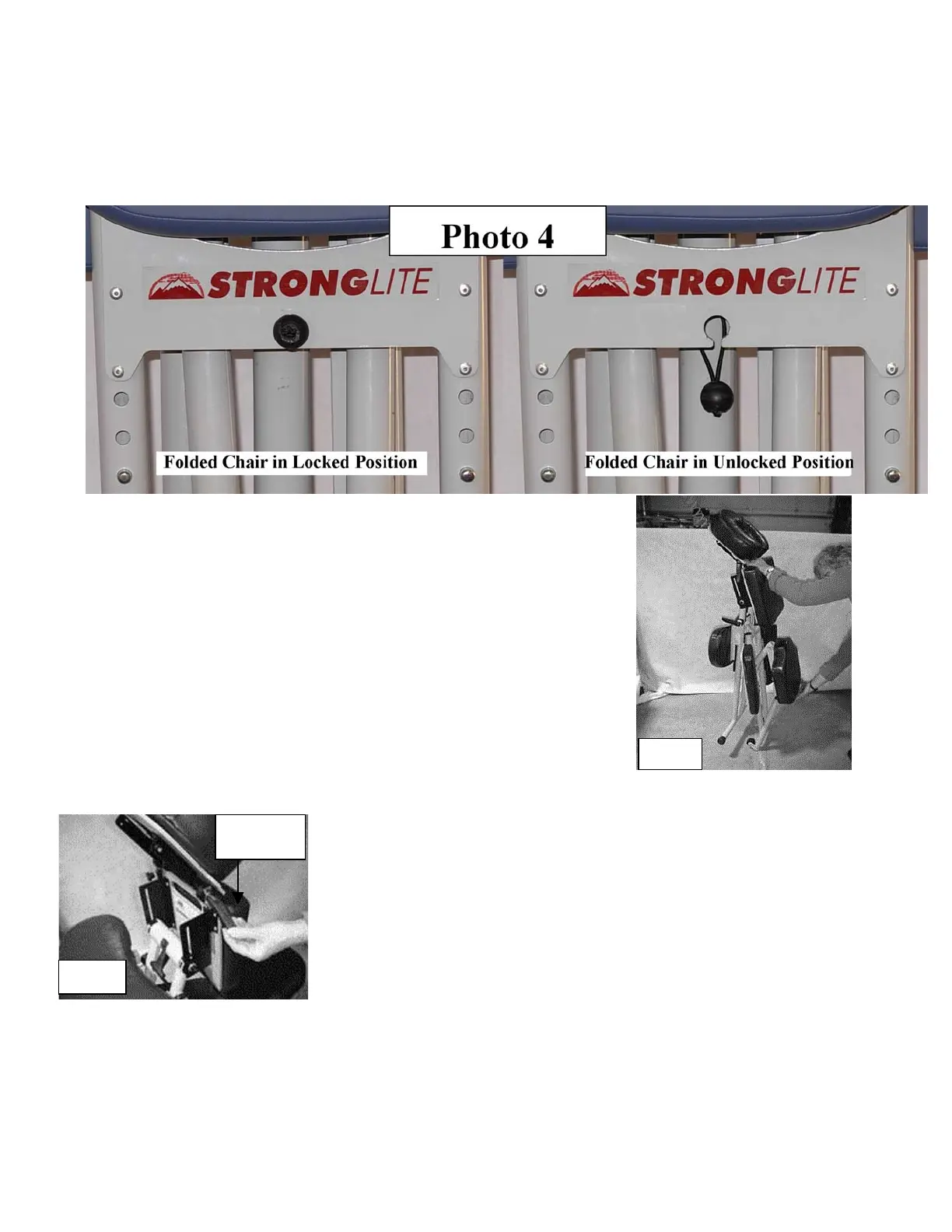
A. Release the bungee that is holding the chair closed by pulling out and down on the ball found in
the center of the rear support plate. See Photo 4.
B. Grasp the chest plate hand hole with one hand and lift the
bottom of the seat from the back with the other hand. The chair
may open slowly the first few times. See Photo 3
After the chair is fully opened, the two locking buttons found
beneath the seat on the center support will click into position.
See Photo 9. Simply check that this has happened, that the
knee rests are firmly in place, and did not come loose from
shipping or handling.
C. Now set up the rest of the chair from the top down. It is as easy
as 1, 2, 3.
Photo 6
Face Rest
Cam Lever
1. Flip the face rest cam lever to the unlocked position and set the
face rest to a comfortable position, then flip the cam lever to the
locked position, see Photo 6. Be sure that the teeth of the plastic
locking disks on the face rest are fully engaged. The crescent face
rest pad is shipped off the base plate and can now be installed by
attaching the Velcro
TM
on the pad to the Velcro
TM
on the base.


 To Next Page