EasyManua.ls Logo

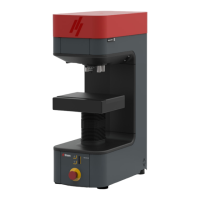
Struers Duramin-40 - User Manual

Struers Duramin-40
70 pages
Print Icon
To Next Page IconTo Next Page
Loading...
Duramin Software
Duramin-40 - Duramin-100
Duramin-170 - Duramin-600
Duramin-650
Instruction Manual
Original Instructions
Doc. no.: 16607026-01_A_en
Date of release: 2021.03.26

Table of Contents

Questions and Answers

Summary

About this manual

Safety Information and Precautions

Intended Use of the Hardness Tester

Defines the proper application and user qualifications for the hardness testing machine.

Software Safety Procedures

Details safety procedures related to the software, including emergency stop functions.

Getting Started with Duramin Software

Software Description and Overview

Provides an overview of the Duramin software's capabilities and functions.

Network Connection Setup

Explains how to connect the hardness tester to a network for data sharing.

Operating System Configuration

Describes the pre-installed operating system and its limitations.

Adding Software Modules and Licenses

Guides users on how to add optional software modules and licenses.

Setting up the Duramin Software

Starting and Exiting the Software

Covers the procedures for launching and closing the Duramin software application.

Navigating the Software Interface

Introduces the main software interface elements and navigation structure.

The Top Menu Functions

Details the functions available in the main software menu bar.

Selecting and Configuring Test Methods

Explains how to select and configure test methods, scales, and loads.

Understanding the Main View Area

Describes the primary display area showing specimen views and analysis.

Overview of Test Tools

Outlines the tools available for adjusting test settings and patterns.

Diagram Display for Test Results

Explains the diagram area for visualizing test results.

Dashboard Controls for Test Execution

Details the dashboard controls for managing test execution and parameters.

Optical Controls and Reporting Menus

Covers controls for camera views, snapshots, and reporting.

Using Software Shortcuts

Lists keyboard and mouse shortcuts for faster software operation.

The System Menu Configuration

Explains how to configure system-wide settings like language and users.

Setting the Software Language

Guides users on how to change the software's display language.

Managing User Levels and Permissions

Describes how to create, edit, and manage different user access levels.

Managing User Accounts

Details the process of creating, editing, and deleting user accounts.

Configuring Software Settings

Explains various software settings for test execution and data export.

Mounting and Configuring an Indenter

Provides instructions for installing and configuring indenters on the machine.

Basic Concepts of Duramin Software

Dashboard Interface Overview

Explains the dashboard controls for operating the hardness tester.

Camera Views and Sources

Describes the objective and overview camera views and how to switch between them.

Creating and Managing Test Programs

Details how to create, load, and delete test programs (templates).

Jobs Management and Creation

Explains how to create and manage jobs, which are instances of programs.

Capturing and Managing Snapshots

Covers capturing and managing images (snapshots) during testing.

Method Selection Process

Guides users on selecting the appropriate hardness testing method and scale.

Managing Test Archives

Explains how to save, open, and manage test results archives.

Test Pattern Creation and Configuration

Introduces the concept and creation of test patterns for automated testing.

General Pattern Settings

Details settings for managing, naming, saving, and loading test patterns.

Common Settings for Test Patterns

Covers common settings applicable to most pattern types, including starting points.

Adjusting Light and Contrast

Explains how to adjust light sources and image contrast for optimal viewing.

Autofocus Functionality

Describes the optical and touch focus functionalities for achieving sharp images.

Performing Hardness Tests

Performing Simple Tests

Guides on executing basic single-indentation tests.

CHD (Case Hardening Depth) Tests

Covers the setup and execution of Case Hardening Depth tests.

Welding Tests Procedure

Details the procedure for performing hardness tests on welded materials.

Edge Tests Execution

Explains how to perform hardness tests along the edge of specimens.

Area Tests Setup and Execution

Guides on setting up and executing tests across defined areas of a specimen.

Fracture Toughness Tests

Describes the process for conducting Fracture Toughness tests.

Custom Points Tests

Explains how to create and perform tests using custom point patterns.

Performing an ISO 898-1 Test

Covers the specific steps for performing an ISO 898-1 test on threads.

Reindenting a Point in a Pattern

Details how to re-measure a specific point within an existing test pattern.

Making Custom Conversions

Explains how to create custom hardness value conversions.

Working with Measurement Tools

Describes using measurement tools for distance, angle, and annotations.

Image Stitching Process

Covers combining multiple images to create a larger specimen view.

Working with Multiple Specimens

Guides on testing multiple specimens, often using a specimen holder.

Executing Test Patterns with a Manual Stage

Explains how to run predefined test patterns using a manual stage.

Working with Test Results

Viewing Test Results and Color Codes

Details how to view, analyze, and interpret test results and color codes.

Saving Test Results

Explains the procedure for saving test results.

Reporting Test Results

Guides on including test results and snapshots in reports.

Exporting Test Results

Covers exporting test data in various formats like CSV or Q-DAS.

Maintenance and Service

Regular Testing and Verification

Recommends regular testing with a certified block to verify machine performance.

Machine Calibration Procedures

Advises on the importance and frequency of machine calibration.

Troubleshooting Duramin Software

Software Troubleshooting Guide

Provides solutions for common software and hardware issues.

Error Messages and Solutions

Explains error messages and required actions for resolution.

Contacting Struers Service

Lists information required when contacting technical support.

Software Updates and Improvements

Informs about software improvements and update procedures.

Manufacturer Information

Struers Duramin-40 Specifications

General IconGeneral
Light SourceLED
TypeHardness tester
Load Range0.09807 N to 980.7 N (10 gf to 100 kgf)
Objectives10x, 20x
TurretMotorized
Z-axisMotorized
Test MethodsVickers, Knoop, Brinell
Hardness ScalesHV, HK
Power Supply100-240 V, 50/60 Hz