EasyManua.ls Logo

Stryker RF MultiGen 0406-900-000 - User Manual

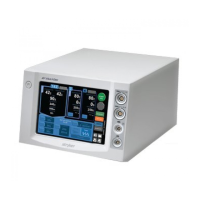
Stryker RF MultiGen 0406-900-000
57 pages
Print Icon
To Next Page IconTo Next Page
Loading...
DSGN-fm-50366 rev. None Page 1 of 1
Effective: July 1, 2008
Label Stock:Dimensions: Color/Material/Finish:
NOTE: This portion of the
document should not appear
on produced Labels or IFUs.
Description/Type:
Stryker Instruments
(269) 323-7700
(800) 253-3210
Print Location: Suppliers/Services:
Part Number: Rev.
8.5 inch (width) x 11 inch
Booklet
Print Center
Four Color Graphics on White Background;
20# Bond or Equivalent
N/A
N/A
Instructions For Use
0406-900-702
E

Table of Contents

Questions and Answers

  • M
    Ms. Cynthia RodriguezAug 16, 2025
    How to troubleshoot Stryker RF MultiGen 0406-900-000 that does not power up?
    • L
      leethomasAug 17, 2025
      If your Stryker Portable Generator doesn't power up, first ensure it's properly connected to a hospital-grade, facility power receptacle with protective earth and that the power cord plugs are fully seated. If that's not the issue, check the inlet fuses and replace them with the same type and rating if they are blown. Finally, verify that electrical power is present at the facility power receptacle. If the generator still fails to power up after these steps, it may need repair.
  • E
    Eric DavilaAug 19, 2025
    What to do if Stryker Portable Generator indicates system impedance is too high?
    • D
      Daniel ScottAug 20, 2025
      If the Stryker Portable Generator shows the message that the system impedance is too high, make sure that all connections of the electrode/MultiGen cable are secure and that the electrode is fully inserted into the cannula. Also, check the ground pad cable connection and placement, and verify that the cannula placement is correct. Ensure the correct mode of operation is selected by touching the PARALLEL button. Finally, inspect the electrode, MultiGen cable, and ground pad cable for any damage and replace them if necessary. If the error persists, further assistance may be needed.
  • H
    Heather HartmanAug 22, 2025
    Why the temperature is not rising at the expected rate on Stryker Portable Generator?
    • J
      Justin ChavezAug 22, 2025
      If the temperature is not rising at the expected rate on your Stryker Portable Generator, and the instrument may be damaged, it could be due to several reasons. First, if the temperature reading is below 36.6° C when the electrode is inserted in the body or not rising when the power output is positive, the electrode thermocouple may be shorted, and the electrode should be replaced. Ensure the electrode is fully inserted into the cannula and that neither the patient nor the electrode and cannula are moving during the procedure. Also, make sure the active tip of the electrode is surrounded by tissue and not in a blood vessel or bone. Finally, inspect the electrode and MultiGen cable for damage and replace them if necessary. If the error persists, further assistance may be needed.
  • B
    Brandon BuckAug 25, 2025
    What to do if Stryker RF MultiGen 0406-900-000 indicates system impedance is too low?
    • K
      Kara CarlsonAug 26, 2025
      If the Stryker Portable Generator shows the message that the system impedance is too low, make sure that the electrode does not touch a metal implant or the ground pad. Also, if operating in parallel mode, ensure the two electrode tips are not touching each other or a metal implant. If the error persists, further assistance may be needed.
  • C
    Chelsea StuartAug 27, 2025
    What causes rapid decrease in temperature detected in Stryker RF MultiGen 0406-900-000?
    • T
      Tammy HillAug 27, 2025
      If the Stryker Portable Generator detects a rapid decrease in temperature, ensure the electrode is fully inserted into the cannula. Also, confirm that the patient, electrode, and cannula are not moving during the procedure, and that the active tip of the electrode is surrounded by tissue, not in a blood vessel or bone. Replace the electrode or MultiGen cable if damaged. If the issue continues, further assistance may be needed.
  • D
    David WangAug 30, 2025
    What causes temperature limit exceeded error on Stryker RF MultiGen 0406-900-000 Portable Generator?
    • O
      Olivia CamposAug 30, 2025
      If the temperature limit has been exceeded on the Stryker Portable Generator, ensure the electrode is fully inserted into the cannula. Also, confirm that the patient, electrode, and cannula are not moving during the procedure, and that the active tip of the electrode is surrounded by tissue, not in a blood vessel or bone. If using a 18G cannula, wipe off the electrode with a sterilized pad to remove any burnt tissue or blood accumulation, especially when creating multiple lesions. Replace the electrode or MultiGen cable if damaged. If the problem persists, further assistance may be needed.
  • N
    Nicole VazquezSep 2, 2025
    What causes rapid increase in system impedance detected in Stryker RF MultiGen 0406-900-000?
    • R
      Robert CoxSep 2, 2025
      If the Stryker Portable Generator detects a rapid increase in system impedance, ensure the electrode is fully inserted into the cannula and that the active tip of the electrode is surrounded by tissue and not in a blood vessel or bone. If the problem persists, further assistance may be needed.
  • S
    Sheryl CooperSep 4, 2025
    How to stop sporadic electrical interference with Stryker Portable Generator?
    • L
      Laura GibsonSep 5, 2025
      If you experience sporadic electrical interference with the Stryker Portable Generator, try turning off all unused electrical equipment in the operating room. You can also relocate electrical equipment or the electrode to increase the distance between equipment, or plug the generator and other operating room equipment into different outlets (circuits).
  • A
    Abigail BrooksSep 7, 2025
    Why temperature reading appears incorrect on Stryker RF MultiGen 0406-900-000?
    • K
      Kelly NolanSep 8, 2025
      If the temperature reading on your Stryker Portable Generator appears incorrect, it might be because the components haven't cooled down after sterilization. Allow the components to cool to room temperature for at least ten minutes before use.
  • R
    Ronnie MartinezSep 10, 2025
    What causes unintended button activation on Stryker RF MultiGen 0406-900-000 Portable Generator?
    • L
      Lindsay JohnsonSep 12, 2025
      If you are experiencing unintended button activation on the Stryker Portable Generator, it may be caused by touching the screen in two places simultaneously. To avoid this, touch the screen button in one place only.

Summary

Introduction and Safety

User;Patient Safety

Key safety information and warnings for using the Stryker RF MultiGen generator.

System Overview and Components

Indications for Use and Accessories

Defines intended applications, contraindications, and compatible accessories for the generator.

System Overview

Provides a general description of the generator's function, components, and interface.

User Interface and Features

Hardware Interface and Symbol Definitions

Details the generator's physical ports, connectors, and the meaning of its symbols.

Screen Layout and Operation Modes

Describes the GUI, dashboard elements, navigation buttons, and operating modes with color codes.

Operating the Generator: Setup

Software Button Definitions

Explains the function of each button and control within the generator's software interface.

Initial Setup and Connections

Step-by-step guide for setting up the generator, connecting cables, and accessories.

Operating the Generator: Procedures

Procedure Configuration

How to select and configure procedures based on electrode setup and cable connections.

Starting and Performing Procedures

Guide on initiating, performing, and adjusting procedures, including stimulation and RF output.

System Settings and File Management

Procedure Management and File Operations

How to manage procedures, choose placement regions, view summaries, and handle files.

System Settings Configuration

Guide to customizing system settings like registration, display, sound, date/time, and language.

Troubleshooting and Maintenance

Inspection and Testing

Optional procedure to verify generator accuracy for temperature, impedance, and power output.

Troubleshooting and Fuse Replacement

Provides solutions for common problems and instructions for maintenance tasks like fuse replacement.

Specifications and Compliance

Specifications

Detailed technical specifications for the generator, including dimensions, power, and safety standards.

Electromagnetic Immunity Guidance

Information on electromagnetic immunity compliance and relevant standards.

Appendices and Notices

Disposal;Recycle and RF Hand Controller Instructions

Safety guidance for disposal and instructions for the RF Hand Controller accessory.

Technical Data and Default Values

Includes graphs, waveforms, output plots, and factory default values for system parameters.

Software License Notice

Outlines the terms and conditions for using the generator's software.

Stryker RF MultiGen 0406-900-000 Specifications

General IconGeneral
BrandStryker
ModelRF MultiGen 0406-900-000
CategoryPortable Generator
LanguageEnglish