EasyManua.ls Logo

Stryker SR-655HP - User Manual

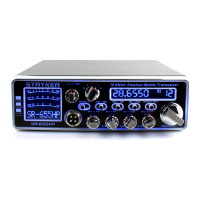
Stryker SR-655HP
10 pages
Print Icon
To Next Page IconTo Next Page
Loading...
For Sales Information Please Contact
RoadTrucker Inc (www.RoadTrucker.com)
8312 Sidbury Rd.
Wilmington, NC 28411
(800) 507-0482 / (910) 686-4281
Question and Answer IconNeed help?

Do you have a question about the Stryker SR-655HP and is the answer not in the manual?

Summary

Introduction and Warranty Information

Introduction

Welcomes the user and highlights the transceiver's features and design for enjoyment and service.

Limited Warranty Details

Outlines the 3-year warranty, activation, non-transferability, and void conditions.

Sales Receipt Requirement

Emphasizes the necessity of including the original sales receipt for warranty service.

Installation and Connections Guide

Package Contents

Lists the items included in the Stryker SR-655HPC transceiver package for inspection.

Optimal Placement and Mounting

Provides guidance on selecting a convenient location and securely mounting the transceiver.

Electrical and Antenna Connections

Details requirements for vehicle electrical systems and proper antenna jack connections.

Antenna Tuning and Advanced Features

Tuning for Optimum SWR

Explains methods for adjusting antennas with setscrews or by cutting to length for best SWR.

External Speaker and Programming

Covers the use of external speakers and the USB programming jack for customization.

Public Address & Safety Warnings

Describes PA system use and warns against improper adjustments by unqualified technicians.

Operation Guide: Controls and Functions

Front Panel Controls Overview

Identifies and briefly describes key front panel controls like Volume, Squelch, and Gain.

Function Menu and Mode Settings

Explains accessing the function menu and using mode switches like AM/FM/PA and VFO.

Specialized Features and Switches

Details features such as Scan, Roger Beep, Hi-Cut Filter, and Echo/Talkback controls.

Advanced Operation and Menu Navigation

Function Menu Customization

Details how to access and change settings like Band selection, Squelch, and Beep via the function menu.

Scan, SWR, and Voltage Protection

Explains scan modes, transmitting SWR protection, and voltage protection settings.

PRG Menu: Scan and Roger Beep Setup

Guides users on adding/deleting channels for scanning and selecting roger beep tones.

Summary

Introduction and Warranty Information

Introduction

Welcomes the user and highlights the transceiver's features and design for enjoyment and service.

Limited Warranty Details

Outlines the 3-year warranty, activation, non-transferability, and void conditions.

Sales Receipt Requirement

Emphasizes the necessity of including the original sales receipt for warranty service.

Installation and Connections Guide

Package Contents

Lists the items included in the Stryker SR-655HPC transceiver package for inspection.

Optimal Placement and Mounting

Provides guidance on selecting a convenient location and securely mounting the transceiver.

Electrical and Antenna Connections

Details requirements for vehicle electrical systems and proper antenna jack connections.

Antenna Tuning and Advanced Features

Tuning for Optimum SWR

Explains methods for adjusting antennas with setscrews or by cutting to length for best SWR.

External Speaker and Programming

Covers the use of external speakers and the USB programming jack for customization.

Public Address & Safety Warnings

Describes PA system use and warns against improper adjustments by unqualified technicians.

Operation Guide: Controls and Functions

Front Panel Controls Overview

Identifies and briefly describes key front panel controls like Volume, Squelch, and Gain.

Function Menu and Mode Settings

Explains accessing the function menu and using mode switches like AM/FM/PA and VFO.

Specialized Features and Switches

Details features such as Scan, Roger Beep, Hi-Cut Filter, and Echo/Talkback controls.

Advanced Operation and Menu Navigation

Function Menu Customization

Details how to access and change settings like Band selection, Squelch, and Beep via the function menu.

Scan, SWR, and Voltage Protection

Explains scan modes, transmitting SWR protection, and voltage protection settings.

PRG Menu: Scan and Roger Beep Setup

Guides users on adding/deleting channels for scanning and selecting roger beep tones.

Stryker SR-655HP Specifications

General IconGeneral
TypeMobile Transceiver
Channels40
MicrophoneDynamic
Weight3.5 lbs
Power Supply13.8 V DC
Channel Spacing10 kHz
Frequency Range26.965 MHz - 27.405 MHz
ModesAM
ModulationAM
Power Output4 Watts (AM), 12 Watts (SSB)

Related product manuals