Mobius - User Manual
®
pg 2
Front Panel Controls
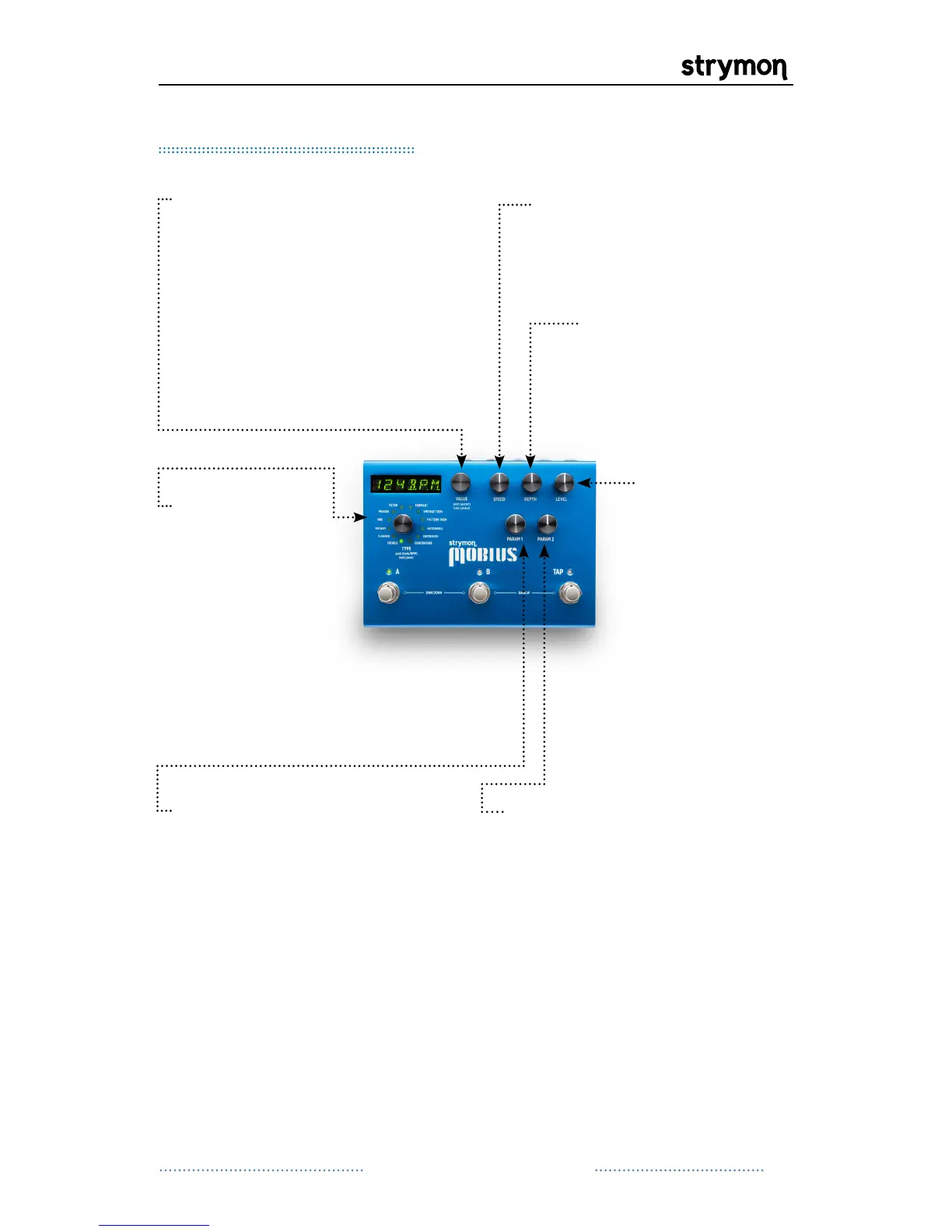
VALUE: Provides fine
adjustment of LFO speed
when the speed is displayed.
Scrolls through presets
when bank or name is
displayed. PUSH to access
the parameter menu for the
current mod machine. HOLD
to access the global menu.
LEVEL: Adjusts
the output level
from -3dB to
+3dB. Set to 12
o’clock for unity
gain.
PARAM 1: Assignable to the
parameters in the current
mod machine. To assign the
PARAM 1 knob, navigate to
the desired parameter, press
and hold the value encoder
and turn the PARAM 1 knob.
TYPE:
Turn to
select desired
Mod Machine.
Push to toggle
the display
between showing
BPM or the
current bank.
Hold to save
current preset.
SPEED: Provides coarse
adjustment of LFO speed.
Continued on Next Page
DEPTH: Sets the
modulation depth
for the current mod
machine.
PARAM 2: Assignable to the
parameters in the current mod
machine. To assign the PARAM
2 knob, navigate to the desired
parameter, press and hold
the value encoder and turn the
PARAM 2 knob.


 To Next Page
 Loading...