Mobius - User Manual
®
pg 3
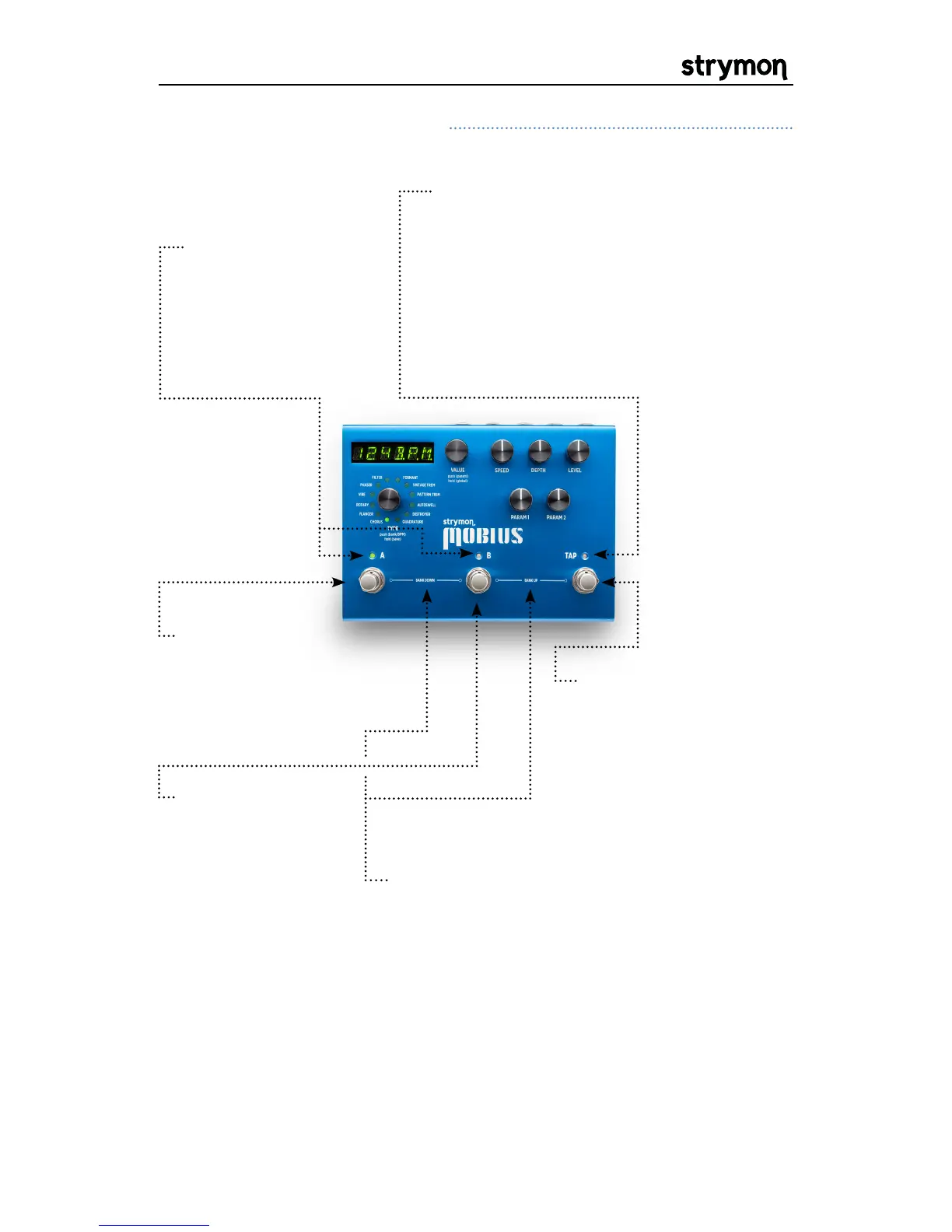
BANK SELECT: Press A & B to select a lower
bank. Press B & TAP to select a higher bank.
While the selected bank is pending it is
displayed as “BANKXX” where XX is the bank
number.After the desired bank is selected,
press A or B to activate a preset from that
bank.
A & B LEDS:
Green
if active. Amber
if the preset has
been edited. Off if
bypassed.
FOOTSWITCH A:
Press to engage
or bypass preset
A of the current
bank.
FOOTSWITCH B:
Press to engage
or bypass preset
B of the current
bank.
TAP: Tap to set the LFO
speed. Press once to
sync LFO for Phaser,
Filter, Formant, Pattern
Trem and Quadrature.
Assignable to tap or
speed select for Rotary.
Front Panel Controls Continued
TAP LED: Pulses to indicate current
LFO rate. Flashes amber to indicate
that a tap division is active.
TIP:
To find the knob positions of a
saved preset, turn each knob until the
LED returns to GREEN after glowing
Amber.


 To Next Page
 Loading...