Mobius - User Manual
®
pg 32
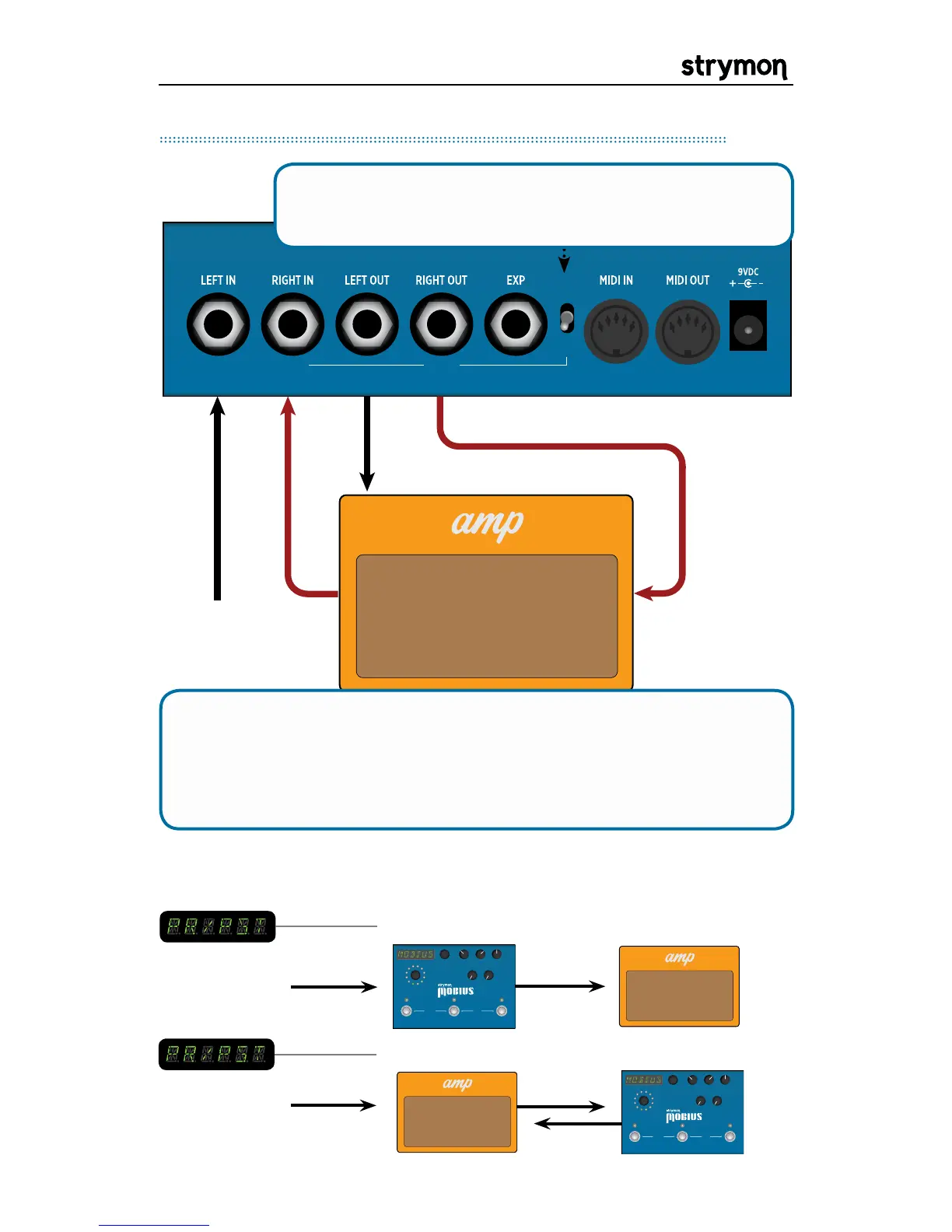
STEREO
IN/OUT
PRE /
POST
OUTPUT 2INPUT 2
Instrument Send Return
Amp Input
Connect INPUT 2 and OUTPUT 2 to your amplifier’s effects
loop. Then you can select whether the modulation effect occurs
before the amplifier input or in the amplifier effects loop. This is
selectable per preset.
PRE
TYPE
push (bank/BPM)
hold (save)
push (param)
hold (global)
VALUE
PARAM 1 PARAM 2
B TAPA
SPEED
DEPTH LEVEL
BANK DOWN BANK UP
FILTER
DESTROYER
VIBE
ROTARY
FLANGER
PHASER
CHORUS
FORMANT
AUTOSWELL
VINTAGE TREM
PATTERN TREM
QUADRATURE
®
TYPE
push (bank/BPM)
hold (save)
push (param)
hold (global)
VALUE
PARAM 1 PARAM 2
B TAPA
SPEED
DEPTH LEVEL
BANK DOWN BANK UP
FILTER
DESTROYER
VIBE
ROTARY
FLANGER
PHASER
CHORUS
FORMANT
AUTOSWELL
VINTAGE TREM
PATTERN TREM
QUADRATURE
®
POST
INSTRUMENT
PRE/POST Setup in an Amplifier’s Effect Loop
Set the PRE/POST switch to the down position to use
Mobius in a pre/post type setup.
When connected as above, the PRE/POST setting in the preset
menu has the following effect:
INSTRUMENT


 To Next Page